Connect Favikon to Claude
Add Favikon to Claude as a custom connector and query 10M+ creator profiles without leaving the chat. Setup steps, first prompts, and fixes when it will not connect.
Claude reasons well about creators and knows nothing true about them. It cannot tell you a creator's engagement rate last month, whether their audience is real, or which brands they have already worked with. Ask anyway and you get a confident list containing at least one person who does not exist.
That is not a Claude failure. There is no creator database behind it, and general assistants make poor browsers: they cannot reliably scan and analyse social profiles at any real scale.
Connecting Favikon supplies the missing half. Claude keeps the reasoning and gets a live, scored index underneath it: 10M+ creator profiles across 9 networks, 200M+ posts analysed, refreshed every 24 hours.
Before you start
- A Favikon account. MCP is available on the Free Trial, Pro and Enterprise plans, so you can test it before committing to anything.
- A Claude account that supports custom connectors.
- Two minutes.
Connect it
- Sign in to app.favikon.com with your existing Favikon credentials.
- Go to app.favikon.com/mcp.
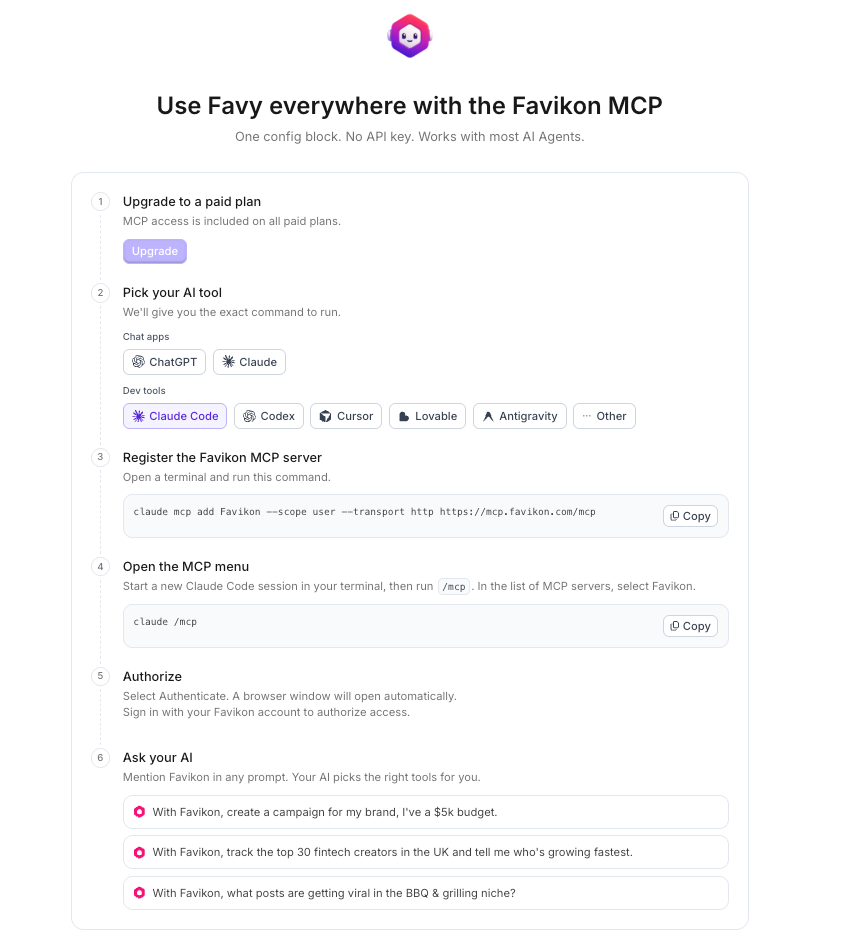
3. Choose Claude as your AI tool.
- Follow the connection instructions that appear on screen. In Claude this means adding Favikon as a custom connector and authorising it against your account.
The setup screen gives you the exact link and walks you through it, so there is nothing to copy from this page.
Check it works
Paste this. If the connection is live you get real names with real numbers, and Claude will offer to act on them:
Find 20 mid-tier AI Marketing creators in Europe and check their authenticity.What should happen: Favikon returns the list, flags any low-authenticity profiles, and offers to exclude them and re-rank, without leaving the chat. If instead you get a tidy list of plausible names with suspiciously round follower counts, the connector is not being used.
What you can actually ask it
Favikon exposes its whole toolset here, not a cut-down version. Five workflows cover most of what people use it for, and a sixth catches everything else.
Creator discovery
Five different routes, depending on what you already know:
Show me the top 20 fitness creators worldwide right now. Find fashion creators in Brazil, 50K to 500K followers. Who has [brand] worked with in the last 3 months? Find creators similar to [creator]. Find creators who have posted streetwear sneaker unboxings.
The third one is the underused one. It reads a brand's tagged content and shows you their actual roster, which is the fastest competitive research available in this category.
z
Creator analytics
Pull up [creator]'s profile. Is their audience authenticity solid, any brand safety flags, and is $1.1K a fair rate per mention?
Creator growth
In home and design content, what formats are driving the most saves right now, and who has gained the most authority score this week?
Social listening
What is trending in Gen Z skincare right now, and how does our share of voice compare to our top 3 competitors this month?
The full workflow, in one instruction
Find 15 mid-tier skincare creators in the US, add the top 8 to my Spring Launch campaign, and draft an outreach message offering a $500 flat fee plus product.
Why do this inside Claude rather than the app
Because of everything else already in the conversation. Your brand guidelines, the CRM notes you pasted, last quarter's campaign learnings, the brief you are halfway through writing. Favikon becomes callable at any point in that thread rather than a separate destination you have to remember to visit, and the answers get sharper the more context sits above them.
The entry point stops being Favikon's front door and becomes wherever your work already is.
How credits work here
Creator searches and deep profile data draw on your Favikon credits, exactly as they do in the app. Some things cost nothing, including collaboration history, so you can check an entire shortlist against a competitor's roster for free. If you would rather approve each spend, ask for a cost preview before running a search and you will get one.
If something goes wrong
- The connector will not authorise. Check that you are signed in on app.favikon.com first, with your brand account, before starting the connection.
- It connects but no tools appear. Disconnect and reconnect from app.favikon.com/mcp. A connection made with a stale link looks connected and does nothing.
- It answers from general knowledge instead of Favikon data. Name the source once: "using Favikon, find...". After an exchange or two it stops needing the hint.
Not on a plan with MCP?
Favy is the same agent with the same tool access, built into the Favikon app, and it is on every plan. It sits at the top left of the sidebar and needs no installation at all. MCP is for people who would rather not leave the tool they already have open. Both read the same index.
Others Tools