Connect Favikon to Lovable: Build a Creator Tool on Live Data
Wire Favikon into Lovable. Setup, a first build prompt.
Every creator-tool dies the same way. The interface looks great, the data is fake, and turning fake data into real data was never scoped.
Connecting Favikon removes that step entirely. What you build queries a live, scored creator index from the first version: 10M+ profiles across 9 networks, refreshed every 24 hours.
Before you start
- A Favikon account. MCP is available on the Free Trial, Pro and Enterprise plans, so you can test it before committing to anything.
- A Lovable account. with access to its integrations settings.
- A clear idea of what you are building.
Connect it
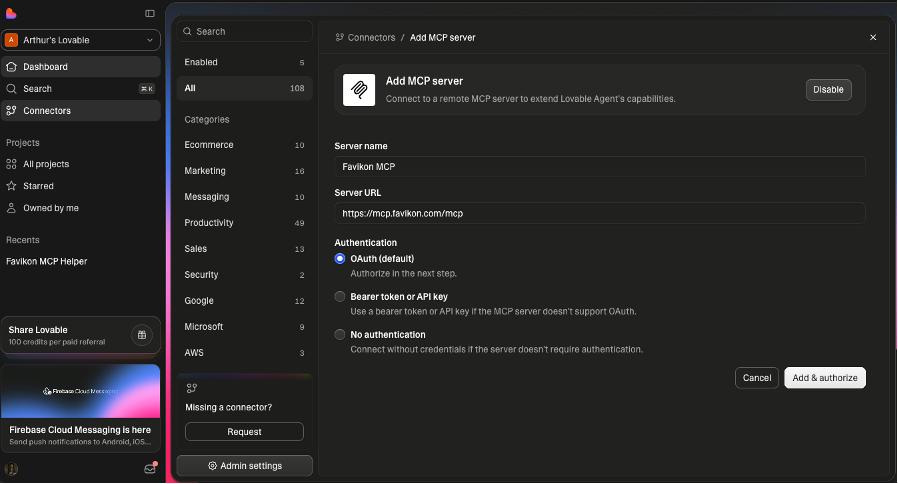
Favikon isn't in Lovable's featured catalog, so it can't be install directly. You'll need to add a custom MCP servers can only be added from your side:
- Open https://lovable.dev/
- Open Connectors in the sidebar (root level).
- Click the New MCP server card.
- Name it "Favikon" and paste the URL
https://mcp.favikon.com/mcp(transport: HTTP/streamable). - Save, then complete any OAuth it shows.
- Make sure the connector is enabled for your project.
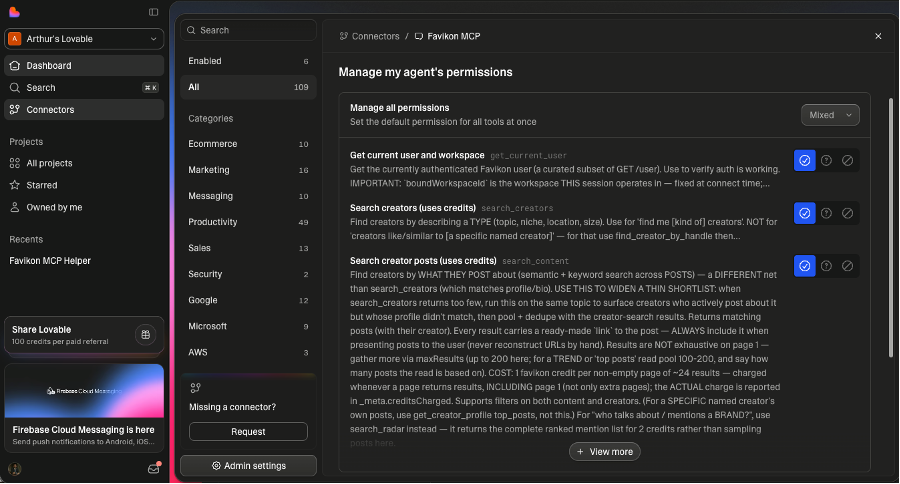
Accept your desired agent's permissions
Build something already. Try those prompts!
1. Build a Creator Discovery Dashboard
"I'm building a creator discovery dashboard in Lovable for {{brand_name}}. Use the Favikon MCP to find {{number}} {{creator_type}} creators on {{platform}} in {{country}} with {{min_followers}}–{{max_followers}} followers. Pull their estimated prices, engagement rates, and brand-fit scores, then display them in a sortable table with filters for follower count and engagement."
2. Generate a Campaign Landing Page
"Create a campaign landing page in Lovable for {{campaign_name}}. Use the Favikon MCP to source {{number}} creators in the {{niche}} niche, then build a page that shows the selected creators, their estimated collaboration prices, and a 'Join the campaign' CTA. The page should be styled for {{brand_name}} and include SEO metadata."
3. Build a Lookalike Creator Tool
"I want a lookalike creator tool in Lovable. Build a page where I can paste a creator handle like {{seed_creator_handle}}, and the Favikon MCP returns {{number}} similar creators on {{platform}} in {{country}}. Display their handles, follower counts, engagement rates, and estimated prices in a clean grid."
4. Create a Brand Mention Tracker
"Build a brand mention tracker in Lovable for {{brand_name}}. Use the Favikon MCP to find creators who have mentioned the brand in the last {{timeframe}}, then build a dashboard that shows the top {{number}} mentioners, their post engagement, whether the mention was organic or sponsored, and a button to add them to a campaign."
5. Build an Outreach Campaign Manager
"Create an outreach campaign manager in Lovable for {{brand_name}}. Use the Favikon MCP to find {{number}} creators, create a campaign, draft a 3-step outreach sequence in {{language}} for {{channel}}, and build an interface where I can preview, approve, and launch the campaign directly from the app."
How credits work here
Creator searches and deep profile data draw on your Favikon credits, exactly as they do in the app. Some things cost nothing, including collaboration history, so you can check an entire shortlist against a competitor's roster for free. If you would rather approve each spend, ask for a cost preview before running a search and you will get one.
If something goes wrong
- 401/403 or "authentication required" → the server needs auth; re-run the connect flow and complete OAuth, or paste the API token Favikon gives you in your account settings.
- 406 Not Acceptable → the server isn't accepting the standard streamable-HTTP handshake; try adding it as an SSE endpoint (
.../mcpvs.../sse) if Favikon documents one. - Connected but no tools listed → the server exposes nothing to your account tier, or tools must be enabled server-side in Favikon; check their dashboard.
- Timeout / network error → verify the URL in a browser or with
curl -i https://mcp.favikon.com/mcp; if it's not reachable publicly, it can't be used as a remote connector. - Admin-disabled or MCP off → a workspace admin re-enables it under Manage connectors, or turns MCP on in Privacy & security settings.
Prefer other LLMs?
Favy is the same agent inside the Favikon app on every plan, and the guided MCP setup covers Claude and ChatGPT in about two minutes each.
Others Tools