How to Increase Your LinkedIn Performance with Claude
Discover how to use Claude to analyze your LinkedIn performance, spot content trends, and create posts that drive more engagement. Learn practical ways to improve your content strategy using AI and real performance data.


I spent two years posting on LinkedIn without knowing what actually worked.
I run SEO and growth marketing at Favikon. My whole job is reading data and acting on it. Search Console, Semrush, SEOGets, PostHog. I will spend an afternoon arguing about whether a 0.4% CTR lift is real. Then I would open LinkedIn, write a post based on a feeling, hit publish, and look at the view count two days later like it was a lottery ticket.
The problem was never effort. It was that LinkedIn gives you numbers but no analysis. You get impressions per post. You do not get "your hooks that open with a contradiction get 2.3x the median of your hooks that open with a statistic." Nobody is going to sit there and tag 30 posts by hand.
And I was adamant, I had an idea what worked and wanted to stick to it. Analyzing my own data would basically mean reading every post, which would take a week and I was too lazy to do that.
So I stopped doing it by hand. I connected Favikon to Claude through MCP and started treating my own LinkedIn profile like a dataset I audit.
The results were not subtle. I found out my best performing content had almost nothing to do with the topics I thought were my strength. I found out a chunk of my posts were dying at the "see more" line before anyone read the point. I found out the people in my follower range who grow fastest were doing something structurally different from what I was doing, and it took about four minutes to see it.
Below are the five tactics I use now. Every one of them comes with the exact prompt I run, so you can copy it, swap in your profile, and get your own version. I am going to write these through my lens, which is SEO and B2B growth. Swap my niche for yours and the logic holds.
Before anything: get the MCP connected
None of this works without data. You need the Favikon MCP connected to Claude or ChatGPT.
One thing trips people up here, so read this twice.
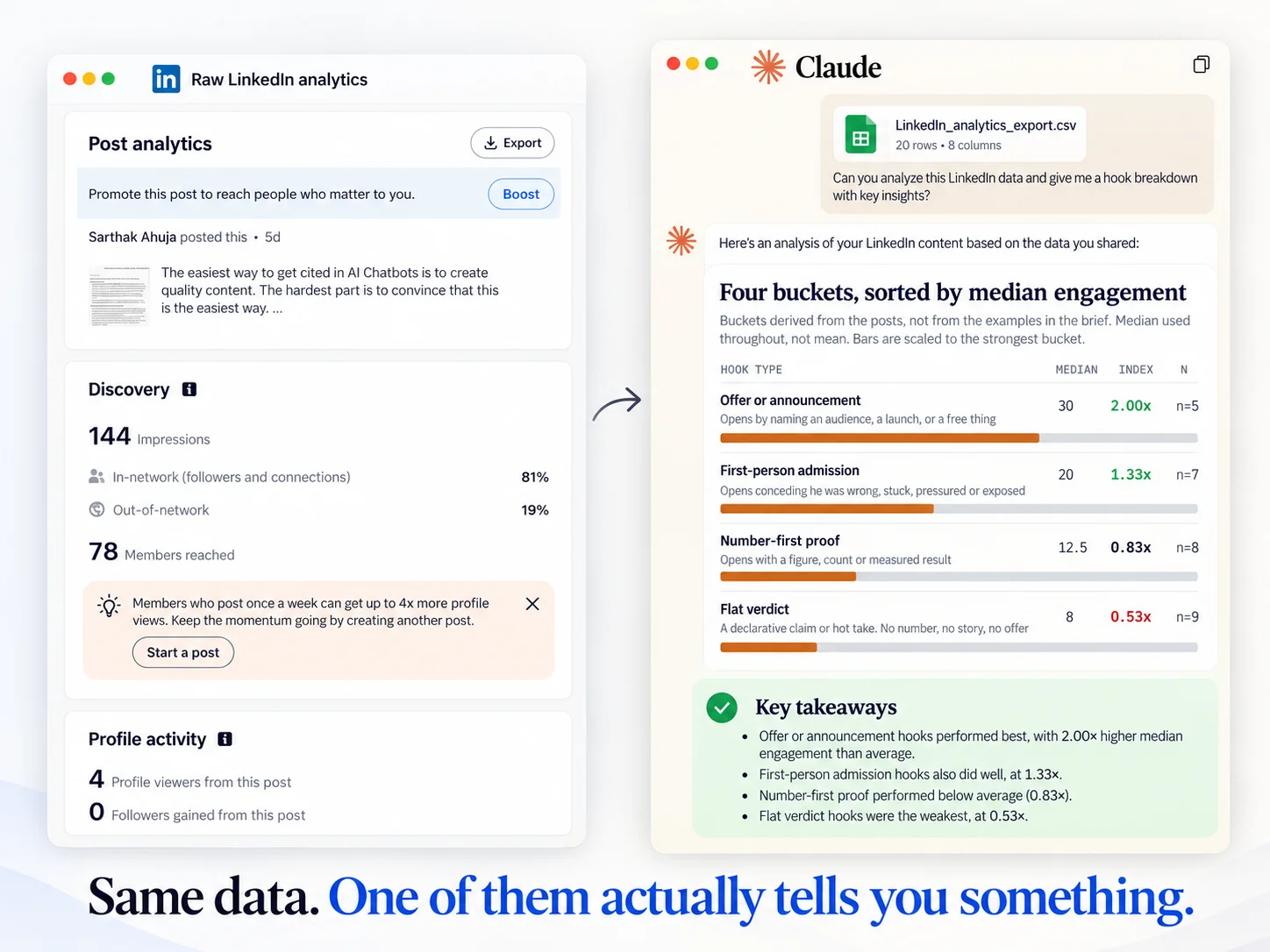
Sign up as a Business. Not as a Creator.
Favikon has two sides. The Creator side is for creators managing their own presence and brand deals. The Business side is the analytics platform, and MCP access sits on the Business side. If you sign up as a creator you will not see the MCP option and you will spend twenty minutes hunting for a menu item that is not there. I have watched three people do this.
So: create a Business account, then connect the MCP to Claude (or to ChatGPT, it works on both). Once it is connected, Claude can pull live profile data, post level performance, creator lookalikes, and cross platform content search. That is what every prompt below runs on.
Two more things worth knowing before you start.
First, every prompt below has a RULES block and a DO NOT OUTPUT block. Do not delete them. They are not padding, they are the difference between a usable answer and twenty minutes of being asked clarifying questions.
I learned this the expensive way. My first versions of these prompts said things like "tell me honestly if you cannot separate the effect" and "report what you excluded and why". Reasonable sounding instructions. What came back was a page of methodology, a list of caveats, two questions aimed back at me, and an offer of three different ways to proceed. I had asked for an analysis and received a consulting proposal.
So the prompts now say the opposite. Never ask me a question. Never offer options. Start with the table. Hard word limit outside the tables. The analysis still happens, it just happens silently, and what lands on my screen is the part I can act on.
Second, know what the numbers are before you build on them.
Public LinkedIn data gives you reactions, comments and reposts. Those are real, counted on the post, visible to anyone. It does not give you impressions. LinkedIn does not expose impressions publicly to any tool. The only place your true impressions exist is your own LinkedIn analytics.
So any view or reach figure attached to a public post is an estimate. Fine as a relative signal, not a measurement, and not something to build a precise claim on. The prompts below run on reactions, comments and reposts for that reason, and they tell the model to ignore view fields without writing you an essay about it. If you want true impressions in the mix, export your post analytics from LinkedIn and attach the file.
Third, medians, and watch your outliers. One post that massively overperformed will drag an average up and quietly decide every conclusion. When I looked at my own last 30 posts, one personal post about graduating and moving to Paris did roughly 47 times my median. Second place did a tenth of that. Every prompt below strips posts above 5x the median out of the maths and lists them in a single line at the end, so you see the outlier without it steering you.
Tactic 1: Find out which of your hooks actually carry reach
This is the one that changed the most for me, so I am putting it first.
The hook is the only part of your post that is guaranteed to be read. Everything below the "see more" line is optional for the reader. So the hook is not the intro to your post. It is the whole pitch for whether the post gets read at all.
I assumed my best hooks were the ones with a number in them. I work in SEO. Numbers are my comfort zone. "We grew organic traffic 340% in 11 months" felt like the strongest thing I could open with.
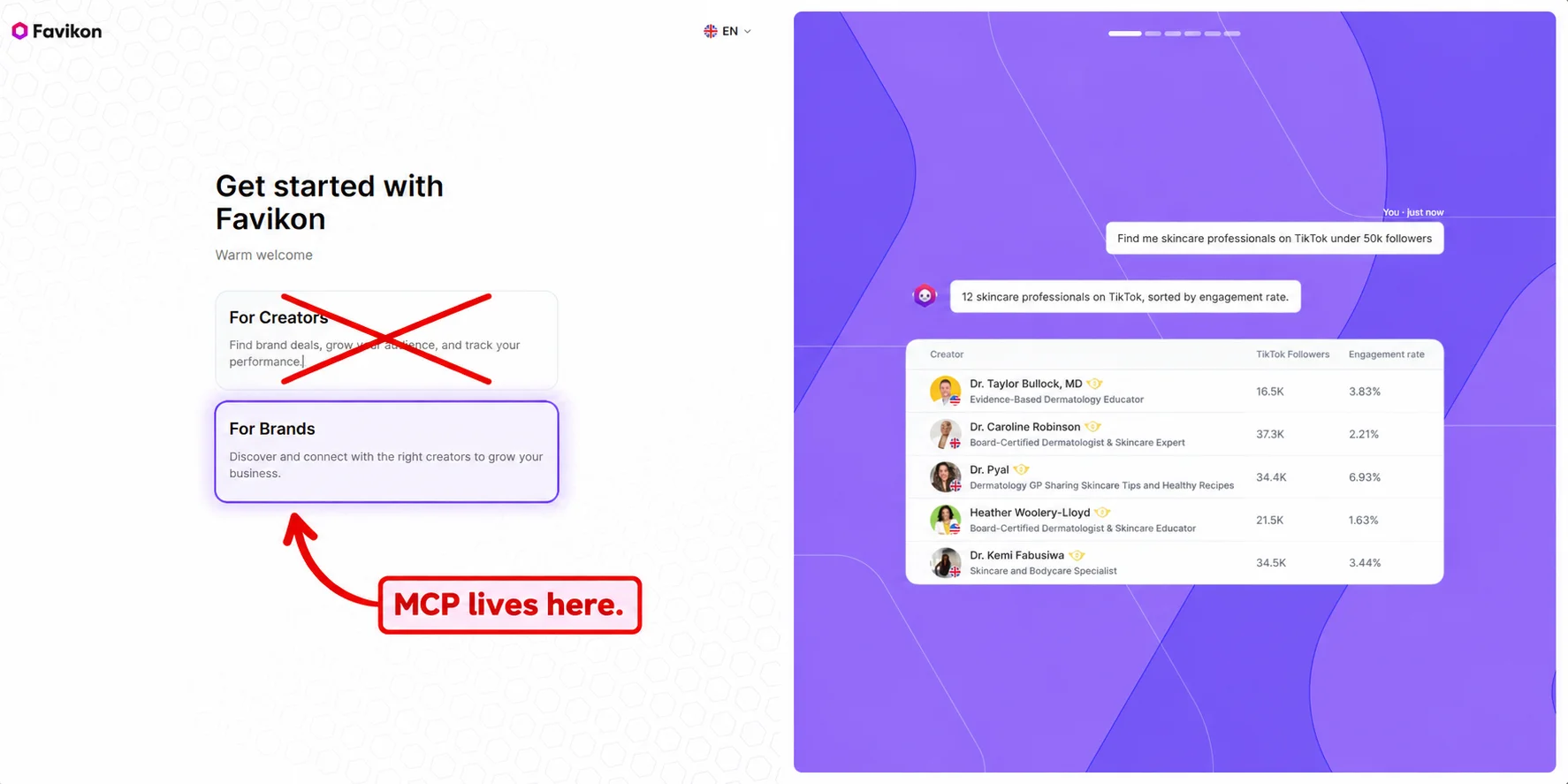
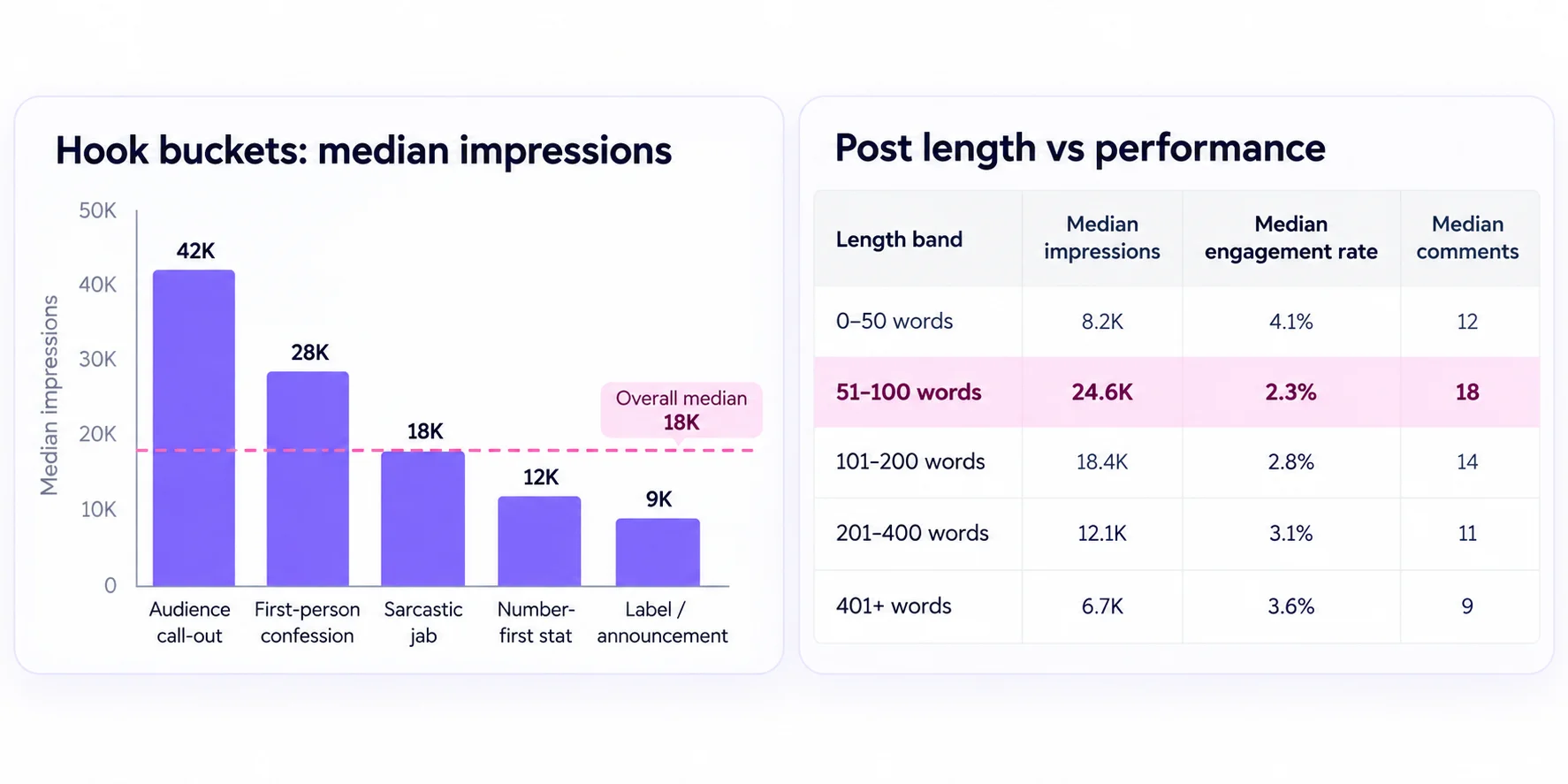
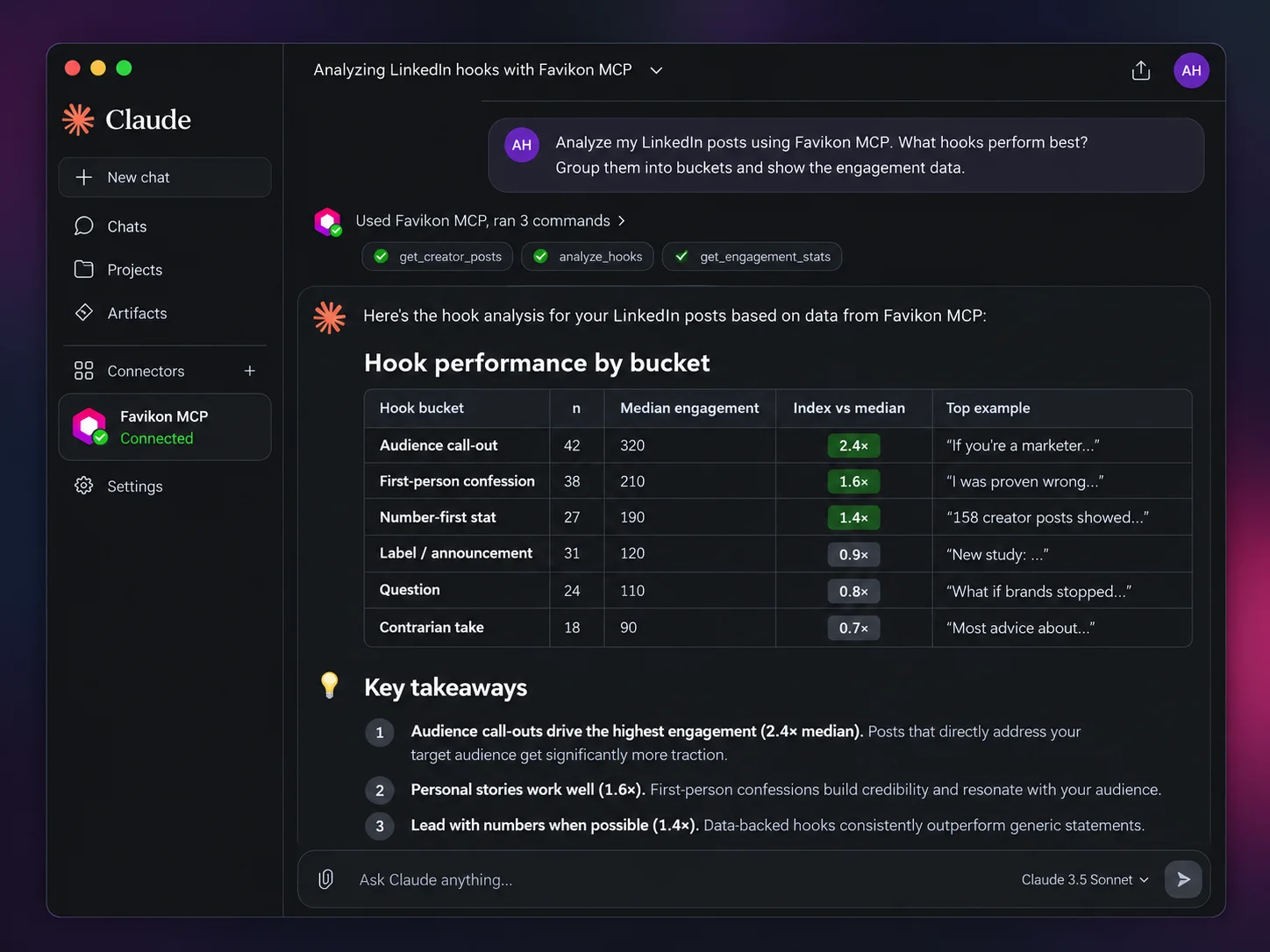
It was not. When I bucketed my last 30 posts and compared medians, my number-led hooks sat below my overall median on reactions and well below it on comments. The hooks that beat everything else were the ones that opened with a position that sounded wrong. Something a competent marketer would want to argue with. "Most of the SEO work I did last year was a waste of time." That kind of opener pulled roughly double the engagement of my case study openers.
The comment gap was the part I had not expected. A contradiction does not just get read, it gets replied to, and on LinkedIn the reply is the distribution.
Same person. Same audience. Same posting times. The hook structure was doing the work.
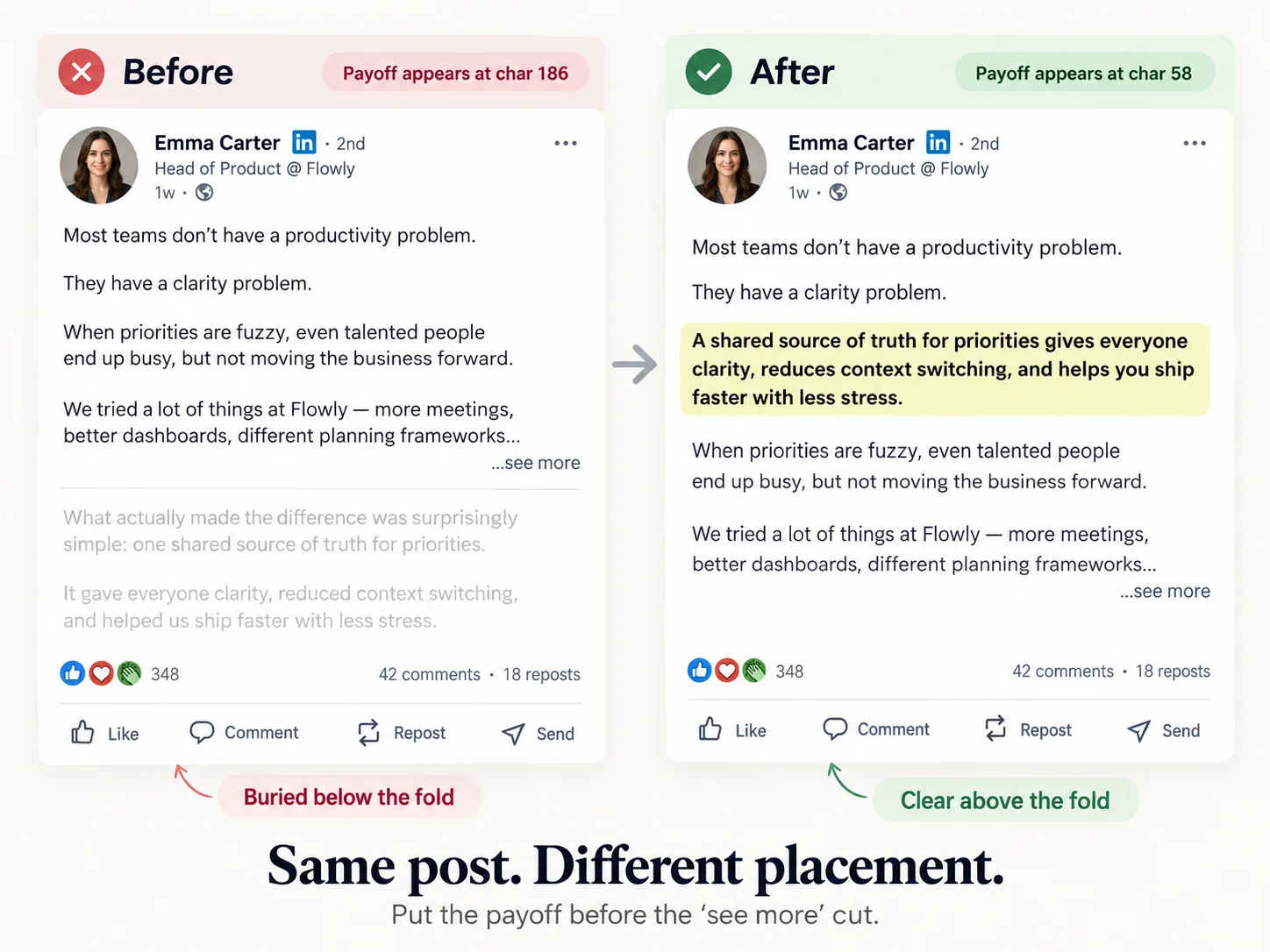
There is a second layer that almost nobody checks, and it is free performance. LinkedIn collapses your post behind a "see more" link after a certain number of characters. The cutoff is not a fixed published number, it moves with device and layout and LinkedIn changes it. On desktop it lands somewhere around the 200 character mark. On mobile it is considerably shorter.
I target 130 characters. Most people read LinkedIn on a phone, so writing to the desktop cutoff means writing to the more forgiving case and losing the harder one. If your payoff clears 130 it clears both. I treat 180 as an absolute desktop ceiling, not a target.
What matters is the principle: if your hook's punchline sits past the cutoff, the reader never sees it. They get a setup with no payoff and they scroll.
I had posts where the contradiction landed at character 240. Dead on arrival. Not because the idea was weak, because it was folded behind a link nobody clicks.
So the prompt below does both. It buckets your hooks by structure and compares medians, and it measures where your payoff sits relative to the fold.
The prompt
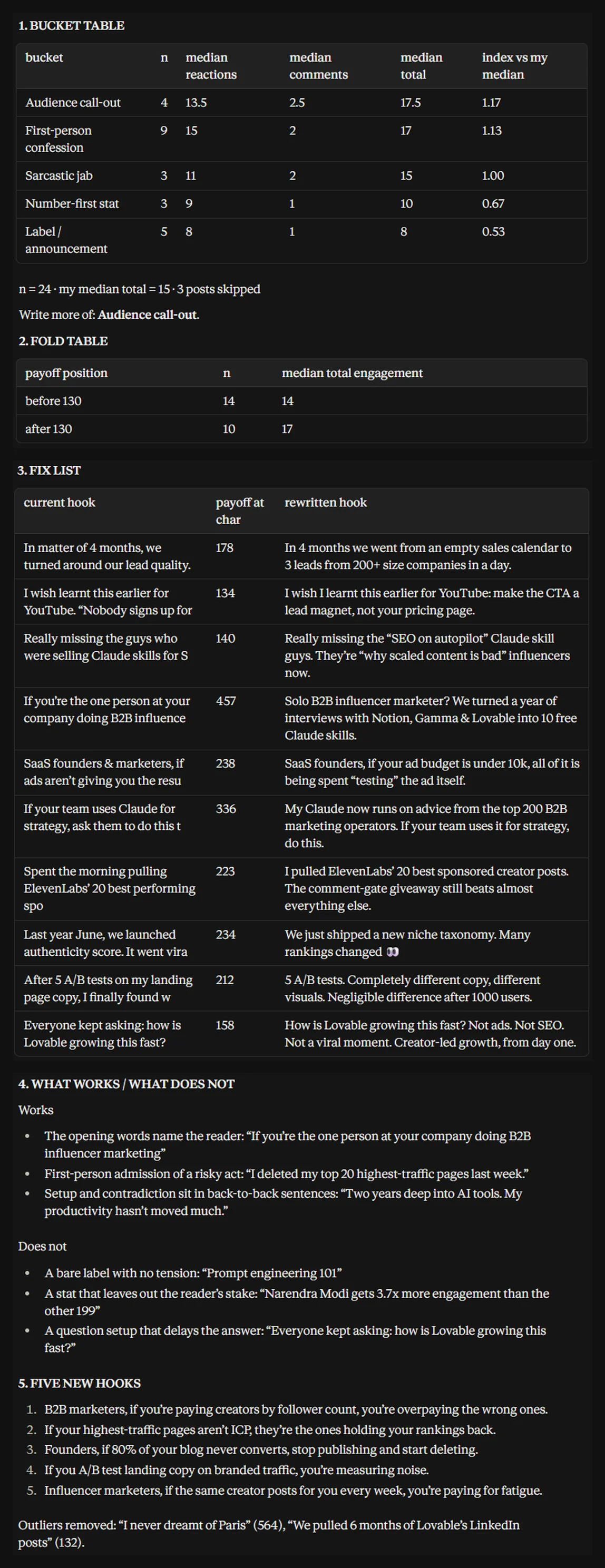
What to do with the output
Do not take the top bucket and write nothing but that for a month. Reach collapses when every post has the same shape and your audience learns to recognise it.
What I do instead: I let the top bucket take about half my posts, and I run the weakest bucket as an experiment with a rewritten structure. If the rewrite does not move the median after six or seven posts, I drop that bucket.
Also, rerun this every 8 to 10 weeks. My bucket ranking changed between two runs, mostly because my follower base shifted as the account grew. What works at 4,000 followers is not automatically what works at 14,000.
Tactic 2: Audit the body, not just the opener
The hook gets the click. The body decides whether anyone finishes, comments, or follows you afterwards. Those are different problems and most people only ever look at the first one.
The two variables I care about here are length and format.
On length, I had a belief I had absorbed from somewhere and never tested: short posts win on LinkedIn. So I kept cutting. I was publishing 500 character posts that read like fortune cookies.
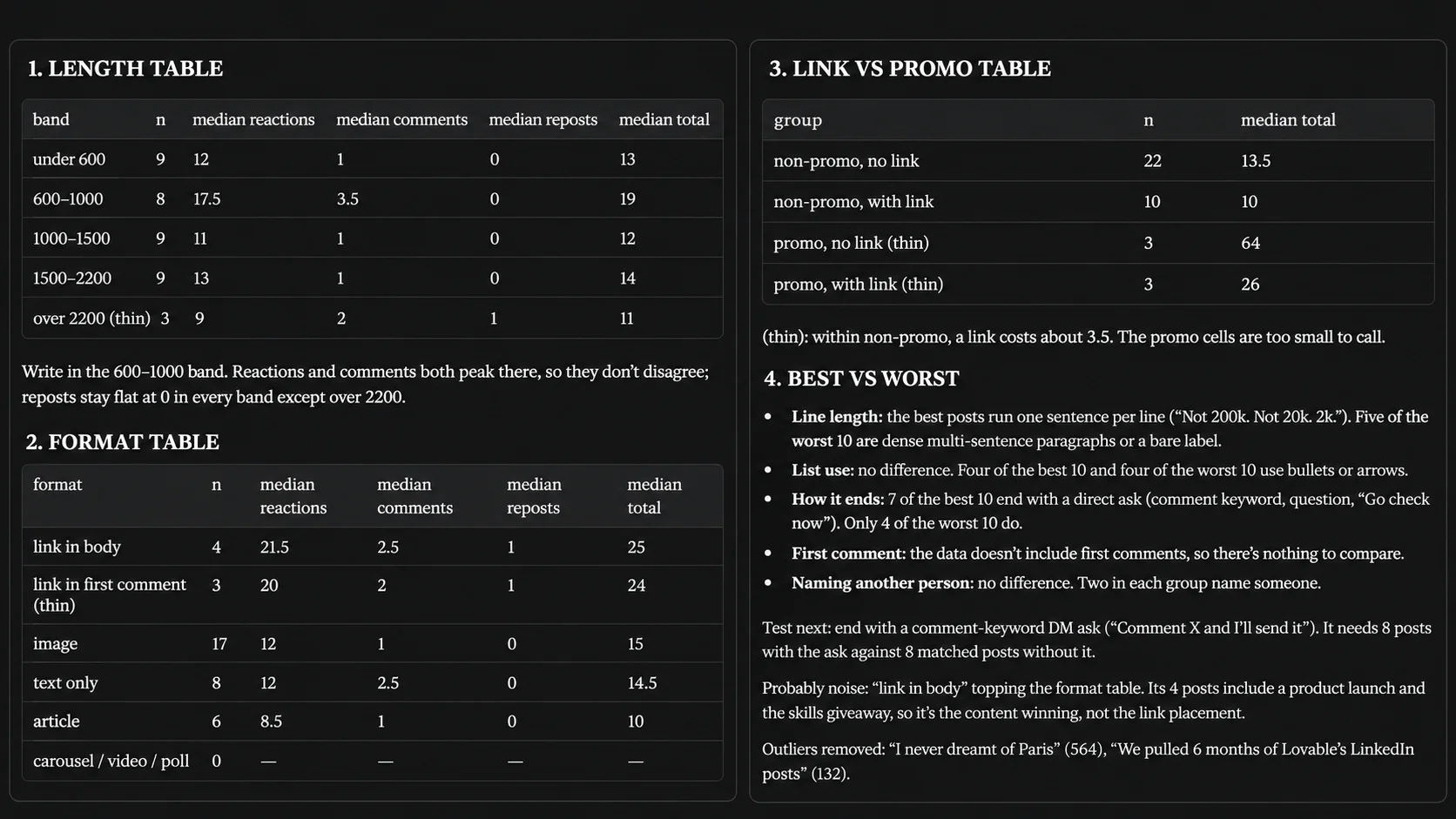
When I actually checked, my short posts pulled the fewest comments of any length band by a wide margin. They were cheap to scroll past and there was nothing in them worth responding to. My 1,200 to 1,800 character posts, the ones where I walked through how something actually worked, brought real comment counts and real conversations.
That is the distinction that matters, and it is why the prompt below reports comments as their own column. Reactions are cheap. Someone taps a button and moves on. A comment costs the reader something, which is why it is the better signal that a post landed, and it is also what pulls the post back into other people's feeds.
One note on a metric you will be tempted to ask for. Engagement rate as a percentage needs a denominator, and the only honest denominators are your follower count or your true impressions. Do not let a prompt compute it against a derived view number, because that produces a ratio that looks like a metric and is actually a constant. Ask for raw counts and medians instead. Rates come back into play in tactic three, where Favikon reports them against follower counts for other creators.
On format, be careful about a trap. A lot of people conclude "video underperforms for me" from four videos. Four posts is not a sample. The prompt below is built to report sample sizes and to refuse to make a confident claim off three data points, because that is exactly where self analysis goes wrong.
One thing I will flag because people ask: external links. You will see endless advice that links kill reach. In my own data, posts with a link in the body did sit below my median. But I also post links less often and usually on promotional content, which is weaker to begin with regardless of the link. So the link may not be the cause. The prompt asks Claude to separate promotional intent from link presence, because that is the only way to tell those apart.
The prompt
What to do with the output
The last line of the output is the one I read first. It is the list of things that look like insights and are not. That one line has stopped me from making changes off five posts more than once.
And test one variable at a time. If you read this output and simultaneously change your post length, start adding carousels, and move your links to the first comment, you will have no idea which one moved the number. I pick one thing, run it for six posts, then compare.
Tactic 3: Benchmark against people your size, not people you admire
Everything above is you versus you. That has a ceiling. If every structure you have ever tried is mediocre, your own data will faithfully tell you which of your mediocre structures is least bad.
So at some point you have to look outside. The mistake is looking at the wrong people.
I used to study the big accounts in my space. Marketers with 200,000 followers. Then I would copy what they did and watch it do nothing. It took me embarrassingly long to work out why.
At 200,000 followers you are playing a different game. Those accounts can post a one-line opinion with no evidence and it will do 100,000 views, because the distribution is already there and the name carries the credibility. If I post a one-line opinion with no evidence, it does 900 views, because nobody has a reason to care what I think yet.
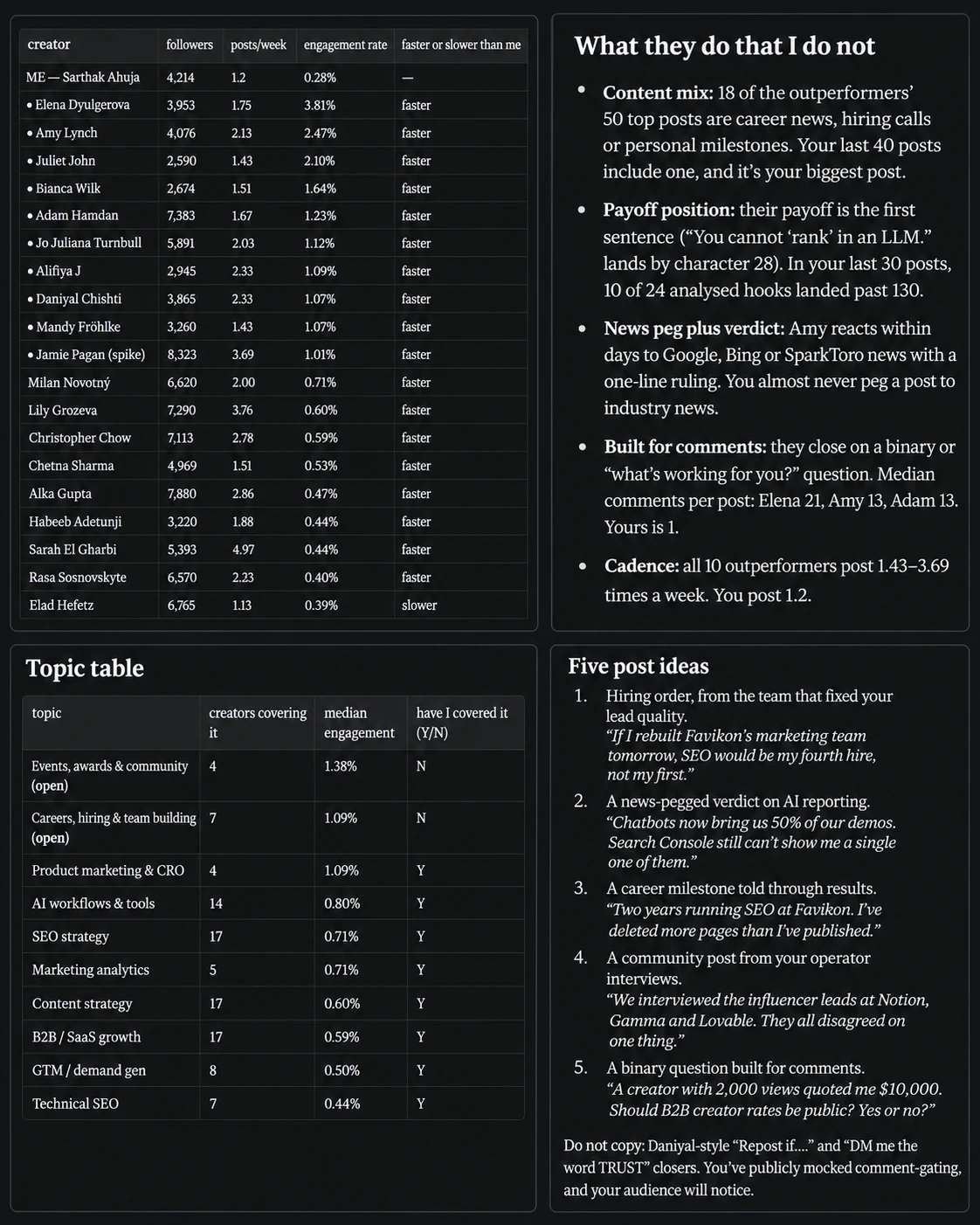
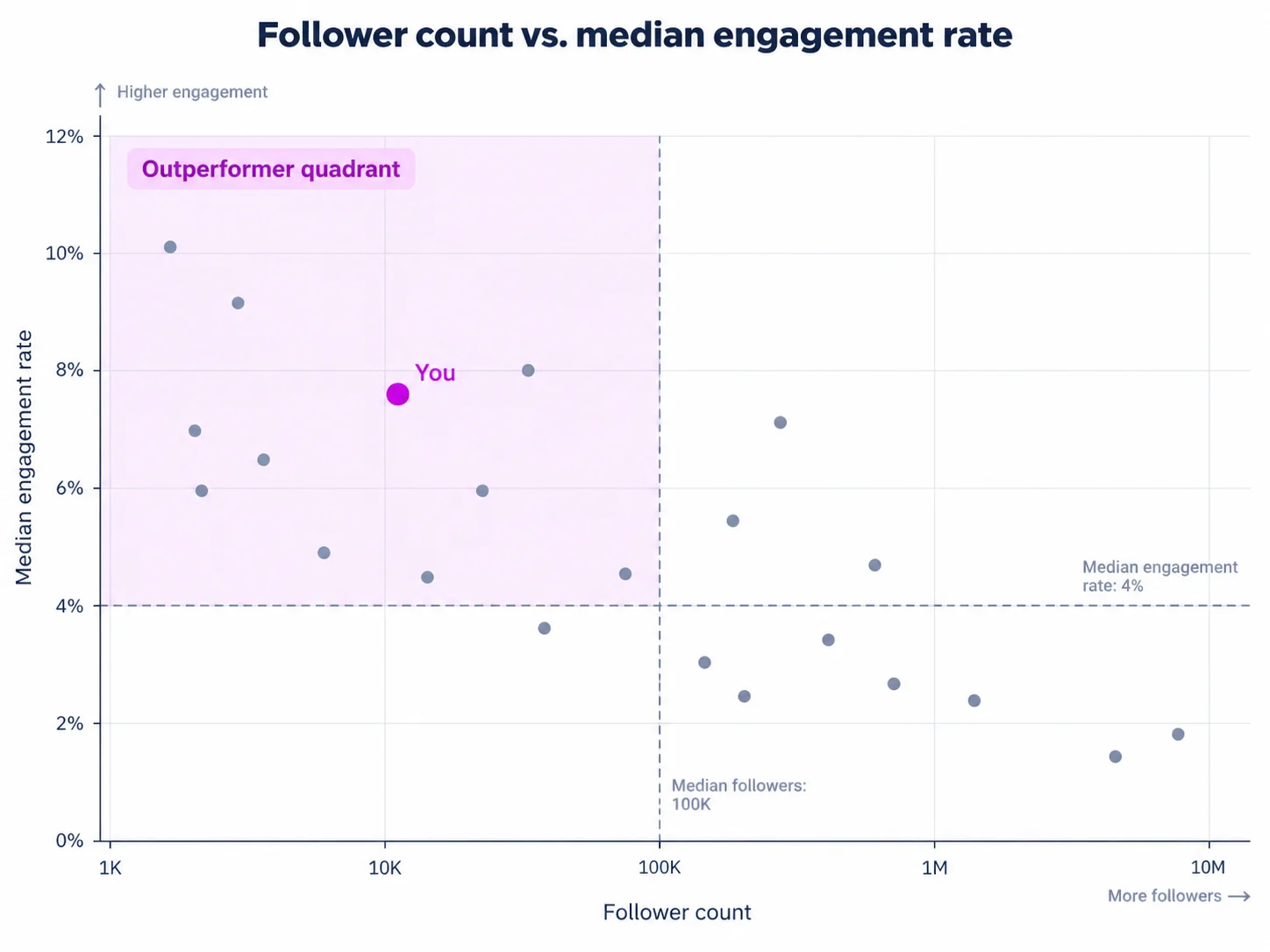
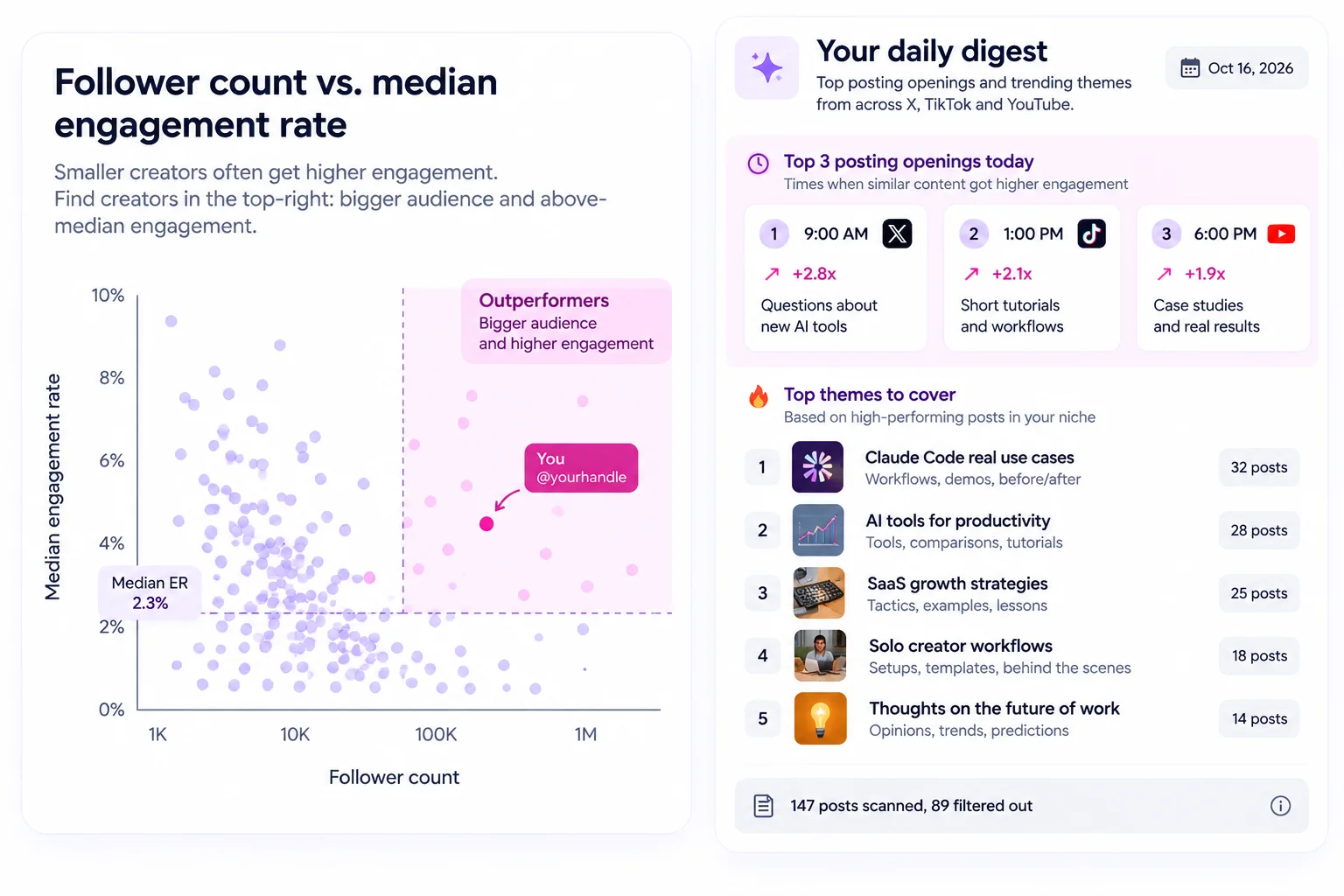
The accounts worth studying are the ones roughly your size in roughly your niche, specifically the ones growing faster than you. They are solving the exact problem you have, which is earning attention without having it already.
This is where the lookalike data earns its place. You can find creators in your niche inside your follower band, then look at what is actually working for them and what the gap is between their content and yours. Doing this manually means opening forty profiles and scrolling. It is about an hour of work for a vague impression. Here it takes one prompt.
When I ran this for SEO and B2B growth, the finding was uncomfortable. The faster growing accounts in my band were posting far more opinionated, specific, often slightly risky takes on industry practice. I was posting tutorials. Tutorials are useful and they get saved. They do not get argued about, and on LinkedIn the argument is the distribution.
The prompt
What to do with the output
Point four in the output matters more than it looks. There is always something the outperformers do that you should not copy. Engagement bait. Fake vulnerability. Posting six times a day. Patterns that work for them and would cost you credibility with the people you actually want as customers.
And be honest about the topic list in step 6. Some of those gaps exist because you are not credible on that topic, and writing about it anyway is how you get a post that does well and attracts exactly the wrong audience.
Tactic 4: Build a daily tracker of your industry and make it recurring
The first three tactics tell you how to write. This one tells you what to write about, every single day, without opening LinkedIn.
Here is the problem with scrolling your feed for ideas. The feed is not showing you your industry. It is showing you what the algorithm thinks will keep you on the site, which is mostly the loudest 20 accounts you already engage with, plus job announcements, plus someone's motivational post about their morning routine. You come away with a distorted picture and twenty-five minutes gone.
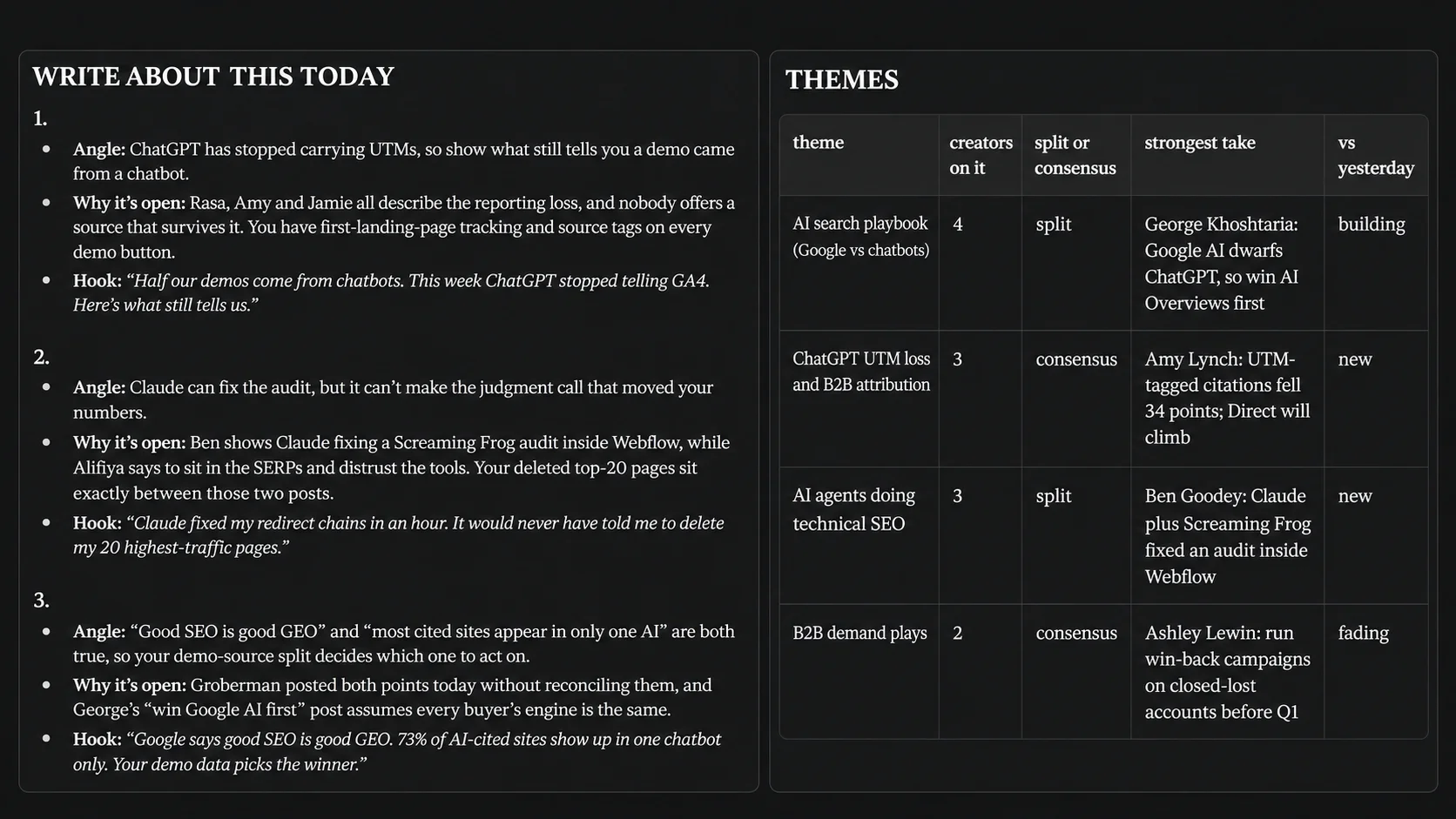
What I wanted was the opposite. Give me the top 200 people in my space, tell me what they collectively talked about yesterday, strip out the noise, and tell me where the gap is. Then do it again tomorrow without me asking.
The noise filter is the important part. I do not want to read:
- Job announcements and "I am thrilled to share I am joining"
- Work anniversaries, promotions, team photos
- Conference selfies and "great to catch up with" posts
- Product launch promos and webinar registration pushes
- Pure engagement bait with no substance
- Generic motivational content
That is probably half of LinkedIn by volume. Once it is gone, what remains is actual industry signal, and the volume is manageable. I read my digest in four minutes with coffee.
The real value is not the summary. It is the gap. If 30 people in your space are all reacting to the same news and all saying roughly the same thing, that is not an opportunity, it is a crowd. The opportunity is the thing being discussed in a way you disagree with, or the thing nobody has connected to the thing next to it. That is what the prompt is built to surface.
The prompt
Make it recurring
This is the part people skip, and it is the difference between a nice one-off report and something that actually changes your output.
Once the digest comes back in a shape you like, say this in the same chat:
Turn this into a recurring task, every weekday at 8am my time. Same tracked set, same filters, same format, same 300 word limit. Lead with the three openings every time. Never ask me anything on a run, and never report on the tracked set or the filtering unless the set itself breaks.
Claude will set it up as a scheduled task and it runs on its own. Mine lands before I start work. I read it, and either there is something worth writing that day or there is not. Both are useful answers.
Two practical notes. Refresh the tracked set every couple of months, because people move in and out of relevance in any niche. And actually prune the list when the digest surfaces someone who keeps posting things you do not care about. The filter only works if the input set is right.
Tactic 5: You are missing what is already happening on TikTok, X and Instagram
This is the one almost nobody does, and it is where I get the most unfair advantage.
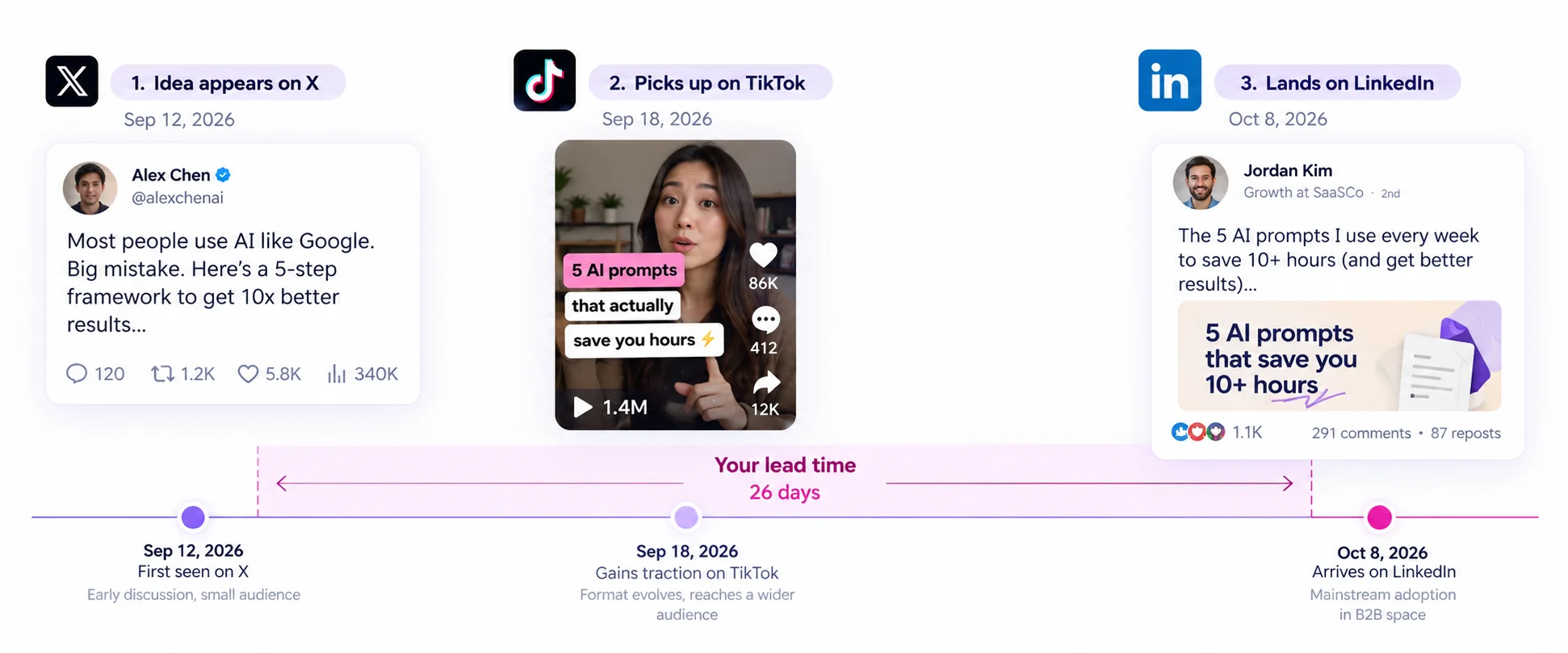
LinkedIn is slow. An idea shows up on X or TikTok, gets argued about, gets refined, gets turned into a format that works, and only then does it arrive on LinkedIn, usually weeks later, usually watered down. By the time a take is doing numbers on LinkedIn it has already been through a full cycle somewhere else.
I watched this happen with AI search. The practical conversation about ChatGPT and Perplexity sending or not sending traffic was happening on X among a small group of people running actual tests, well before LinkedIn marketers started posting about it. Anyone reading X at that point had a few weeks of lead time on a topic that eventually became unavoidable on LinkedIn.
That lead time is the entire play. You are not copying posts. You are seeing which ideas have already proven they can hold attention, in a faster environment, before your platform catches up.
The platform differences matter and you use them differently.
X is where practitioners argue. You go there for the actual disagreement, the test results, the thing someone discovered last Tuesday. The ideas are raw and often half right, which is useful, because the half that is wrong is frequently the most interesting post you can write.
TikTok is where you learn pacing. Not topics, structure. A good TikTok establishes tension in under two seconds because it has to. Watch how creators in your space open and you will fix your LinkedIn hooks faster than by studying LinkedIn hooks. The constraint is the same constraint as the fold, just harsher.
Instagram is mostly a format library. Carousel structure, how information gets broken across slides, what makes someone keep swiping. Directly transferable to LinkedIn documents, which are still underused.
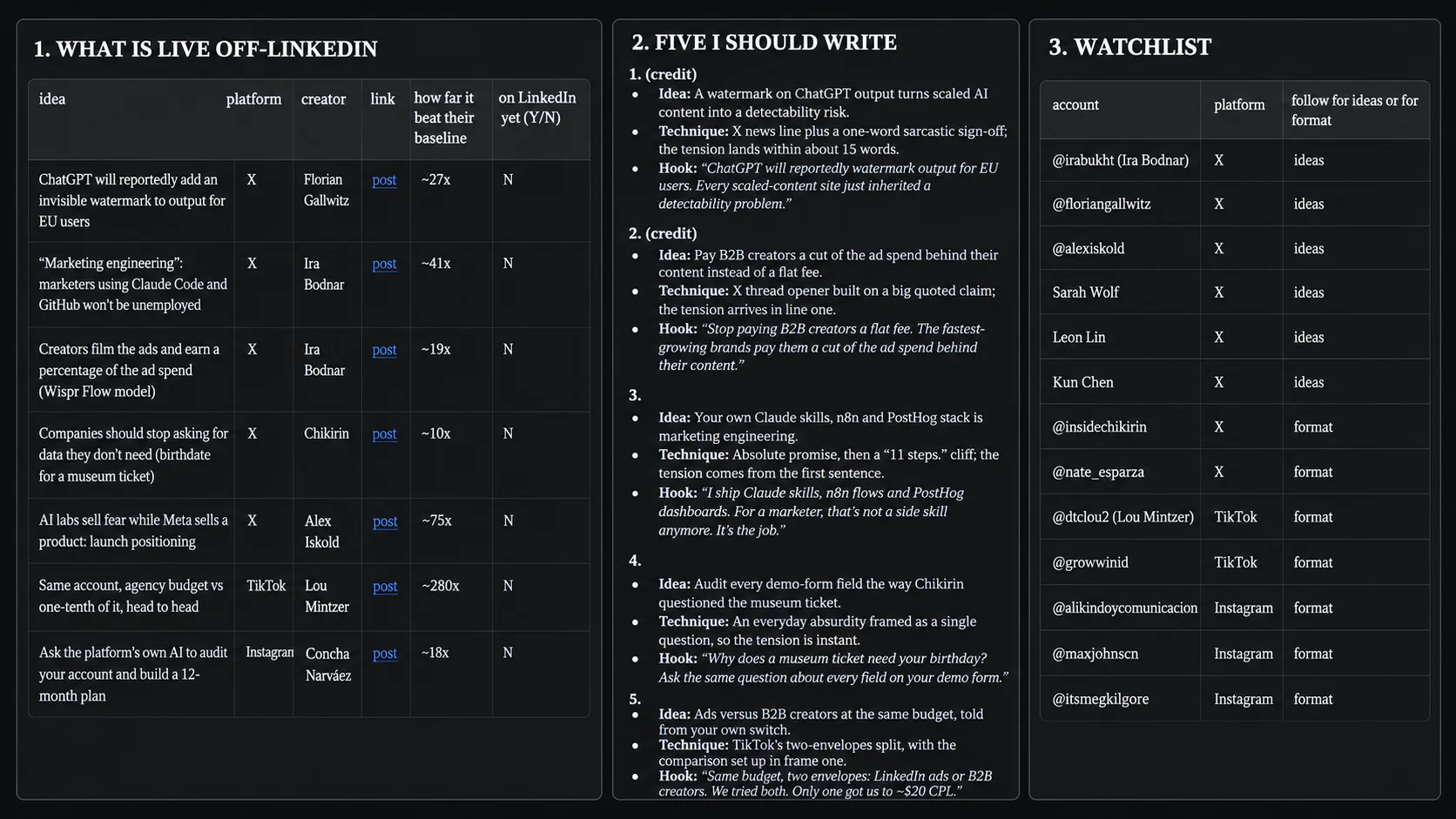
Content search across platforms is how I do this without maintaining four feeds and losing an hour a day to doomscrolling. I search my topics, I get what is actually performing, and I read or watch the ones worth the time.
The prompt
What to do with the output
Actually watch the things. I know that sounds obvious but the whole point is absorbing how the idea was delivered, and a summary strips that out. I watch maybe six TikToks a week from this. Ten minutes, and it does more for my hooks than any amount of reading about hooks.
Step five is the sleeper. Do not just run the search, build the watchlist. Follow those accounts, put them somewhere you will actually see them, and you get the lead time passively from then on.
One caution. Credit where you are taking someone's specific idea rather than a general theme. The LinkedIn version of someone's X thread, posted without attribution, gets noticed and it is not a good look. Crediting the source costs you nothing and usually earns you a connection.
Where to start
If you do all five of these at once you will do none of them. Here is the order I would use.
Run tactic one this week. The hook analysis is the highest leverage thing on this page and it takes one prompt. Fix the posts where your payoff is falling past the fold, because that is free reach you are currently throwing away.
Then set up tactic four, the daily tracker, because it runs on its own after you build it. Everything else is work you have to remember to do. That one just shows up.
The rest you can run monthly.
What I would leave you with is this. I did not get better at LinkedIn by writing more. I wrote roughly the same amount. I got better at it when I stopped guessing what worked and started reading what my own data said, which turned out to disagree with almost everything I believed about my own writing.
The only reason that was possible is that the analysis stopped being a two hour spreadsheet job and became a prompt.
Get set up
Start with Favikon Business and connect the MCP to Claude or ChatGPT.
Sign up as a Business, not as a Creator. MCP access is on the Business side, and this is the single most common thing people get wrong in the first five minutes.
Once it is connected, open Claude, paste the first prompt on this page, drop in your profile URL, and you will know more about your own LinkedIn performance in ten minutes than you have learned in the last year of posting.
Others articles