How to Find Instagram Influencers in Your Niche in 2026
Find Instagram influencers in your niche using search, hashtags, brand collaborations, and location tags. This guide shows you how to check engagement and audience fit, build a relevant shortlist, and use Favikon Creator Search when manual research becomes difficult to manage.


Updated October 16, 2026
Finding Instagram influencers in your niche takes about ten minutes. Deciding who actually belongs on your shortlist is where most marketers lose hours.
A recipe creator might look perfect on paper, but their content won't tell you whether their followers live in your delivery area. A viral reel won't tell you what their next sponsored post will return, either.
This guide walks you through how to find Instagram influencers in your niche using search, hashtags, suggested accounts, brand partnerships, location tags, and Google. You'll also learn how to check engagement by hand and when it makes sense to move that research into Favikon Creator Search.
TL;DR: How to Find Influencers in Your Niche
Use this sequence to turn relevant posts into a shortlist you can act on:
- Search specific topics, customer problems, and niche hashtags rather than relying on broad terms such as “food influencer.”
- Use suggested accounts, public brand tags, and paid partnership labels to find more candidates connected to your niche.
- For local campaigns, check both the creator's connection to the area and where their audience lives.
- Compare recent, similar posts, read the comments, and ask creators for audience and performance data before booking.
- When manual search stops scaling, Favikon Creator Search lets you run the same brief across 10M+ profiles in a fraction of the time. Start your free 7-day trial.
1. Search Instagram with Niche Keywords and Hashtags
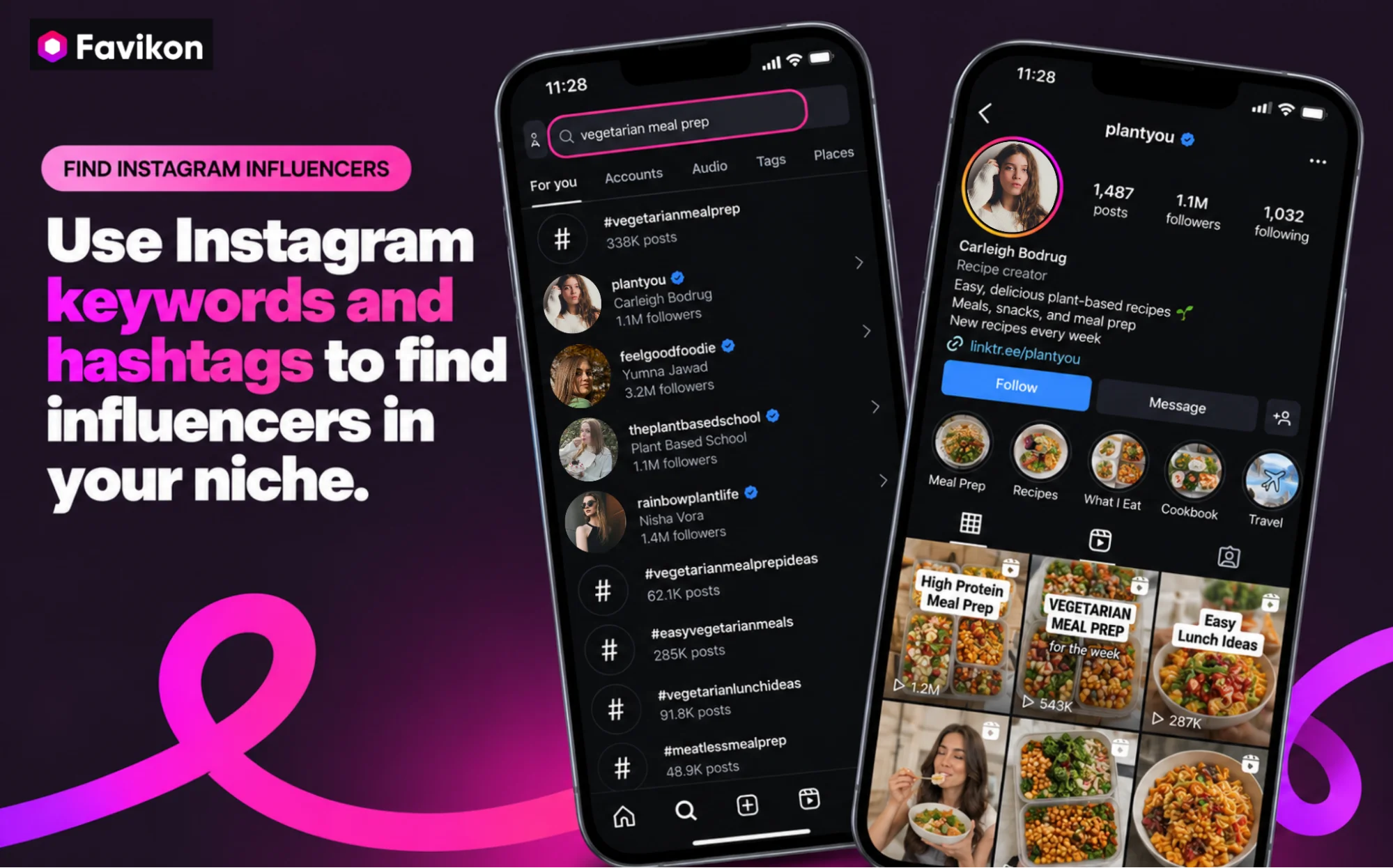
Open Instagram's search bar and start with the subject your ideal creator would post about. Searching “influencer” is optional. Your next partner might describe themselves as a cook, runner, teacher, or photographer instead.
Before searching, write one sentence describing the fit.
For example: “We need UK creators who show working adults how to prepare affordable vegetarian lunches.” That gives you a topic, an audience, and a market to check against every profile.
Turn that brief into a few searches, such as vegetarian meal prep, budget lunch ideas, and easy work lunches. Try both simple keywords and related hashtags, including #vegetarianmealprep or #budgetmeals.
Look through the account and content results available to you. Open promising posts, visit their creators' profiles, and check whether the topic appears repeatedly. Someone who shared one vegetarian recipe last year needs a different assessment from someone whose recent work consistently covers it.
Hashtags will point you toward the topic, but they won't give you the full picture. Keep searching with different terms. Pick up useful terms from relevant captions, then search those terms separately. Read the dates on the original posts rather than assuming search results are chronological.
Instagram's recommendations reflect your activity and interests. A creator appearing prominently in your results isn't proof that your customers see the same account. Keep searching with different terms instead of treating one results screen as the whole market. Meta explains how personalized recommendations work.
2. Use Suggested Accounts and Creator Connections
Once you have a promising creator, use their profile as a starting point for the next search. Review suggested accounts when Instagram displays them, then look at creators they publicly mention or collaborate with.
Keep the same selection criteria. A suggested account might share a topic, a connection, or part of an audience, but the suggestion itself doesn't mean it suits your campaign.
For the meal-prep example, check recipe collaborations, guest cooks, and creators credited in lunch-planning content. These connections give you specific names to look into rather than another broad search to scroll through.
Start from several different profiles. Following connections from only one creator can leave you with a narrow group whose content looks alike. A budget cook, a vegetarian recipe creator, and a local food reviewer all give you different routes into the same brief.
If the suggestions panel isn't visible in your version of the app, public mentions and collaboration tags work just as well.
3. Check Paid Partnership Labels and Brand Tags
Review the Instagram accounts of competitors and complementary brands. Open their creator collaborations, tagged posts, and reposted customer content, then visit the people behind those posts.
Look for the Paid partnership label and caption disclosures such as “ad” or “sponsored.” Instagram uses the paid partnership label on branded content, giving you a visible starting point for researching previous collaborations. Meta's collaboration guide shows how branded content and creator partnerships work.
For a meal-prep brand, search beyond other meal services. Lunchbox makers, kitchenware brands, and vegetarian food companies can point you to relevant creators without producing a list identical to competitors'.
Read the actual sponsored post. Does the creator explain how the product fits their routine? Do the comments discuss the recipe or product, or mostly enter a giveaway? Record the post link and publication date so you can revisit the evidence.
A brand tag alone doesn't establish a paid relationship. And a paid partnership label won't tell you the fee, the sales results, or whether the creator's even available for your campaign. Ask about current commitments rather than assuming a previous competitor partnership automatically rules someone out.
Check your own tagged posts and mentions, too. A creator who already features your product is worth a look, but run the same audience and content checks before making an offer.
4. How to Find Local Influencers on Instagram
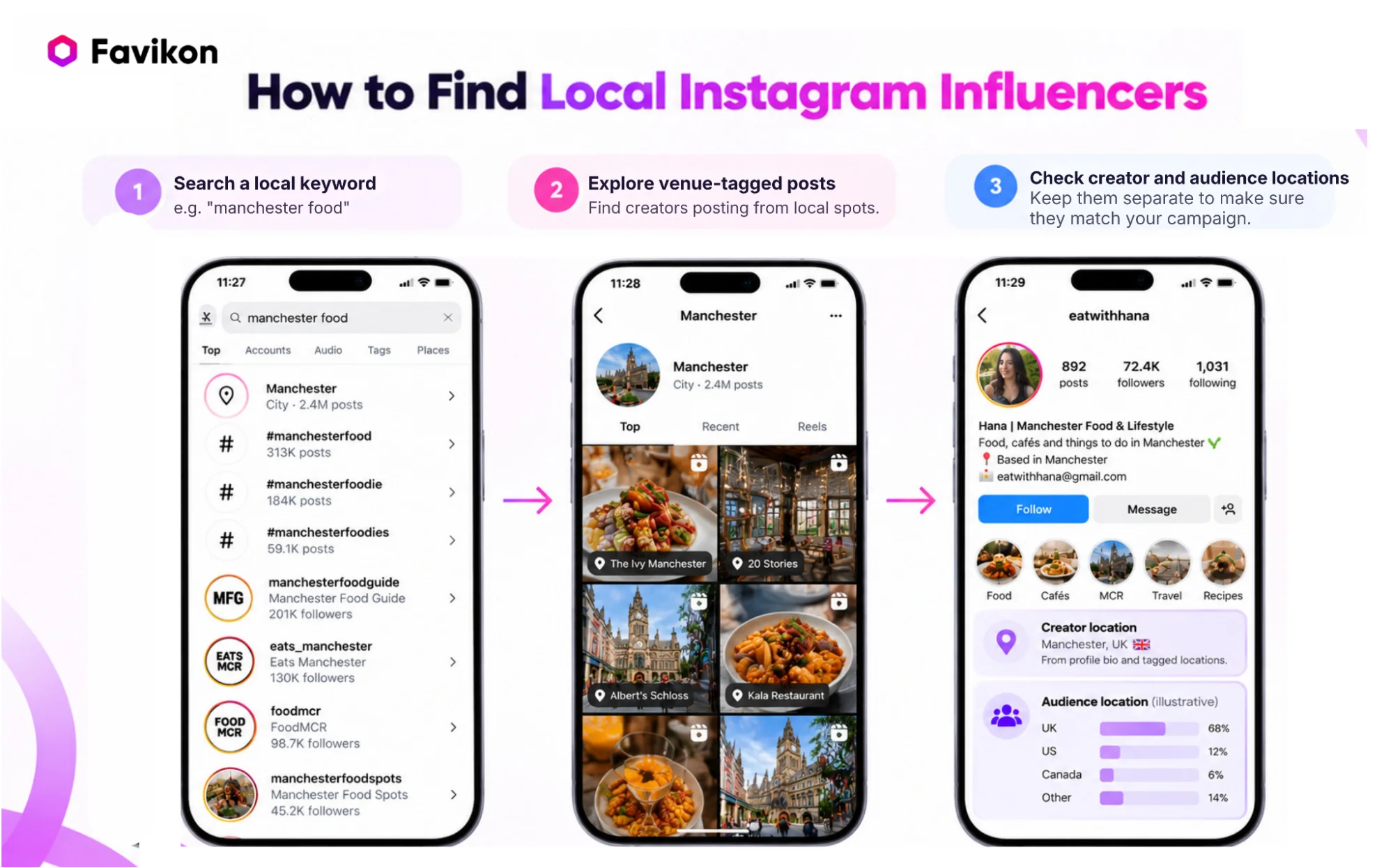
Search your city alongside your niche, review public location-tagged content, and verify audience geography before choosing a local creator.
For example, a Manchester meal-prep business could try Manchester food creator, Manchester vegetarian, and Manchester lunch ideas. Add neighborhood names when your delivery area is smaller than the city, and test city-specific hashtags alongside those keywords.
Next, open public posts tagged at relevant venues, markets, shops, and events. Visit the creators behind useful posts and check whether local coverage appears throughout their recent work. An account that regularly covers neighborhood food spots deserves more attention than a visitor who tagged one restaurant.
Where Instagram offers location-based browsing or its map, use public tagged content as another discovery route. Meta distinguishes a content location tag from someone's actual location, so don't treat the tag as evidence that a creator currently lives there.
Separate the two questions that matter: Can the creator participate locally, and can they reach local customers?
A creator based in Manchester could still have a mostly international audience. Someone based elsewhere might regularly publish Manchester guides for people planning visits.
Ask shortlisted creators for recent audience-location screenshots, including top cities where available, with the account name and reporting period visible. For an event, confirm attendance availability. For a delivery business, compare the audience information with the area you actually serve.
A city being the creator's largest audience location doesn't necessarily mean most followers live there. Look at the percentage as well as the ranking, and don't assume city-level data confirms individual delivery postcodes.
5. Use Google to Find Profiles and Relevant Posts
Knowing how to find influencers on Instagram also means knowing when to search elsewhere. Use Google when Instagram keeps returning the same accounts or when you need a more specific combination of topic and location.
The site: operator restricts results to a website. Quotation marks look for an exact phrase. Google documents both in its guide to refining searches.
Try these example queries, replacing the topic and city with your own:
site:instagram.com "vegetarian meal prep"
site:instagram.com "Manchester" "food creator"
site:instagram.com "meal prep" "paid partnership"
"Manchester food blogger" Instagram
The first searches within Instagram. The second combines a location with a creator description. The third looks for indexed pages containing a topic and partnership wording, though it won't reliably find every paid partnership label. The last can surface creator websites, interviews, and local roundups outside Instagram.
If an exact phrase gives you too few results, remove the quotation marks or shorten the query. A creator who writes “vegetarian lunches” might never use “vegetarian meal prep.”
Google search isn't a complete Instagram database. Its operators work within indexing and retrieval limits, so if a profile doesn't show up, that doesn't mean the creator doesn't exist. Google explains those limits here.
Open the original profile before adding someone to your list. Confirm the handle, recent activity, and current topic coverage rather than lifting a follower count from an old roundup.
6. Check Engagement by Hand Before Shortlisting
Finding an account gives you a candidate, not a booking decision. Before reaching out, review recent content, compare visible engagement, and record what you still need to verify.
Review a Consistent Sample of Posts
Use the latest 10 comparable posts as a practical starting sample. Record their dates, format, visible likes, and comments. Compare Reels with Reels when the campaign needs video rather than mixing every format into one number.
Check the dates on pinned posts. Separate giveaways, obvious outliers, and sponsored content so you can see how each affects the result. Where a result looks unusually strong, ask whether the post received paid promotion.
Avoid comparing a post published an hour ago with one that has had several weeks to collect responses. Use reasonably similar post ages and note the date you collected the figures.
Calculate a Public Engagement Rate
For a comparison based only on visible likes and comments, use this definition below.
Public engagement rate by followers (%) = ((total visible likes + total visible comments) ÷ posts reviewed ÷ current followers) × 100.
As an illustrative example, suppose a creator has 6,000 followers. Across 10 posts, you count 1,800 likes and 120 comments. That is 192 visible interactions per post, giving a public engagement rate of 3.2%.
Label the formula in your shortlist. This calculation doesn't measure how many followers saw the posts, include every kind of interaction, or establish what a campaign will sell. Don't compare it directly with a rate that uses reach or a different set of interactions.
Instagram lets people hide public like counts. When figures aren't visible, mark them as unavailable instead of treating them as zero or guessing. Ask the creator for the missing data. Meta documents its like-count controls.
Read the Comments Behind the Percentage
Look for responses that relate to the content. On a meal-prep post, questions about ingredients, storage, substitutions, or where to buy the product are useful evidence to record.
Repeated generic messages, giveaway entries, or comments unrelated to the post deserve a closer look. They aren't proof of fake followers on their own. A sudden growth spike could also have an explanation, such as a popular post or a collaboration.
Use the same calculation and sampling approach across your candidates. A percentage can help you compare them, but it shouldn't override a mismatch in topic, audience location, or the format you need.
Keep Evidence and Unknowns in the Shortlist
A useful shortlist explains why each creator belongs there and what still needs checking.
Start with these fields:
Before booking, ask for recent audience information and results from content similar to the deliverable you're buying. A creator's strongest-ever Reel isn't a useful substitute for the recent performance of several comparable posts.
When Should You Move Beyond Manual Search?
Use a discovery platform when maintaining and repeating the research becomes the problem, rather than simply because you haven't found the right creator yet.
Manual research can be enough for a small, occasional campaign. Keep it when you can review the relevant profiles, record the evidence, and follow up without losing track of decisions.
The case for a platform becomes stronger when you're repeating searches across markets, comparing many profiles, or rebuilding lists for different clients. Watch for duplicate research, missing source links, and uncertainty about which creators someone already reviewed.
For an Instagram-focused workflow, also check the native Creator Marketplace in Meta Business Suite. Meta documents creator and audience filters, portfolios, and collaboration tools. Review the access and eligibility shown in your account rather than assuming every creator is represented. See Meta's Creator Marketplace guide.

Use Favikon Creator Search for Repeatable Discovery
Favikon's influencer search tool lets you describe the creator you're looking for and search across 10M+ profiles on nine social channels. For this task, keep the search focused on Instagram so another platform's audience doesn't distract from the campaign you're planning.
The aim is to reduce repetitive discovery work. You still need to review the content, confirm audience fit, and agree on deliverables with the creator.
Start with a Specific Creator Brief
Open Creator Search and describe the topic, market, language, and content style. Favikon's Creator Search documentation supports prompts that include platforms and performance criteria.
For the running example, try:
UK Instagram creators who publish affordable vegetarian meal-prep Reels for working adults, post in English, and have between 5,000 and 50,000 Instagram followers.
The follower range is an example search constraint, not a recommended budget or a promise of creator pricing. Start with the criteria you genuinely need, then loosen secondary preferences if the results are too narrow.
Refine the Instagram Results
Use the filters to narrow by niche, country, language, and Instagram performance. Favikon documents follower ranges, engagement metrics, average views, posting frequency, and activity filters in its search workflow.
Apply these to the job. For a Reel campaign, review video performance and the creator's actual video style. For a local campaign, carry the audience-location check forward rather than assuming a creator-country filter resolves it.
Check the Profile Before Approving the Creator
Open a profile and switch performance data to Instagram. Review recent content and previous collaborations, then check available audience information against the brief.
Favikon's influencer analytics and profile documentation describe audience countries and cities, interest data, and Instagram follower credibility. These give you more evidence to investigate, not a guarantee of future campaign results.
Check which audience reports your account can access before relying on them for the shortlist. If a decisive detail is unavailable, ask the creator for supporting data and leave that item unverified until you receive it.
For a narrower question, such as who already posts about vegetarian lunch delivery, use Favikon Content Search. Review the matched posts and their dates instead of assuming a broad creator category proves that specific interest.
Save the Shortlist and Keep the Review Trail
Save promising creators or add selected profiles to a campaign. Favikon also documents saved searches and search history, which can help you return to the same brief. Check the credit cost before rerunning searches or loading more results. The search guide explains these actions.
Keep a short reason for each selection in your campaign notes or working shortlist. “Publishes weekly vegetarian lunch tutorials, audience location awaiting confirmation” is more useful than a saved profile with no context.
Review Favikon's current plans against the search and audience data you need, then start your creator shortlist.
Frequently Asked Questions
How Do I Find Influencers in My Niche for Free?
Search Instagram keywords, niche hashtags, suggested accounts, public brand tags, and location-tagged posts. Use Google to find additional profiles, then compare recent content and visible engagement in a spreadsheet before contacting creators.
How Do I Find Micro-Influencers on Instagram?
For finding micro-influencers, search specific customer problems and local communities rather than broad niche terms. Look for smaller accounts posting consistently about those topics, and don’t filter by bio keywords alone. Shortlist based on content fit, audience relevance, and recent performance.
How Do I Find Local Influencers on Instagram?
To find local influencers on Instagram, combine your city or neighborhood with your niche, review public venue tags, and check recurring local coverage. Ask for recent audience-city data before booking. A creator's location doesn't establish where their followers live.
What Is a Good Instagram Engagement Rate?
A good Instagram engagement rate depends on follower size and niche, but most marketers use 1% to 3% as a baseline for mid-size accounts. Micro-influencers under 50,000 followers often hit 3% to 6%. Always compare like for like: same niche, similar follower size, consistent formula.
Can I Check an Influencer's Audience Demographics for Free?
It depends. A creator may share recent audience screenshots with you during campaign discussions. Ask for the account name, reporting period, and relevant locations. Their public bio alone doesn't verify the audience's demographics.
How Can I Tell Whether an Influencer Has Fake Followers?
To identify fake followers, look for patterns across recent posts, such as repeated unrelated comments or unusual growth without an obvious explanation. Treat these as reasons to investigate, not proof. Ask for supporting performance data before making a decision.
How Should I Contact an Instagram Influencer?
To contact an Instagram influencer, use their listed business email or preferred contact method. Mention a specific relevant post, explain the deliverable and timing, and ask about availability, rates, and audience fit.
Build a Shortlist You Can Explain
Start with one focused search and save three promising creators. For each, record a relevant post, a reason they fit, and the most important detail you still need to verify. That gives you a usable next step without committing to a platform first.
When repeating that process becomes difficult to manage, bring the same brief into Favikon. Keep the selection standard unchanged: relevant content, an audience you can serve, and evidence that supports the collaboration.
Build your Instagram creator shortlist in Favikon →
Others articles