Trigify Alternative 2026: Best Replacements After the Shutdown
With Trigify shutting down, businesses need new tools to track social engagement, identify leads, and monitor creators. Compare the best Trigify alternatives in 2026, including Favikon, Clay, PhantomBuster, and Common Room, to find the right fit for your needs.


Trigify Alternative: What to Use Now That Trigify Has Shut Down (2026)
TL;DR
- Trigify announced on 23 September 2026 that its team is joining HubSpot. The standalone platform was retired, with standard customer access ending at 11:59pm BST on 22 October 2026. The product is not being migrated into HubSpot.
- Trigify did two different jobs. It resolved social engagement into named leads for outbound, and it monitored creators, competitors and keywords across platforms. Most replacement guides only cover the first one.
- If you used Trigify for lead resolution into a CRM, your replacement is Clay, PhantomBuster or Common Room.
- If you used Trigify for watching what your market is actually publishing, Favikon Tracker is the closer fit. It monitors creators, keywords, hashtags and mentions across Instagram, YouTube, TikTok, LinkedIn and X in one self-refreshing table.
- The part that changed my week: connecting Tracker to Claude through MCP, so my ICP's posts arrive ranked every morning instead of me scrolling a feed.
- Four copy-paste prompts are included below. They are free, they work on day one of a trial, and you can set them to run on a schedule.
I got the Trigify shutdown notice like everyone else, and my first reaction was not about the tool. It was that a whole category of people just lost their morning routine overnight.
I run SEO and growth marketing at Favikon. I am going to be upfront about the obvious: I work for a company that sells a social listening product, so you should read this with that in mind. What I am not going to do is pretend Favikon replaces every single thing Trigify did, because it does not, and a guide that claims otherwise will waste your afternoon.
So here is the honest version.
What actually happened to Trigify
On 23 September 2026, Trigify announced that its team was joining HubSpot. The standalone platform is being retired rather than folded into HubSpot's product. For customers on the standard notice period, access ended at 11:59pm BST on 22 October 2026. Monitoring and signal collection stop. API access and integrations stop. Accounts close.
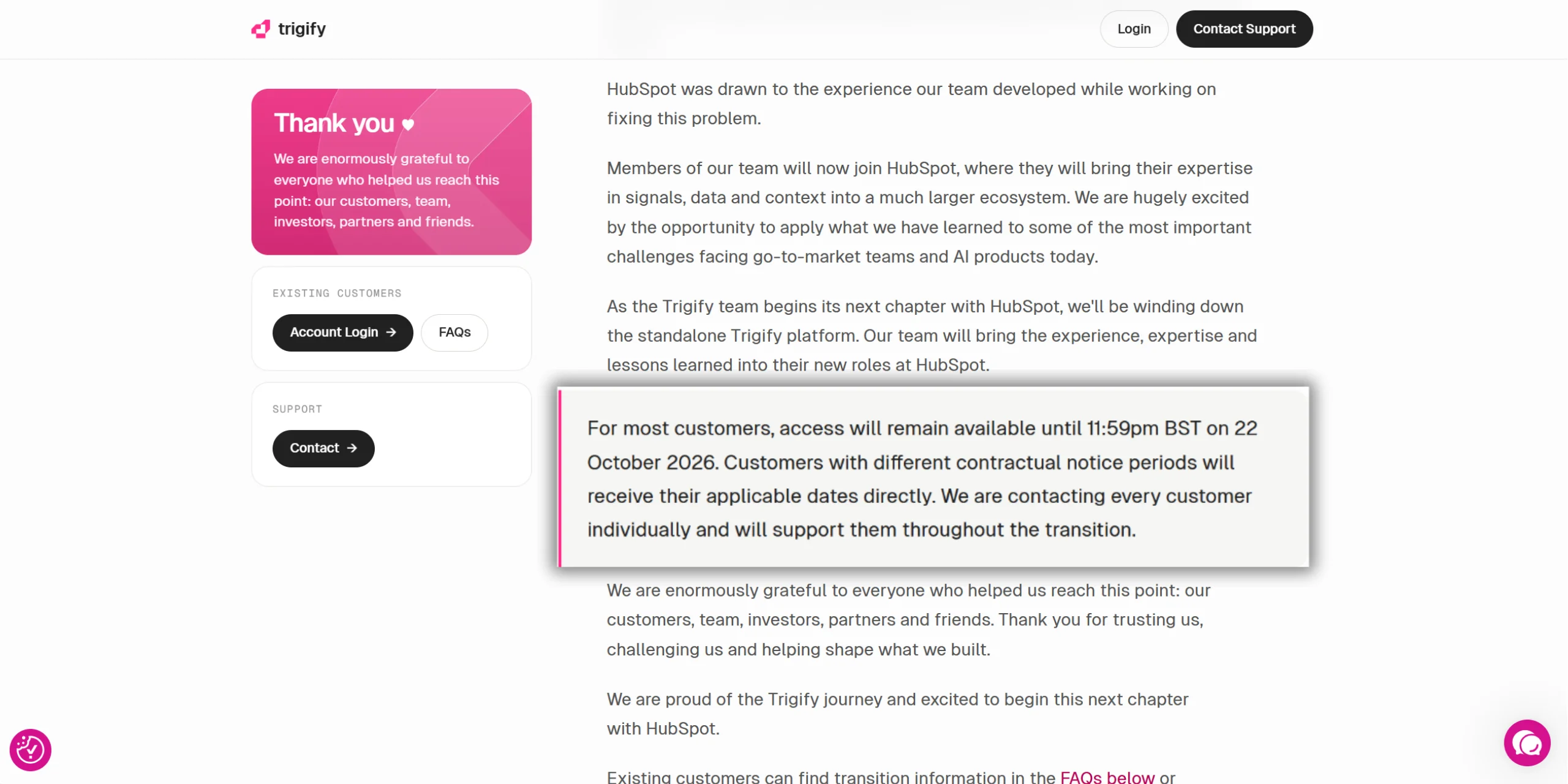
Trigify's own FAQ is clear that accounts are not migrating to HubSpot and that customer data is not transferring with the team. If you have not exported yet, that is the first thing to do, before you think about replacements.
A three year old product with a loyal base disappearing in a month is rough. I have no interest in dunking on them for it. They built something people used daily, which is harder than it looks.
Trigify did two jobs, and you probably only used one
This is the part almost every "best alternatives" list gets wrong, and it is why people end up buying the wrong replacement.
Trigify was sold as one product. In practice it covered two very different workflows.
Job one: signal to lead. You nominate posts, creators, competitor pages and keywords. Trigify watches engagement, resolves the people who engaged into named individuals with the source post attached, and pushes them to your CRM, Slack or an outreach sequence. This is a sales motion. It feeds pipeline.
Job two: market monitoring. You nominate the accounts and topics that matter, and Trigify tells you what is being published and discussed across LinkedIn, X, Reddit, YouTube and elsewhere. This is a marketing motion. It feeds content, positioning and competitive awareness.
Reported pricing sat somewhere in the $40 to $199 a month self-serve range, with custom enterprise tiers above that. Treat those figures as reported rather than confirmed, since the pricing pages are gone now.
Work out which job you were actually paying for before you shop. If your Trigify output ended up in a sequence, you want job one. If it ended up in a doc, a Slack channel or your own head before you wrote something, you want job two.
What to replace each job with
Here is the split, as straight as I can make it.
If you need job one, go build it in Clay. I am not going to sell you something that does not do what you need.
The rest of this article is about job two, because that is the part I use every day and the part I think most Trigify refugees underrate.
What I actually do: my ICP's posts arrive before I open LinkedIn
I stopped using the LinkedIn feed for market awareness about a year ago.
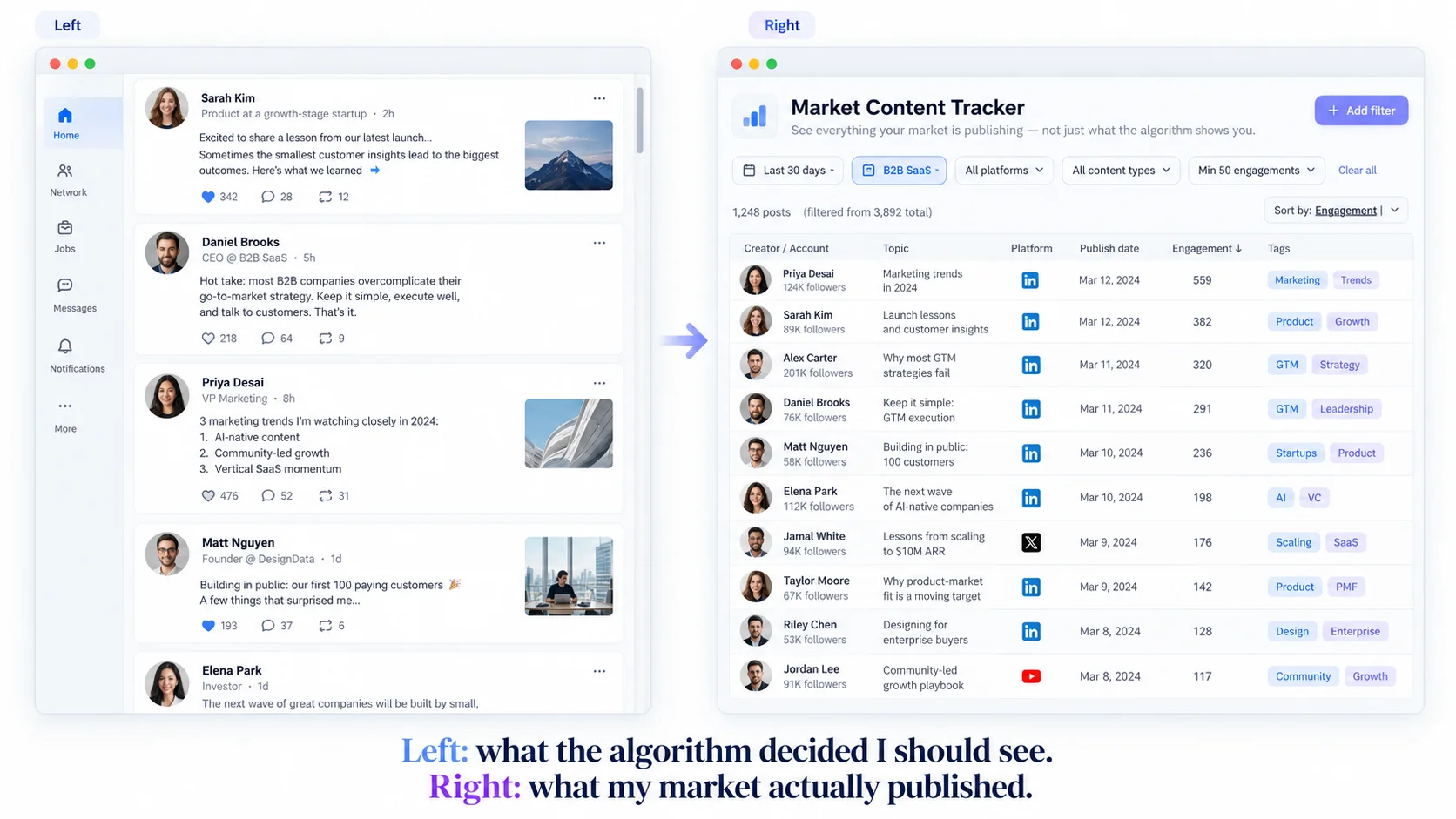
The feed is not showing you your industry. It is showing you what keeps you on the site. That means the twenty loudest accounts you already engage with, plus job announcements, plus somebody's post about their morning routine. You scroll for twenty five minutes and come away with a distorted picture of your own market.
What I wanted instead was simple. Give me the people who actually matter in my space. Tell me what they published. Strip the noise. Rank it so the most important thing is first. Do it again tomorrow without me asking.
That is a Tracker plus Claude. Three steps.
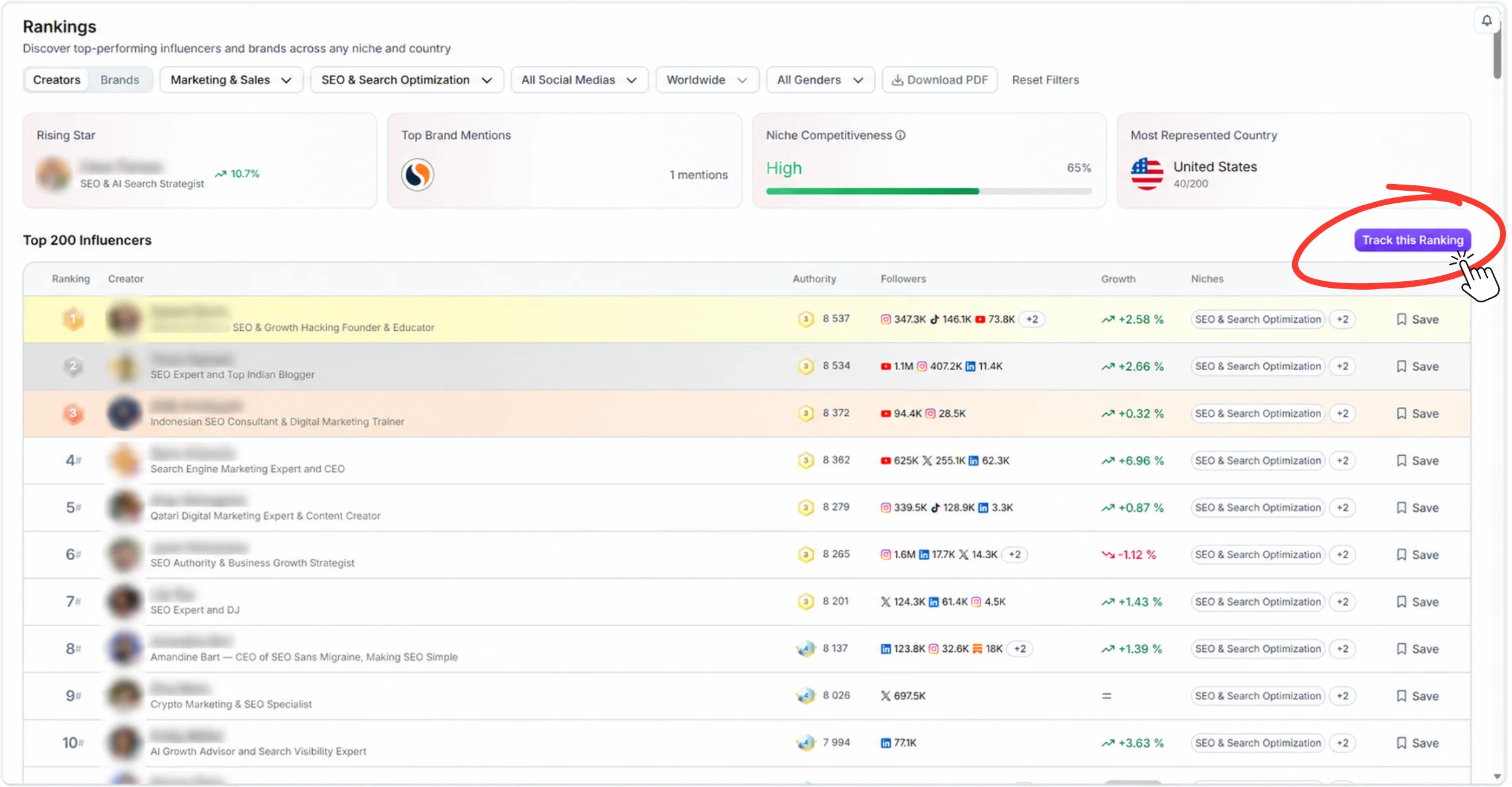
Step one. Build the list. Use Creator Discovery or push a Rankings segment to pull the top creators in your niche. Mine is roughly 200 SEO and B2B growth people. Add them to a Tracker.
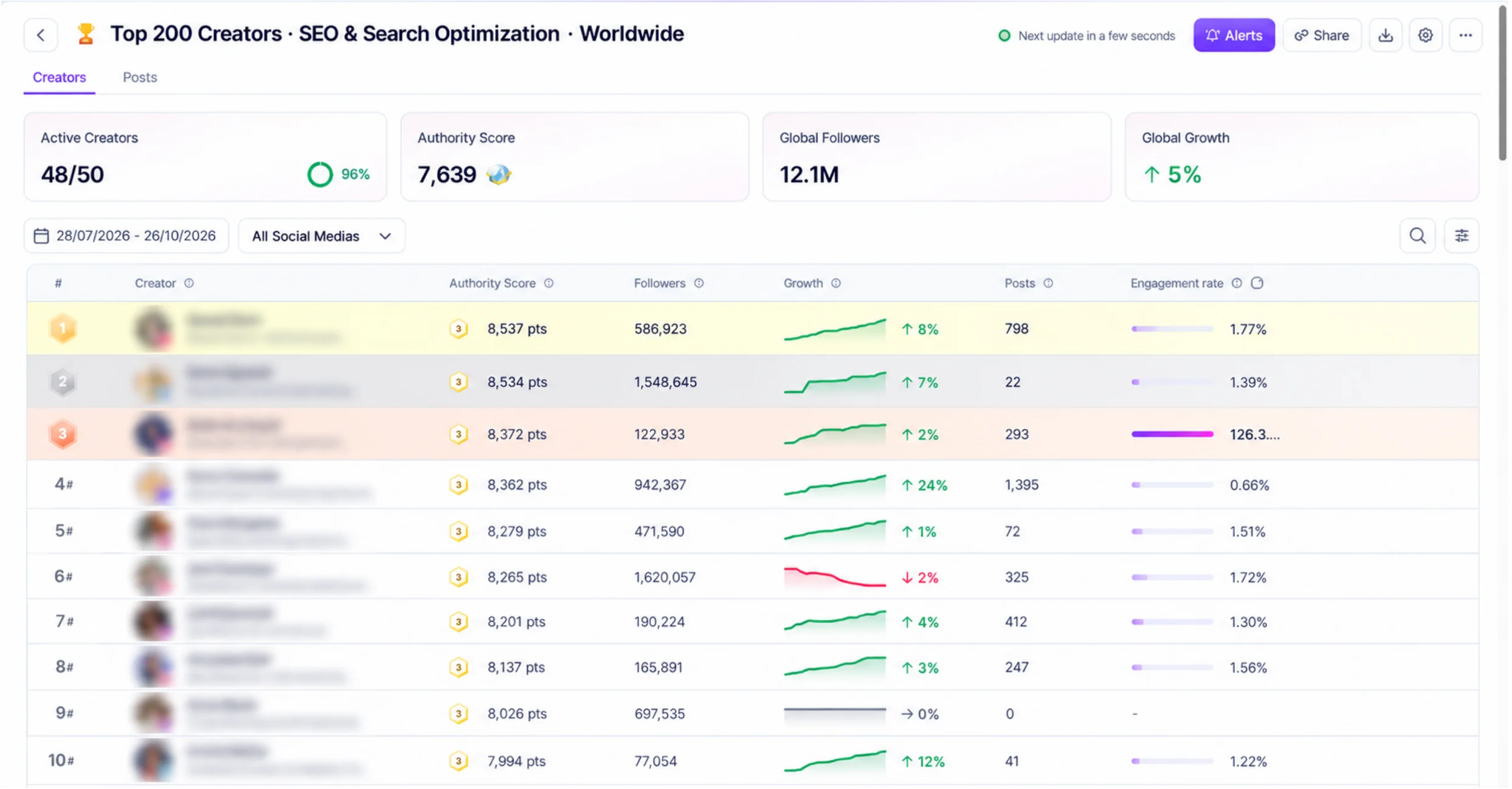
Step two. Let it run. Tracker refreshes on its own. Every creator and every post updates: authority score, follower growth, post count, engagement rate. You can read it two ways, by creator or by post, and filter by platform, format, hashtag or mention.
Step three. Connect the MCP and ask Claude for the digest. This is where it stops being a dashboard you have to remember to open and becomes something that shows up.
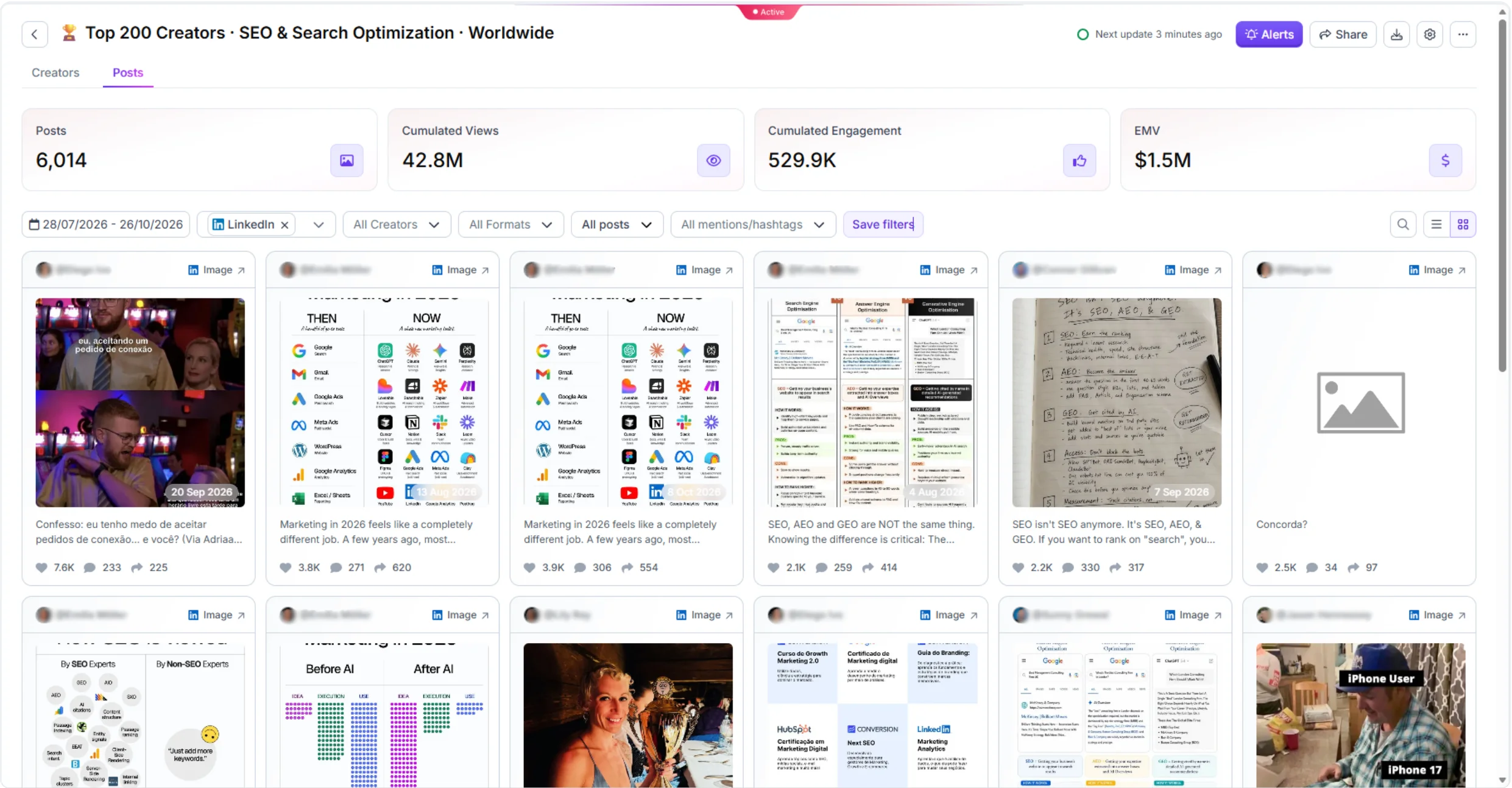
Alexa on our content team runs a version of this. Her job involves engaging with ICP content, and the bottleneck was never the engaging, it was finding the right posts early enough to matter. She now opens a ranked list in the morning instead of hunting.
Try Tracker free for 7 days — no credit card required.
Seven things that become possible once this is running
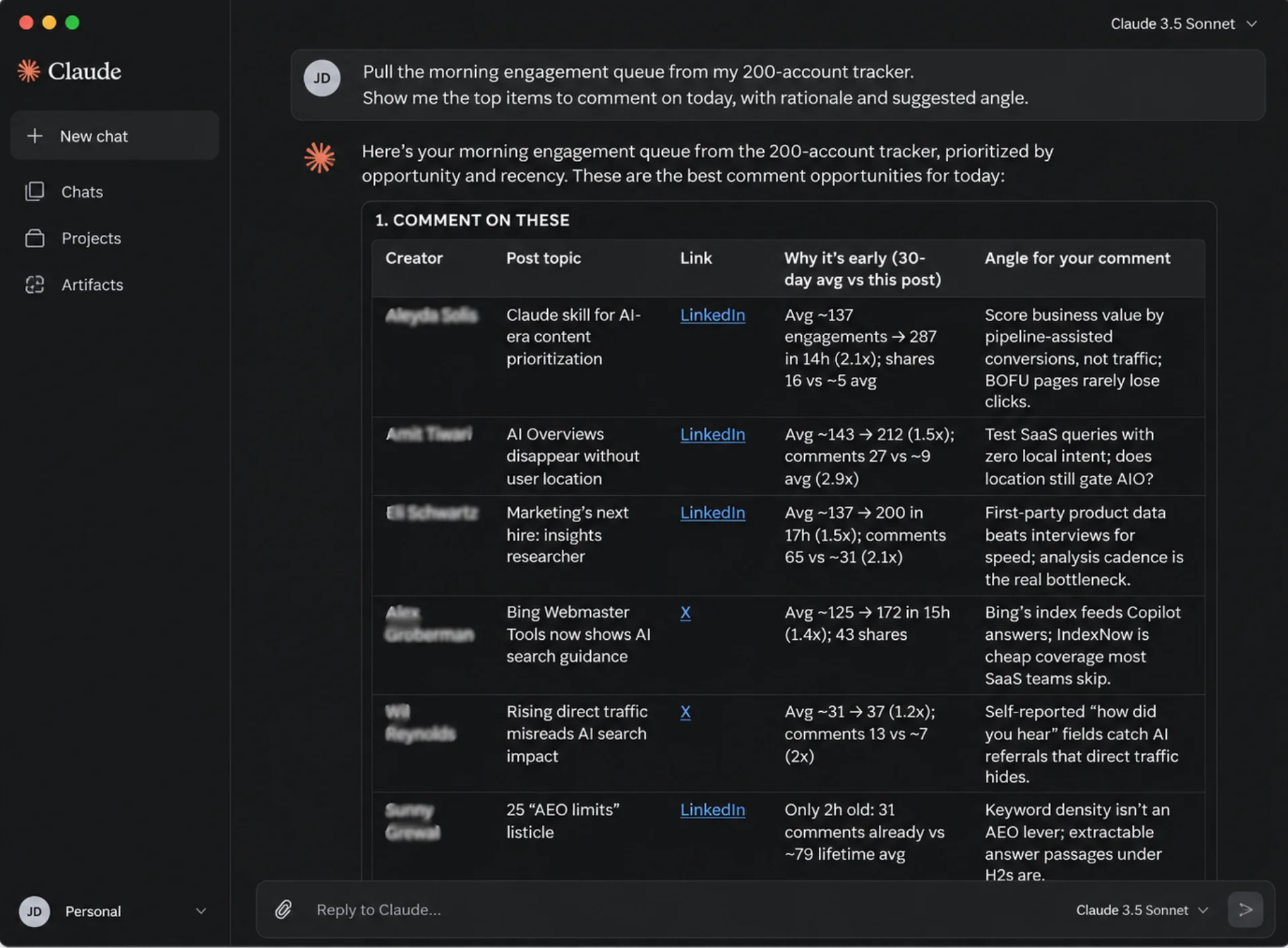
1. A morning engagement queue, ranked by what is about to take off. Not "here is everything your market posted." Here are the eight posts worth a comment, with the ones showing unusual early traction at the top. Commenting early on a post that goes big is worth more than commenting late on a post that already did.
2. Competitor campaign watch. See which creators your competitors are working with, what the content looks like, and how it performed. Competitor Insights handles the discovery side. Tracker keeps it live instead of being a one-off audit you did in March.
3. Content gap detection for your own publishing. If thirty people in your space are all saying the same thing about the same news, that is a crowd, not an opportunity. The opportunity is the thing being discussed in a way you disagree with, or the two threads nobody has connected. A tracked set makes that visible. A feed does not.
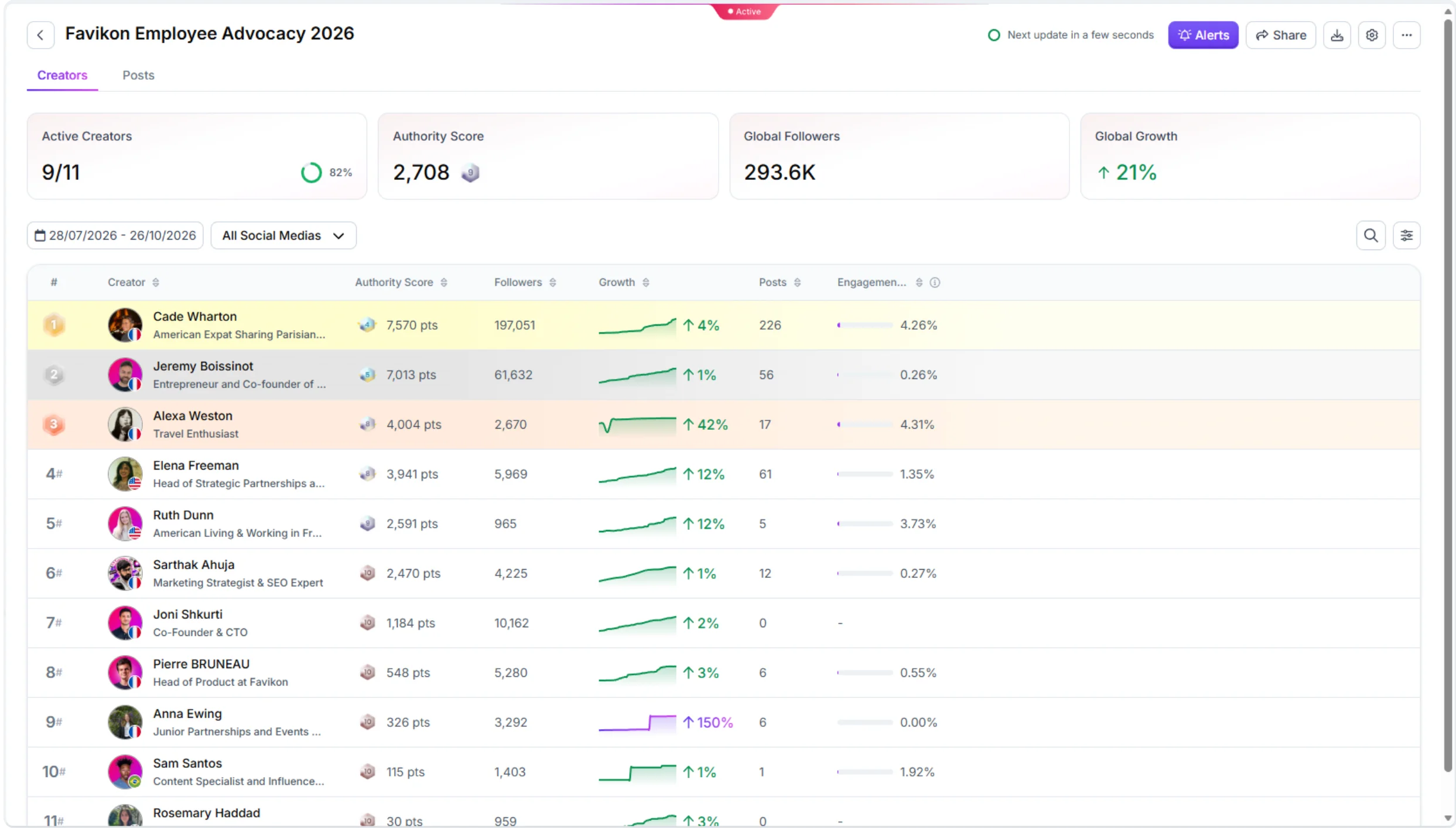
4. Employee advocacy reporting that does not involve chasing screenshots. Add your own team to a List and track their presence and growth on a weekly cadence. Who posted, what landed, how the team's reach is trending. This is a standing Tracker use case and it kills one of the most annoying recurring reports in B2B marketing.
5. Creator vetting before you spend money. You are already watching them. When you decide to pay one, the performance history is sitting there, and Creator Analytics adds the authenticity and brand fit checks on top. You are not making a decision off a media kit.
6. Brand and keyword social listening across five platforms. Not just posts that tag you. Build a Radar or Content Search segment for the keyword, mention or hashtag you care about, then filter the Tracker report by it. Most native tools only show you mentions that tag your handle, which is a fraction of what is actually being said.
7. Cross-platform early warning. LinkedIn is slow. An idea gets argued over on X, refined, turned into a format that works, and arrives on LinkedIn weeks later. If your Tracker spans X, TikTok, Instagram and YouTube as well as LinkedIn, you get the lead time. I have written about how I use that cross-platform gap for content in more detail.
What else Tracker does beyond creator monitoring
Social listening is the sharpest use case, but the same mechanics cover two more.
Trend tracking. Push a Rankings segment into Tracker and watch what the top 200 creators in a niche are posting about, week over week. This is how you see a topic rising before it is obvious.
Employee advocacy. Covered above, but worth repeating because it is the one people do not expect a social listening tool to handle. Your own team is just another List.
Export. Any Tracker view pulls into a CSV for a report, a deck or your own BI tool. The data stays yours, which after this month is not a small consideration.
And what else Favikon does
Tracker is one part of the platform. If you are rebuilding a stack anyway, the rest is worth knowing about:
- Creator Discovery — find creators by writing a prompt rather than stacking filters.
- Creator Analytics — authenticity, audience quality and brand fit before you sign anyone.
- Influencer CRM — every creator relationship in one place.
- Influencer Outreach — automated, multi-channel, AI-assisted.
- Campaign Management — run the whole thing from one board.
- Favikon Rankings — free public leaderboards by niche and country, updated weekly.
If you want to see how this plays out for a real B2B program, our HubSpot influencer marketing case study breaks down how HubSpot works with LinkedIn creators. More examples sit on the customers page.
How Favikon connects to Claude or ChatGPT through MCP
This is the part that turns a dashboard into a daily habit, so do not skip it.
Favikon exposes 43 tools over MCP, which is the standard that lets an AI assistant call a product's data directly. Once it is connected, Claude or ChatGPT can pull your Tracker contents, live creator data, post-level performance, lookalikes and cross-platform content search, without you exporting anything.
One thing trips everyone up, so read it twice. Sign up as a Business, not as a Creator.
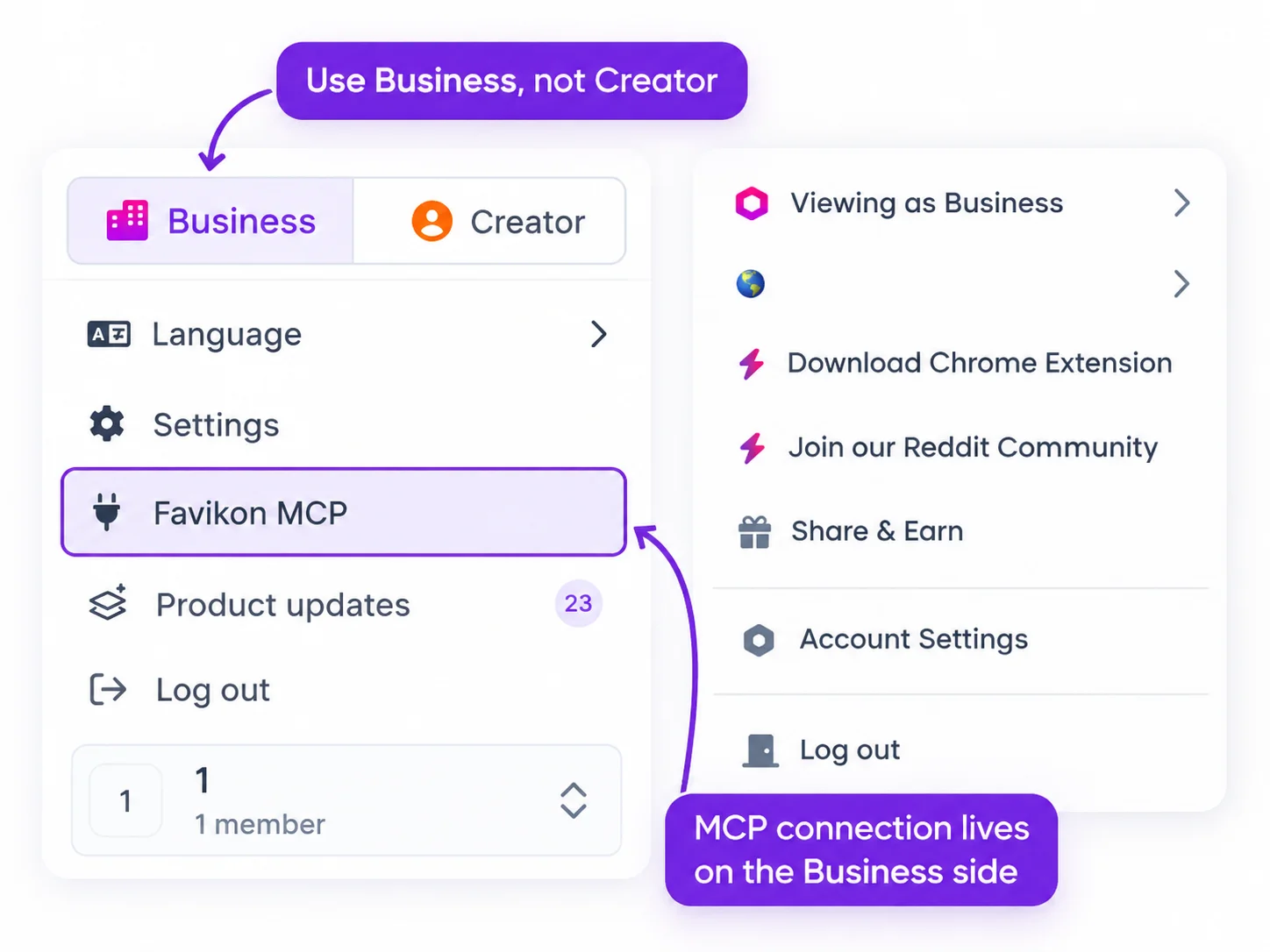
Favikon has two sides. The Creator side is for creators managing their own presence and brand deals. The Business side is the analytics platform, and MCP access sits on the Business side. If you sign up as a creator you will not see the MCP option and you will spend twenty minutes hunting for a menu item that is not there. I have watched several people do exactly that.
So: create a Favikon Business account, connect the MCP to Claude or ChatGPT, then run the prompts below.
One note on the prompts. Each has a RULES block and a DO NOT OUTPUT block. Do not delete them. Without them you get a page of methodology, a list of caveats and two questions back. With them you get the table you asked for. I learned that the expensive way.
Four free prompts to copy
Prompt 1: The morning ICP engagement queue
Prompt 2: The weekly market digest
Prompt 3: The employee advocacy scorecard
Prompt 4: Competitor creator watch
Make it recurring
Once the output looks right, say this in the same chat:
Turn this into a recurring task, every weekday at 8am my time. Same tracker, same filters, same format, same word limit. Never ask me anything on a run.
Claude sets it up as a scheduled task and it runs on its own. Mine lands before I start work.
We publish more of these openly in Favlabs, our free Claude skills library.
Start free and connect the MCP
Honest comparison
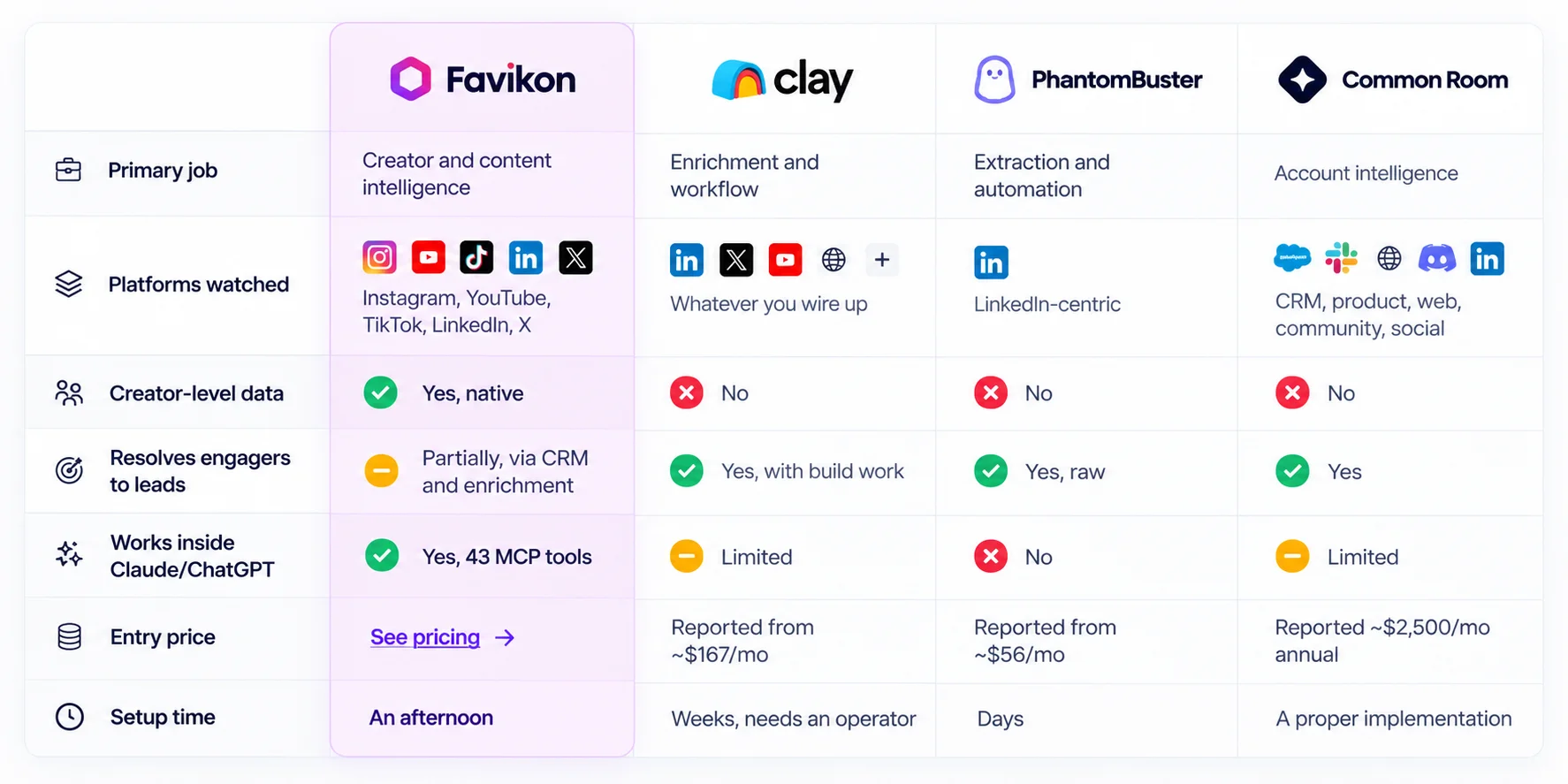
Competitor pricing above is as reported by third-party sources in 2026. Verify before you buy.
Pick Favikon if your signal is what your market is publishing, you care about the creators behind the posts, and you want it inside Claude rather than in another dashboard.
Pick Clay if your signal ends in an outbound sequence and you have someone who enjoys building.
Pick Common Room if you have product telemetry, a real community and the budget.
FAQ
Is Trigify really gone? Yes. The team joined HubSpot, the standalone platform was retired, and standard customer access ended at 11:59pm BST on 22 October 2026. The product is not continuing inside HubSpot and accounts are not being migrated.
Can I export my Trigify data? Only if your access window is still open. Trigify directed customers to its existing export options or to contact their team directly. If your account has closed, that window has passed.
Is Favikon a direct Trigify replacement? For market monitoring and creator intelligence, yes, and it covers more platforms natively. For resolving post engagers into named outbound leads, no. That is Clay or PhantomBuster territory and I would rather say so than waste your trial.
Does Favikon work with ChatGPT or only Claude? Both. The MCP connection works with either.
Do I need a paid plan to try this? No. There is a 7 day free trial with no credit card. Sign up on the Business side, not the Creator side.
How many creators can I track? Build lists by client, niche or region without worrying about per-list limits. See pricing for plan-level detail.
Where to start
If you were using Trigify for market monitoring, here is the order I would use this week.
Export whatever you can still reach. Then build one Tracker, not five. Pick the fifty to two hundred accounts that genuinely define your market and leave the rest out, because the filter only works if the input set is right.
Then connect the MCP and run prompt one tomorrow morning. If the queue is useful, make it recurring and you are done. The whole thing is an afternoon.
What I would leave you with is this. Losing a tool overnight is annoying, but the Trigify shutdown is a decent moment to ask whether you want your market intelligence living in another dashboard you have to remember to open, or arriving in front of you before you start work.
Others articles