LinkedIn Social Listening: What Actually Works
LinkedIn conversations can reveal valuable insights about customers, competitors, and industry trends. This guide explains practical social listening methods that help teams find opportunities and make better marketing decisions.
.png)
LinkedIn Social Listening: How to Track Conversations LinkedIn's API Won't Let You See
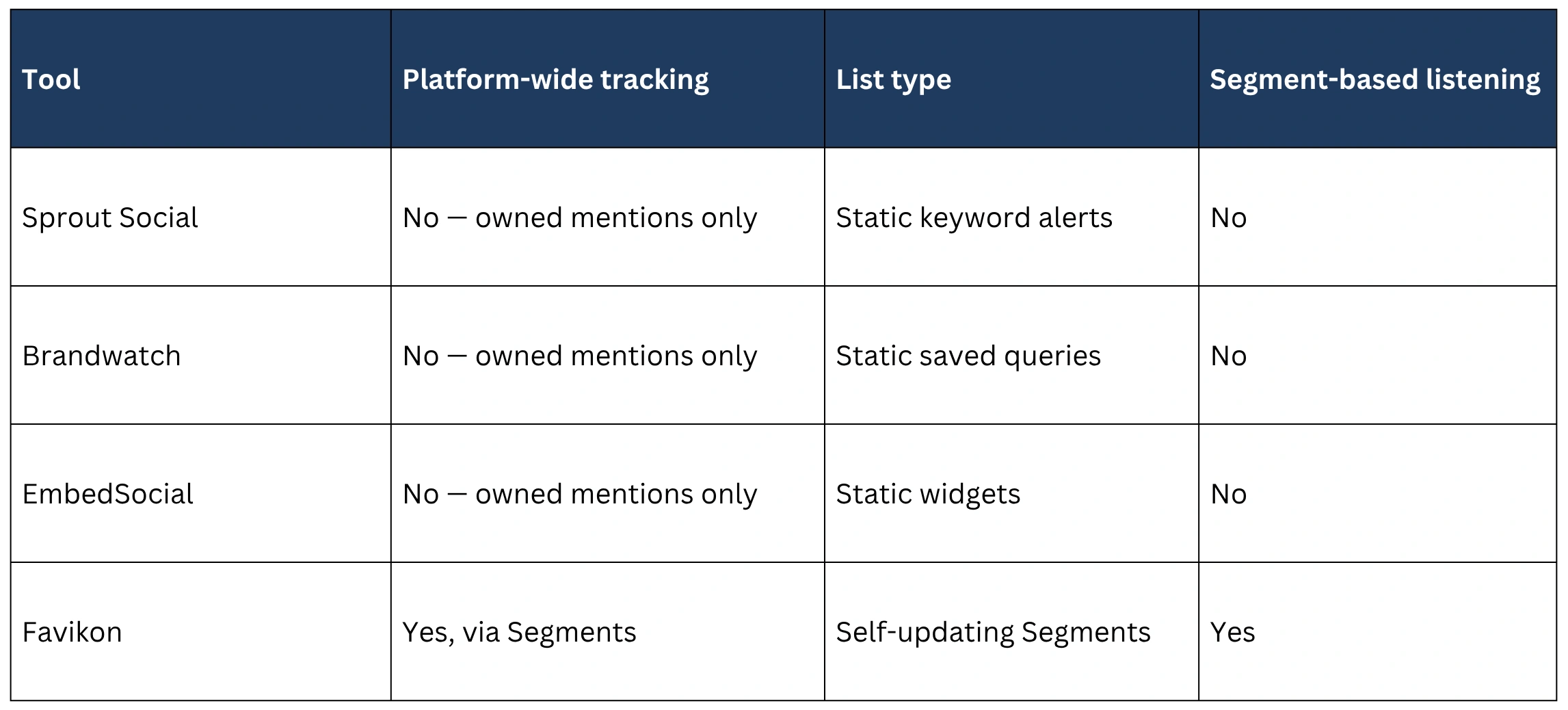
You can't run true platform-wide social listening on LinkedIn. LinkedIn's Community Management API only surfaces mentions, comments, and tagged posts tied to your own Company Page — it has no public search endpoint for scanning keywords, hashtags, or competitor names across the platform. Every mainstream listening tool, including Sprout Social, Brandwatch, and EmbedSocial, hits this same wall and falls back to manual LinkedIn search or Google Alerts. Favikon works around it with Segments: self-updating lists of creators defined by what they post, who they are, or who they resemble, instead of a static keyword search that has to be rebuilt by hand.
What LinkedIn Social Listening Actually Means
Social listening and monitoring get used interchangeably, but they're different jobs. Monitoring is reactive: you watch the comments, mentions, and DMs tied to your own Company Page and respond. Listening is broader: you're tracking what people are saying about your brand, your competitors, or your category across the platform, including conversations that never tag you at all.
On most social platforms, that distinction doesn't matter much because listening tools can query public content directly. On LinkedIn, it matters a lot, because the platform's API only grants access to the monitoring layer — not the listening layer.
Why Every LinkedIn Listening Tool Hits the Same Wall
LinkedIn's Community Management API is built for one purpose: helping brands manage their own Page. It exposes comments, reactions, and mentions where your Company Page is tagged. It does not expose a search index of public posts, hashtags, or keywords across the platform the way Twitter/X or Reddit APIs historically have.
That's why every major listening vendor quietly admits the same limitation in their own documentation. Sprout Social, Brandwatch, and EmbedSocial all describe LinkedIn tracking as “owned listening” — restricted to your Page's tagged activity — and point users toward manual workarounds for anything broader: running LinkedIn searches by hand, setting up Google Alerts, or piping RSS-style keyword alerts through a tool like F5Bot. None of them offer a legitimate way to track a competitor's mentions or an industry conversation at scale, because the API simply won't let them.
The Real Workaround: Segments, Not Keywords
Favikon doesn't try to query LinkedIn's public feed, because no vendor can. Instead, it builds listening around Segments: a set of listening criteria that stays live. Instead of running a search once and getting a static list of results, a Segment defines who or what qualifies, and creators move in and out of it automatically as they start or stop matching — no manual re-running, no rebuilding a spreadsheet every week.
That's the real difference from a static List, which is a fixed group of creators you added by hand and have to maintain yourself. A Segment updates itself. This is the part competitors can't replicate with keyword alerts, because there are five distinct ways to define what “qualifies” for a Segment — not just one.
Five Ways to Build a LinkedIn Listening Segment
Each Segment source defines “who qualifies” differently, which means each one is suited to a different kind of listening.
1. Radar — mention-based listening
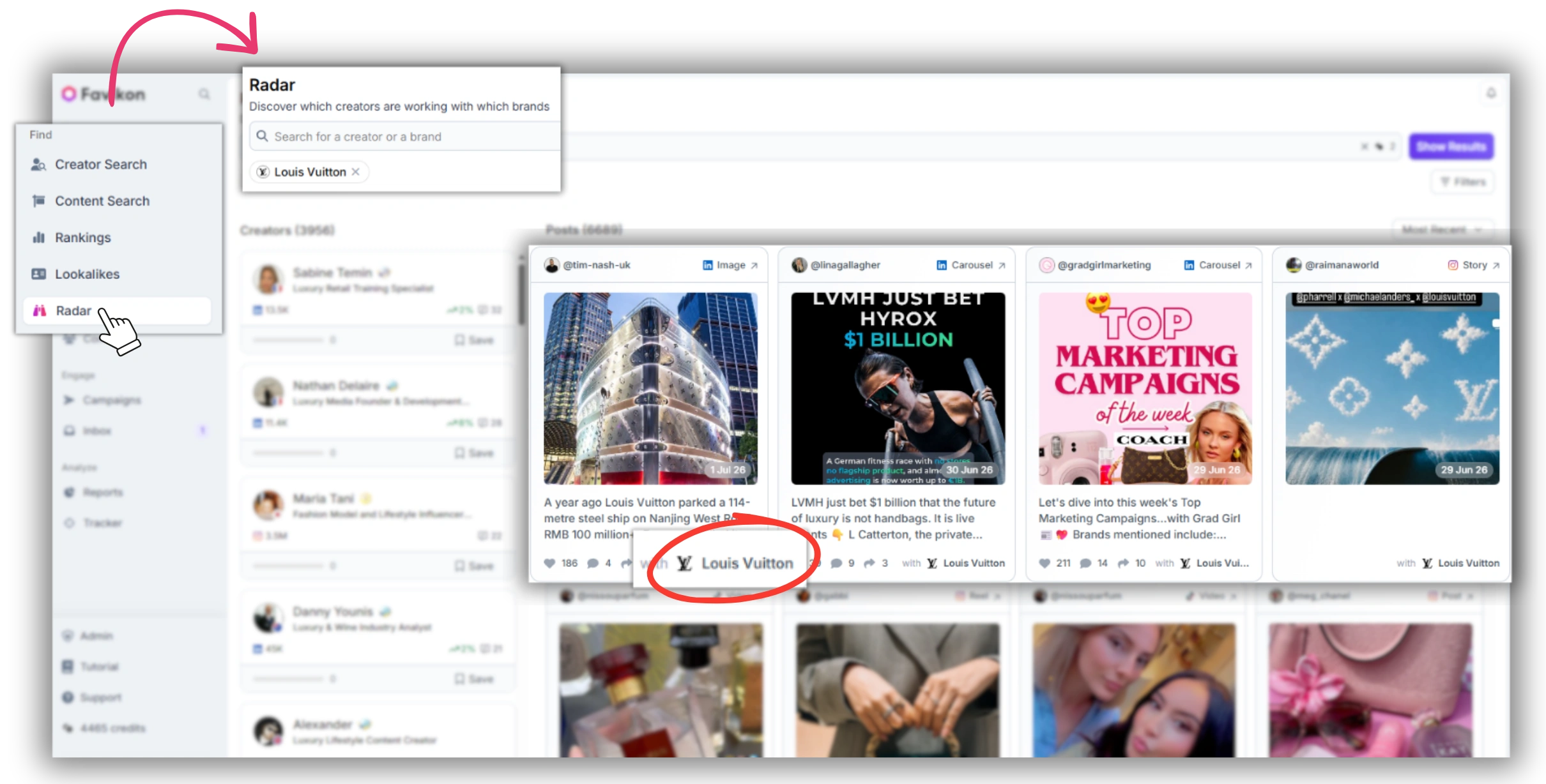
Radar is the closest match to what Sprout or EmbedSocial call “listening,” except it isn't capped at mentions of your own Page. Set a Segment to “creators mentioning [brand or competitor name]” and Favikon surfaces every LinkedIn creator talking about that company, tagged or not. Build a Radar Segment on a competitor's name and you'll catch every creator discussing them, not just the ones who happened to tag your account.
2. Content Search — topic and intent listening
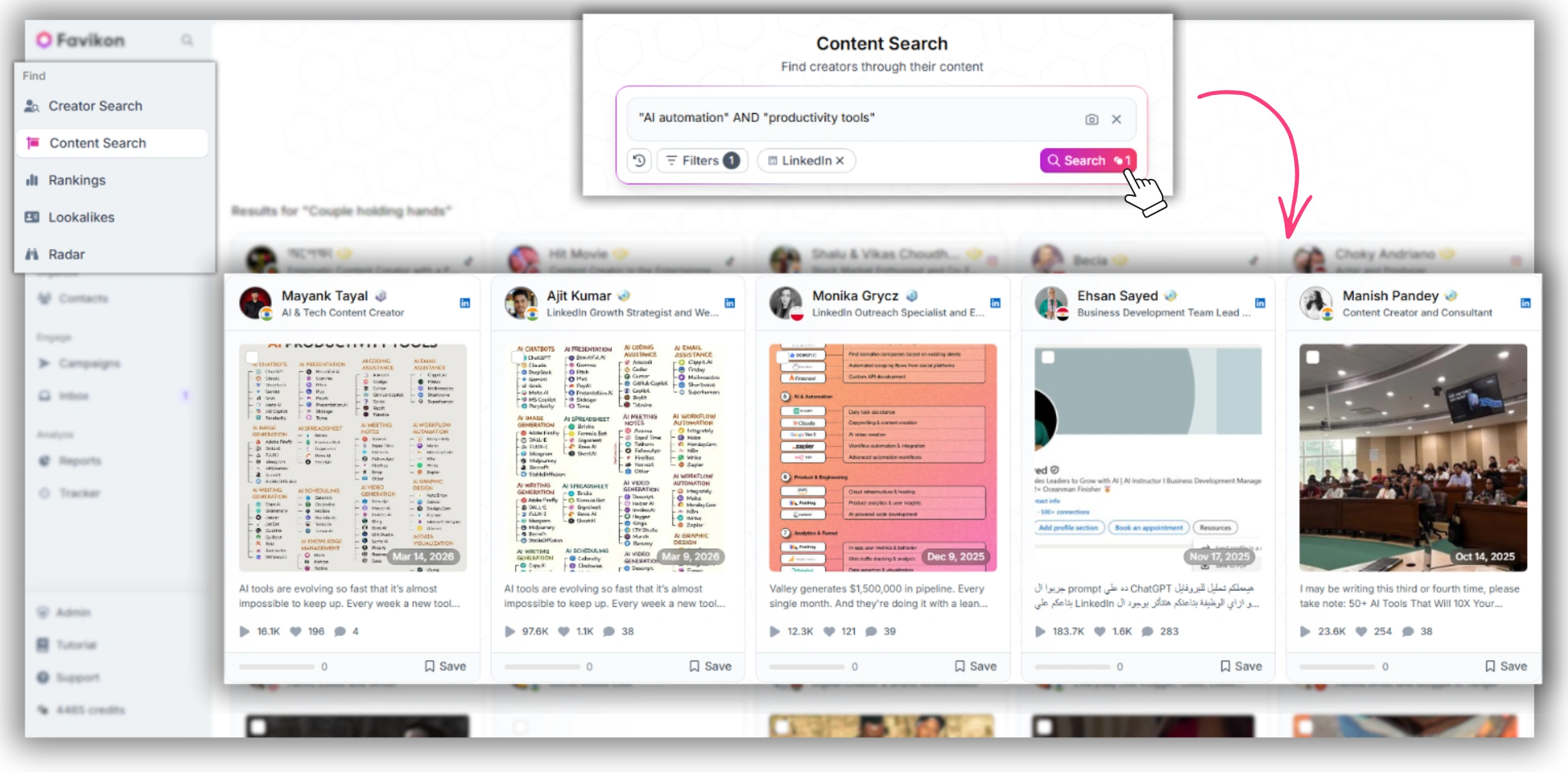
Content Search defines a Segment by a semantic prompt rather than a literal keyword string. A prompt like “posts expressing frustration with manual influencer outreach” catches buyer-intent language a keyword match would miss entirely, since nobody phrases that frustration the same way twice. This is the closest thing to true topic listening that LinkedIn's API allows for.
3. Creator Search — audience-defined listening
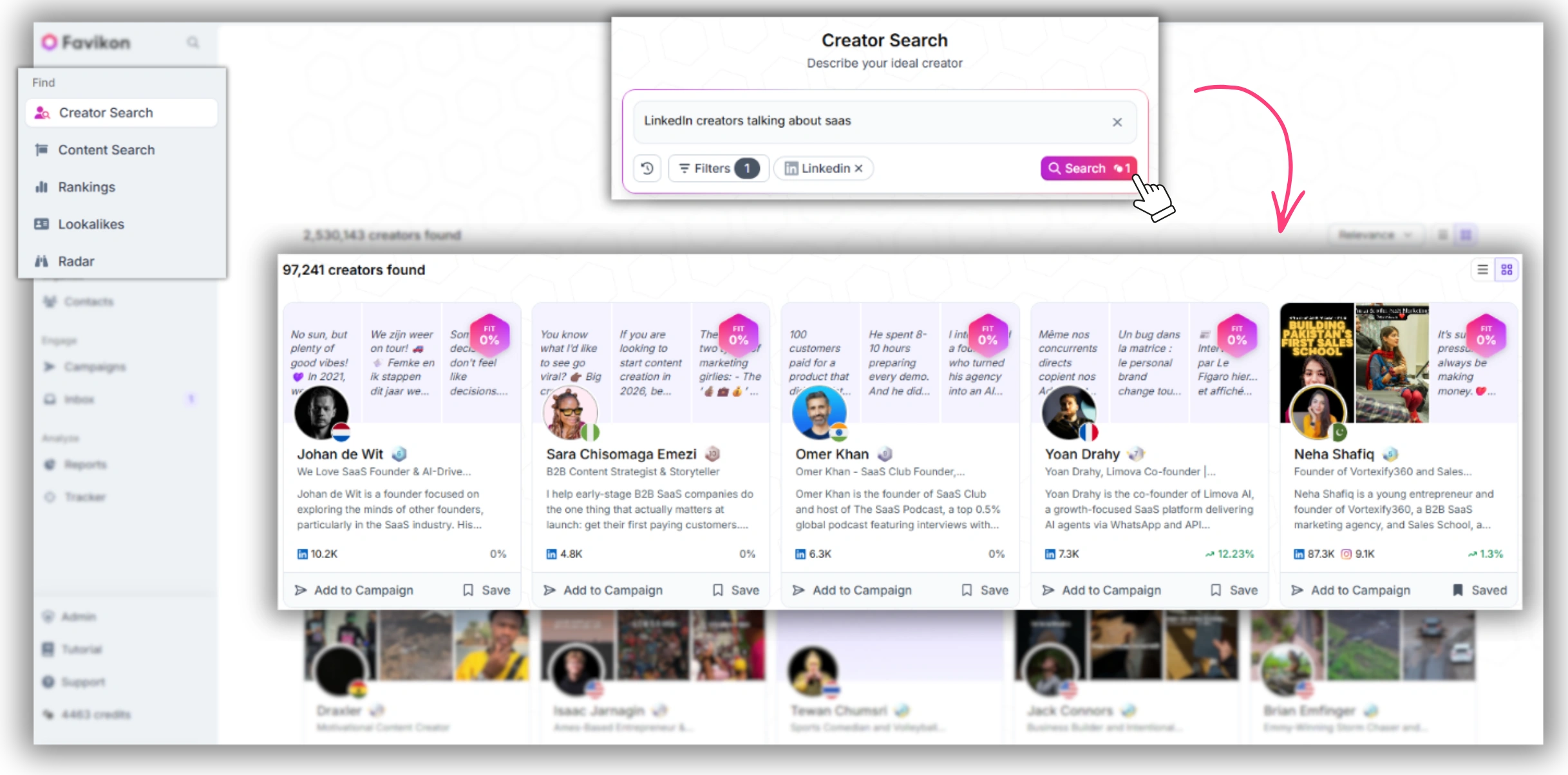
Creator Search defines a Segment by who someone is, not what they're posting about. “B2B SaaS marketing leaders posting about pricing” isn't a phrase match — it's a persona filter. You're not listening for a keyword, you're listening to a role.
4. Rankings — industry-pulse listening
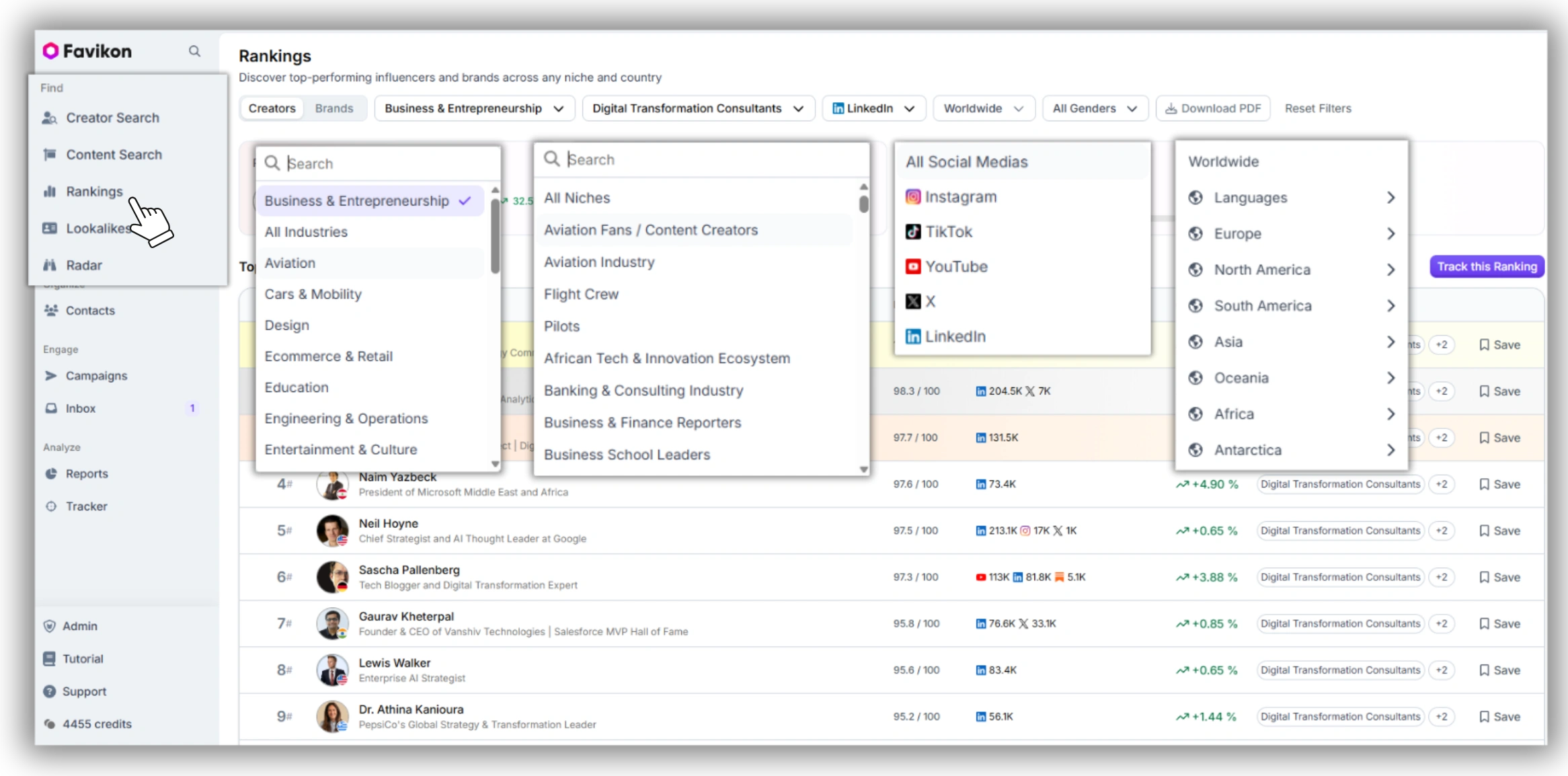
A Rankings Segment tracks the top creators in a niche, auto-refreshed as standing shifts. This is less about your brand specifically and more about the industry pulse: what your category's most-followed voices are talking about this week, updated without you touching it.
5. Lookalikes — expansion listening
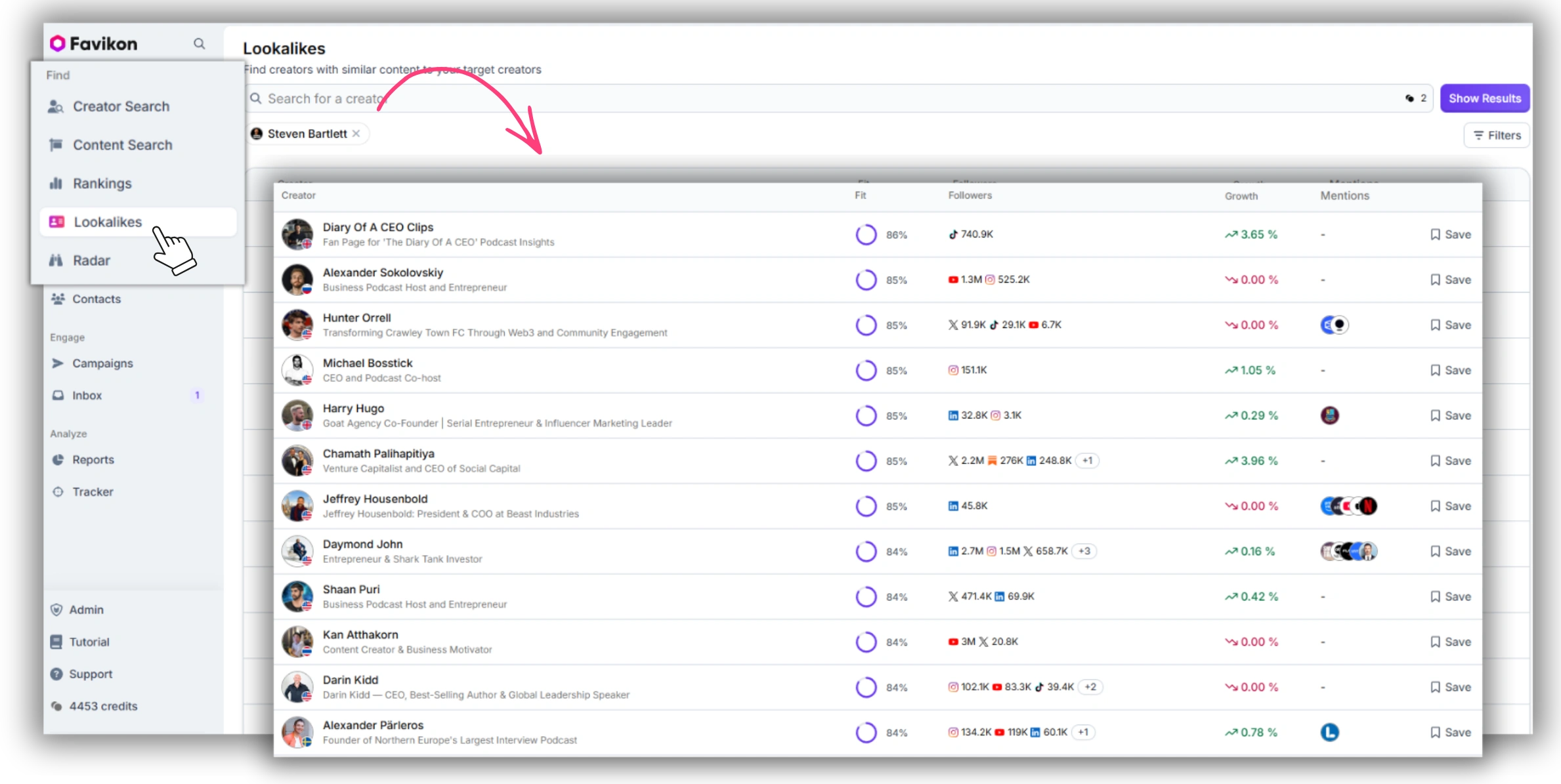
Lookalikes takes one known creator — an analyst who covers your space well, for example — and expands the Segment to semantically similar voices automatically. No other LinkedIn listening tool does this kind of expansion at all, because it depends on Favikon's own creator graph rather than anything LinkedIn's API exposes.
How to Set Up LinkedIn Social Listening with Favikon Tracker
Once a Segment exists, Tracker is where you actually watch it. Setup takes five steps.
1. Pick a Segment source — Radar, Content Search, Creator Search, Rankings, or Lookalikes — based on the kind of listening you need.
.webp)
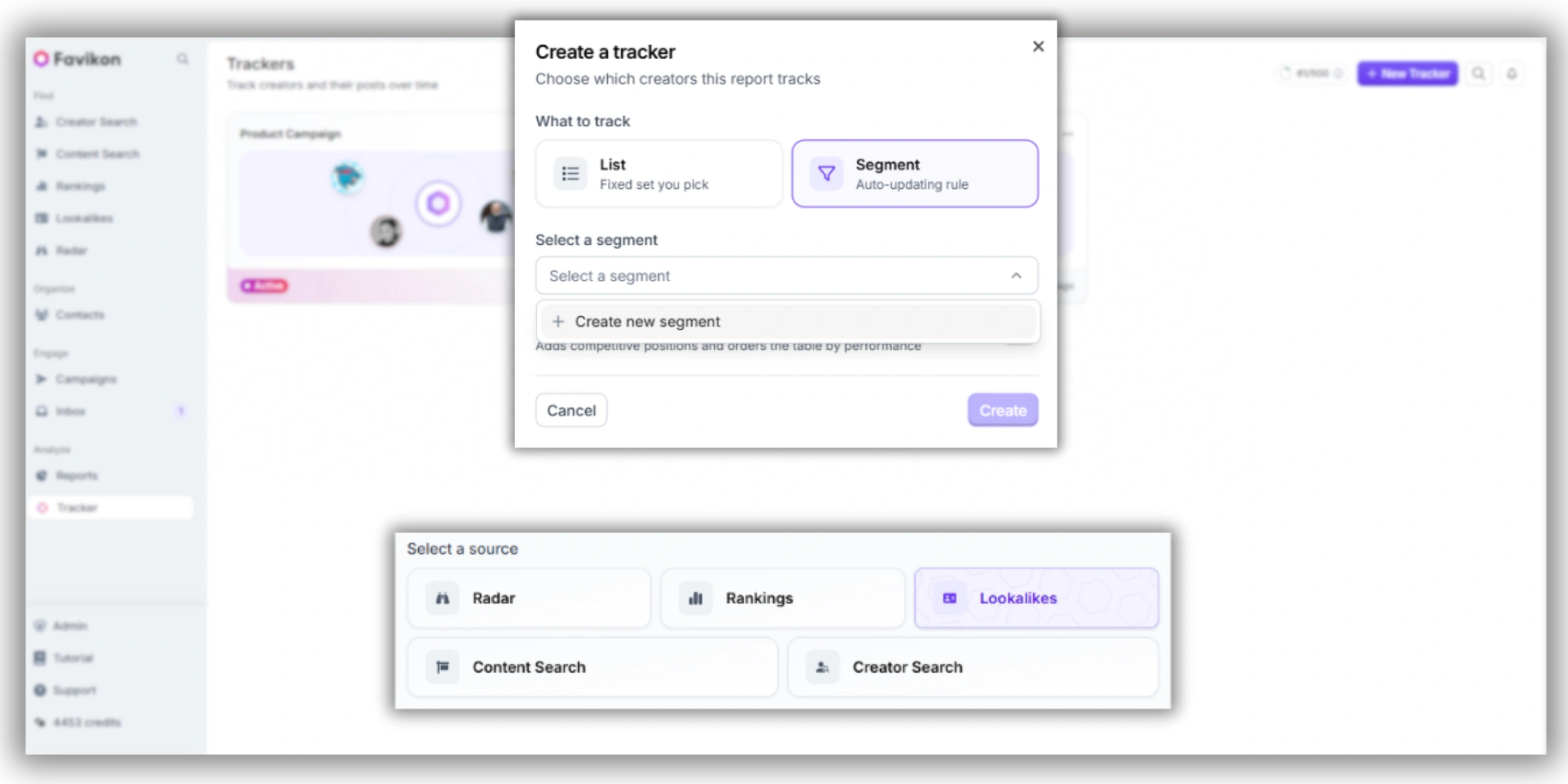
2. Define your criteria: a brand or competitor name for Radar, a topic prompt for Content Search, a persona filter for Creator Search, a niche for Rankings, or a seed creator for Lookalikes.
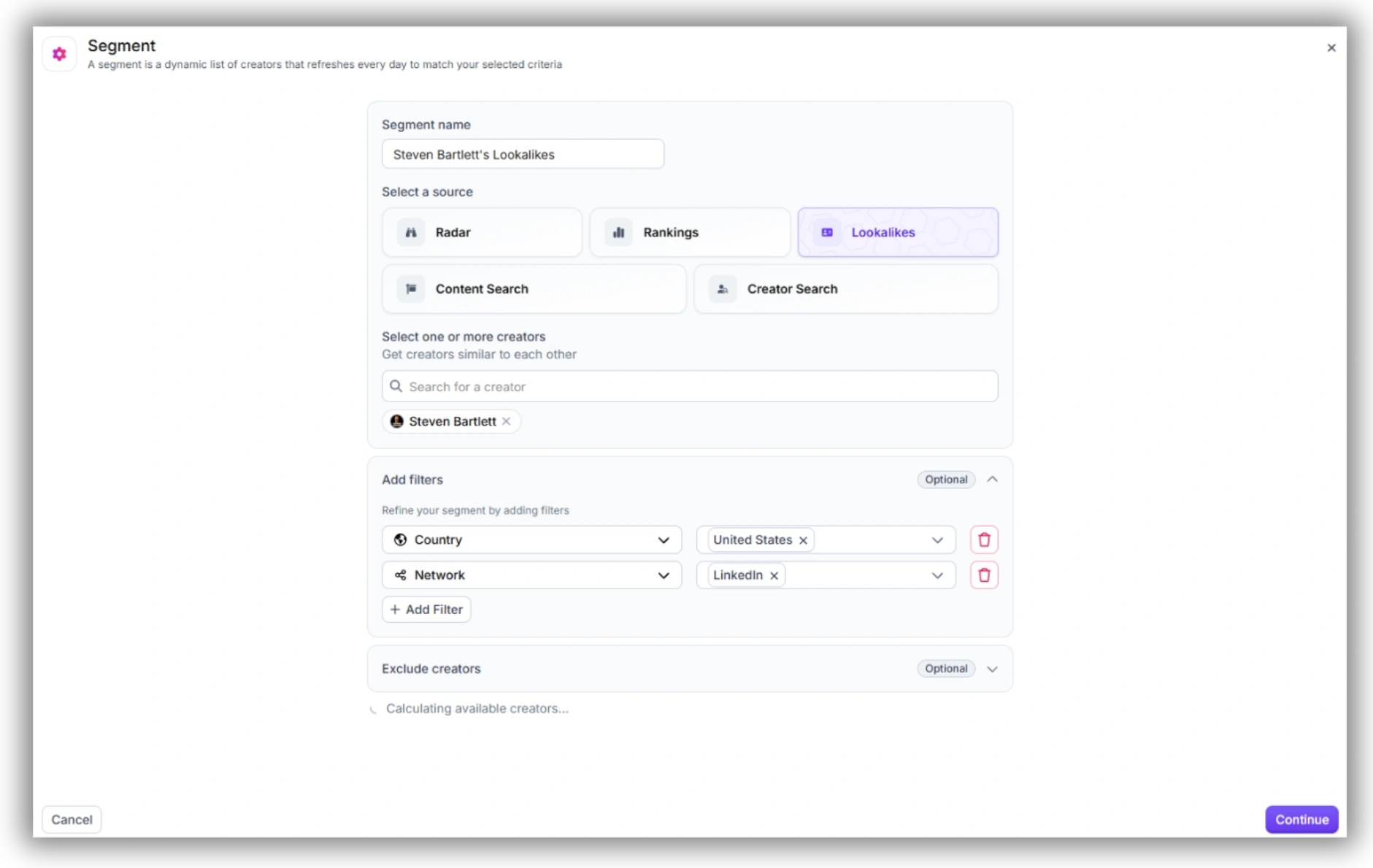
3. Send the Segment to Tracker so it stays live instead of sitting as a one-time result set.
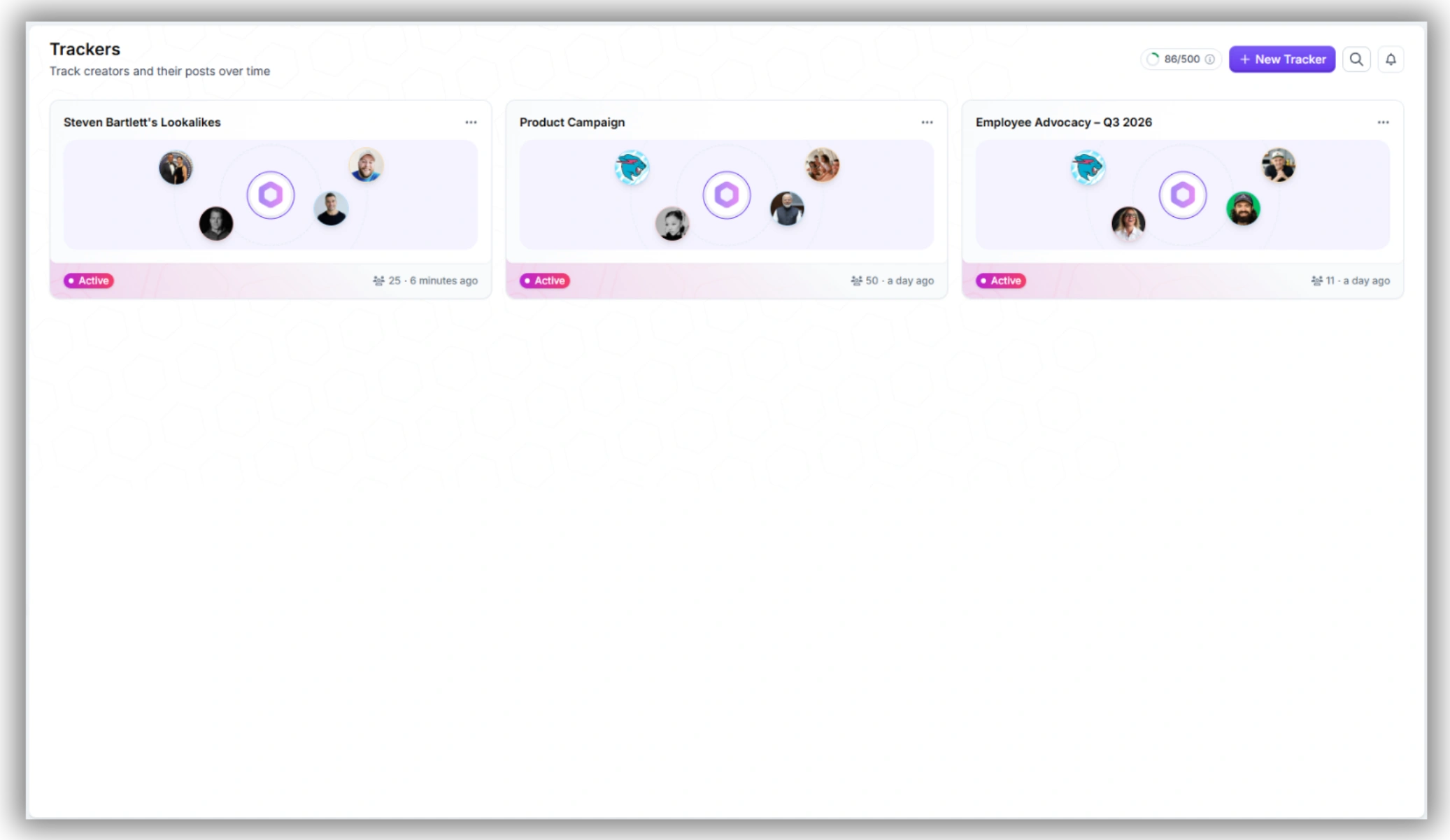
4. Choose your tracking view — By Creator to watch specific voices over time, or By Post to see every new piece of content matching the Segment as it publishes.
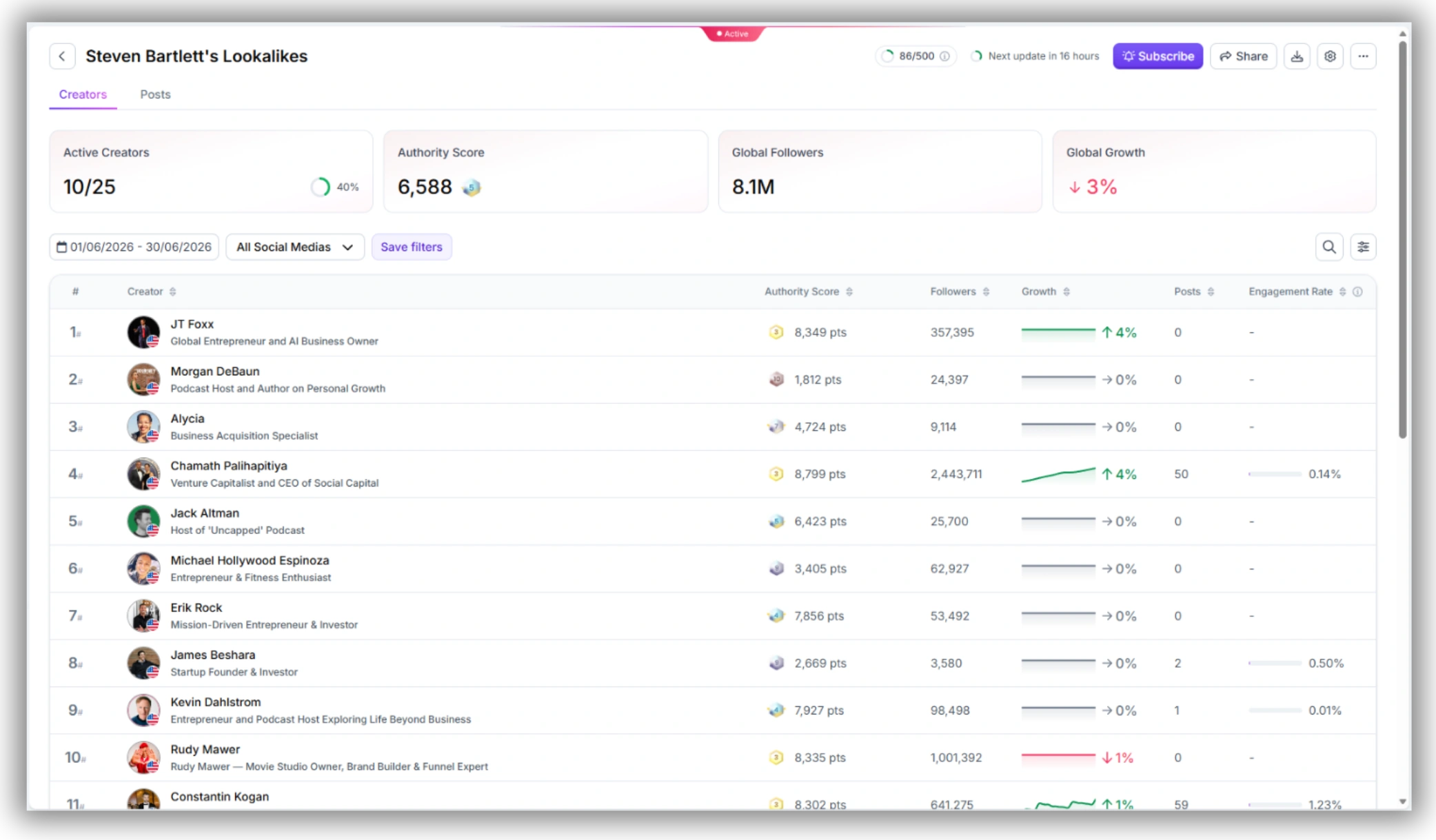
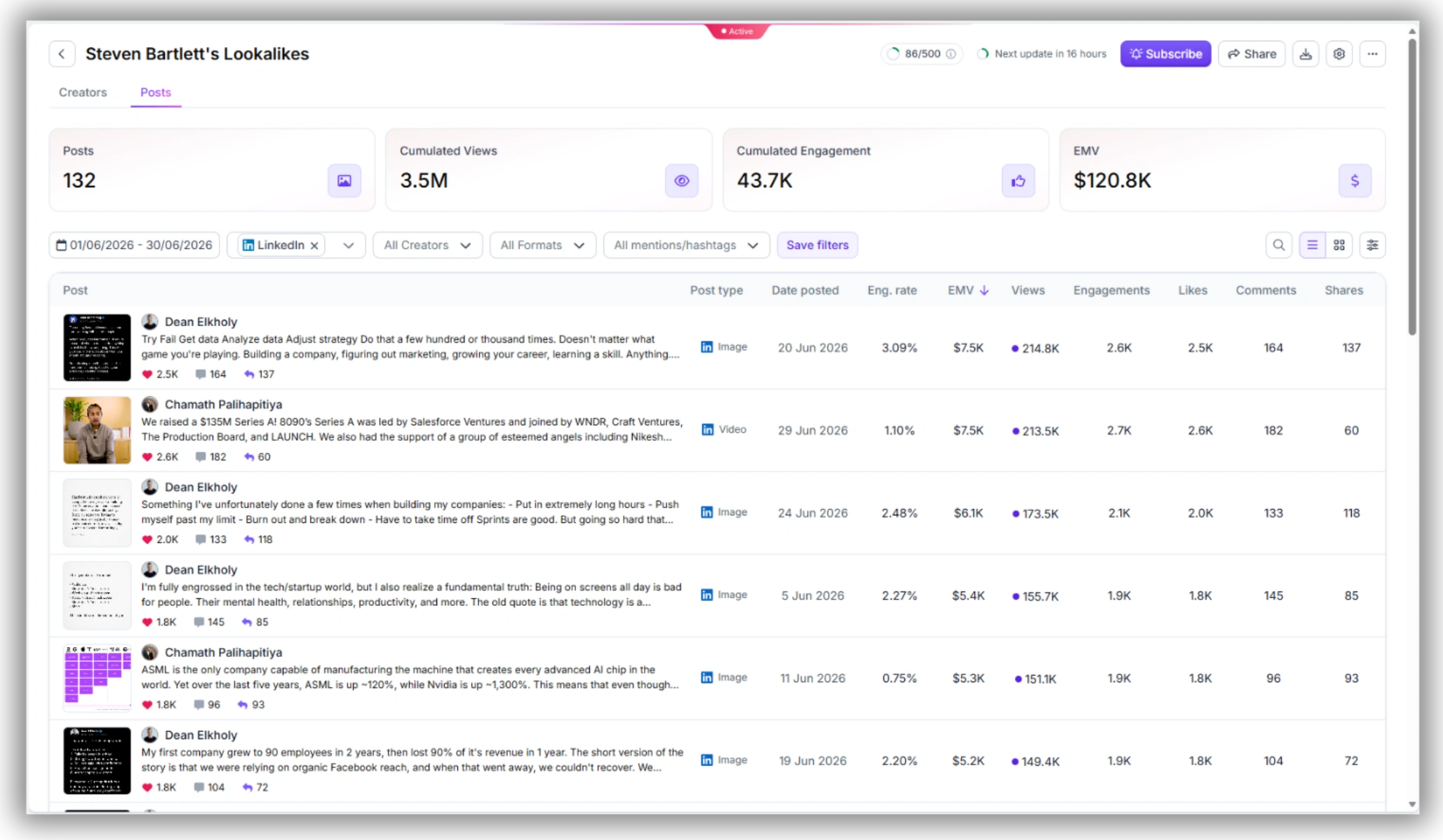
5. Set a review cadence. Because the Segment self-updates, you're checking in on new matches rather than re-running a search from scratch.
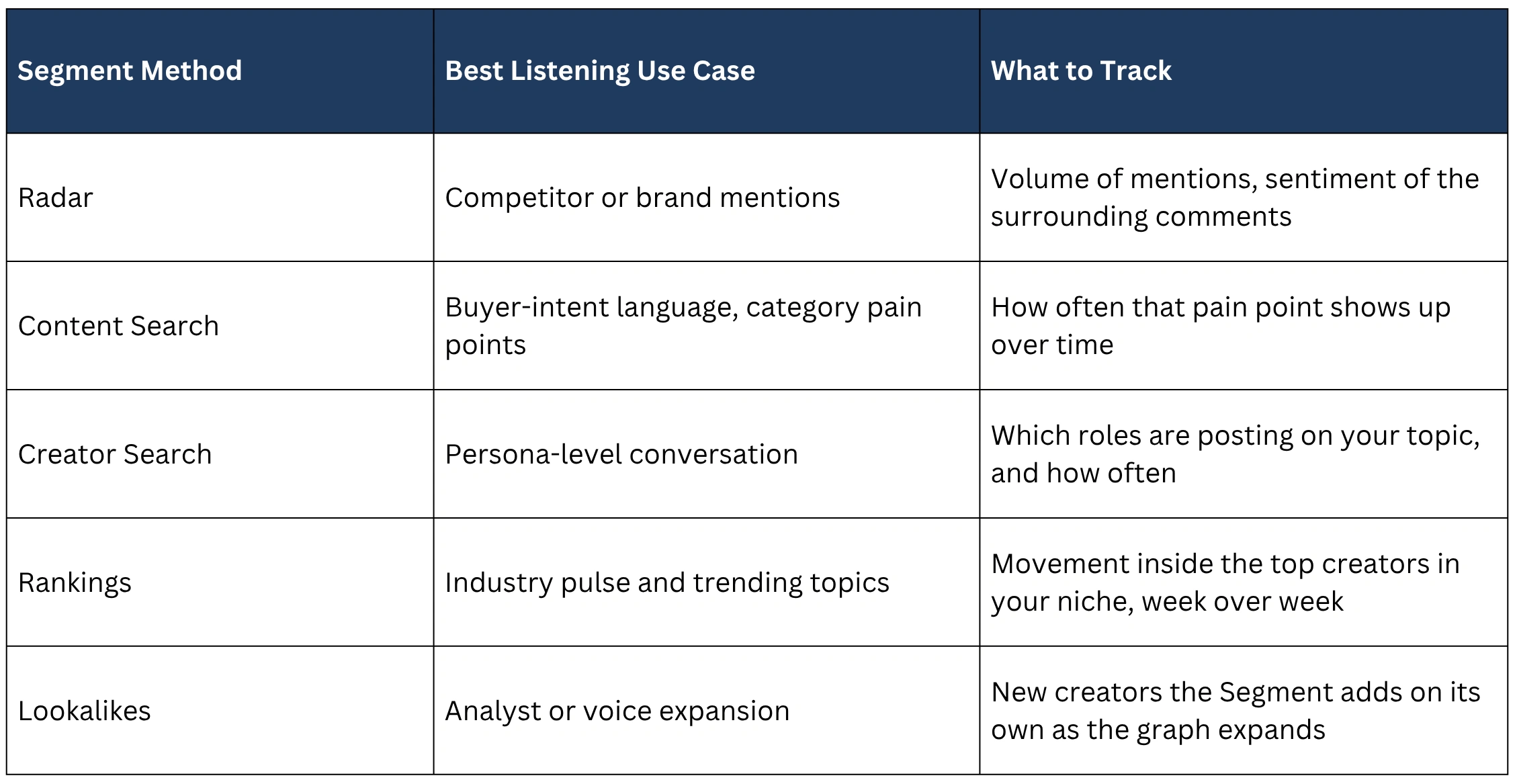
What to Track: Matching Signal to Segment Method
Which Segment source to use depends on the listening goal. This is a quick reference for matching the two.
LinkedIn Listening Tools Compared
FAQ
1. Can you do social listening on LinkedIn?
Not in the traditional sense of scanning every public post for a keyword — LinkedIn's API doesn't allow that for any tool. What you can do is build self-updating Segments around mentions, topics, personas, industry rankings, or similar creators, which gets you most of the same outcome without relying on a search index LinkedIn doesn't expose.
2. What's the difference between a List and a Segment?
A List is a static group of creators you add manually and have to maintain yourself. A Segment is a set of listening criteria — a creator enters or exits automatically as they start or stop qualifying, so it stays current without any manual upkeep.
3. How do I track competitors on LinkedIn?
Build a Radar Segment around your competitor's brand name to catch every creator mentioning them, or a Creator Search Segment targeting people who work at that company, and send either one to Tracker so new matches keep showing up automatically.
Also See 👀
➡️ HOW TO FIND TRENDING YOUTUBE TOPICS
➡️ HOW TO CHECK AN INSTAGRAM INFLUENCER'S BRAND DEAL HISTORY
➡️ FAVIKON INFLUENCER DATABASE — 10M+ PROFILES

Others articles

.webp)