How to Find Trending YouTube Topics (2026)
Trending topics can help creators and brands reach larger audiences on YouTube. This guide explains how to discover popular video ideas, track trends, and choose topics with lasting potential.
.png)
.webp)
How to Find Trending Topics for YouTube Videos (8 Methods, Including One Most Creators Miss)
The YouTube Trending tab shows you what’s already gone viral. By the time a topic appears there, the upload window has closed for everyone except the first ten creators who got there. Chasing trending tabs is a strategy for staying two weeks behind.
This guide covers 8 methods for finding YouTube trending topics — from free platform tools to niche-level signals most creators never check. The goal is to find trends before they peak, not after.
What’s Trending on YouTube Right Now?
What is trending on YouTube at any given moment is visible in three places: the YouTube Trending tab (youtube.com/feed/trending), sorted by country and category; the YouTube Shorts feed, which surfaces fast-moving short-form trends 24–48 hours before they hit Trending; and Google Trends (trends.google.com), which shows search volume momentum for a topic before creators have saturated it. For niche-specific trends, none of these are sufficient — see Method 4 below.
Current top-level trend categories (update monthly)
• Entertainment & pop culture (film/TV drops, celebrity news)
• Tech reviews and AI tool walkthroughs
• Finance and economic commentary (cost of living, investing)
• Health, fitness, and longevity content
• YouTube Shorts-native formats: GRWM, day-in-my-life, cooking POV
Prefer watching? Hit play below.
1. Why the YouTube Trending Tab Is Already Too Late
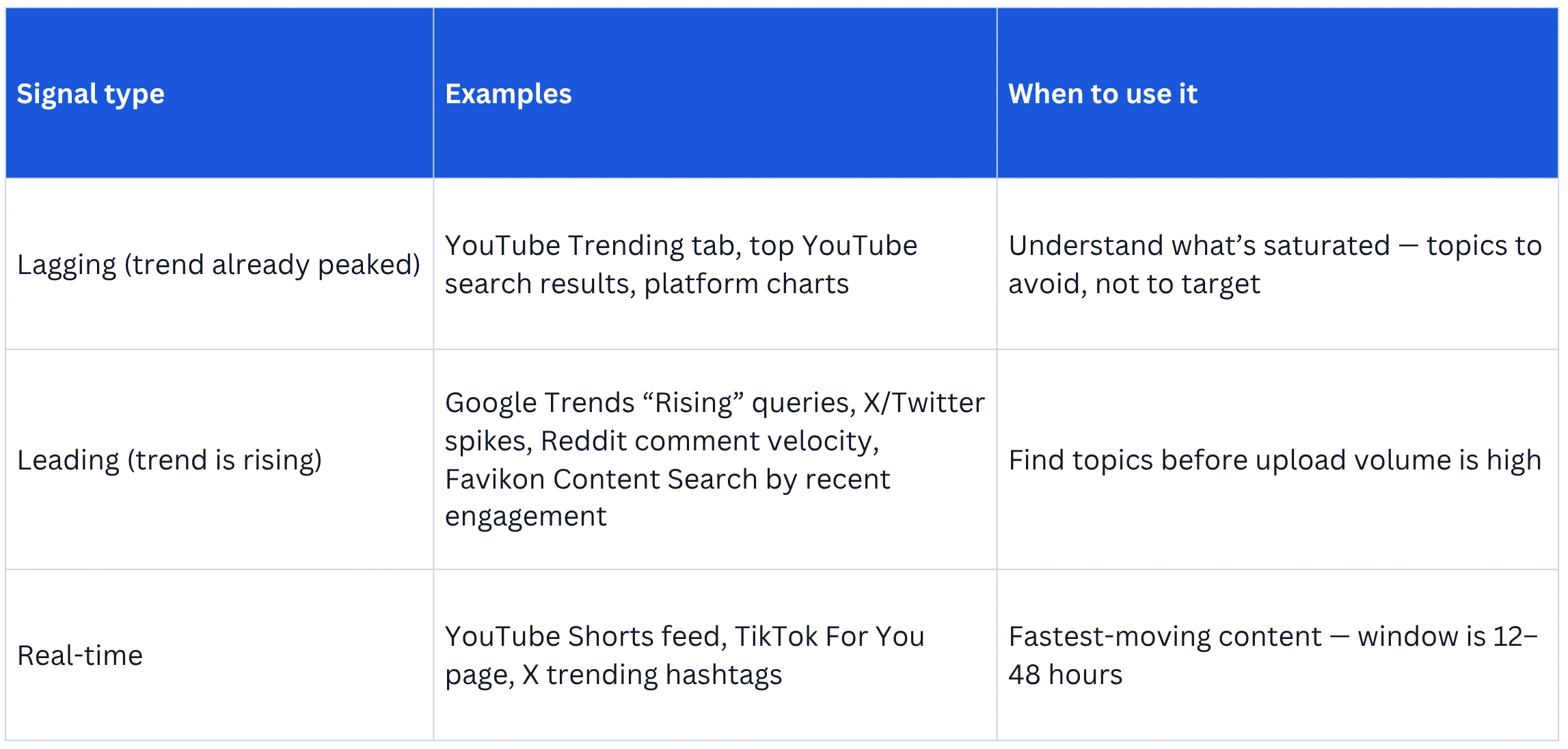
The YouTube Trending tab is a lagging indicator. It measures what has already accumulated views, shares, and engagement velocity over the past 24–48 hours. The content you see there was uploaded before the trend peaked — the creators who benefited most published 3–5 days earlier, when search volume was climbing but competition was low.
There’s a useful distinction to internalize: leading indicators tell you where a trend is going before it arrives. Lagging indicators confirm a trend that’s already here. The YouTube Trending tab is the most visible lagging indicator in the creator ecosystem. Every method in this guide after this section is a leading indicator.
2. Google Trends: The Right Way to Use It for YouTube
Google Trends is the most underused free tool for YouTube topic research — not because creators don’t know about it, but because most use it wrong. Typing a topic and seeing the interest-over-time graph tells you almost nothing useful on its own. The technique that matters is reading momentum, not level.
The “still rising vs. peaking” read
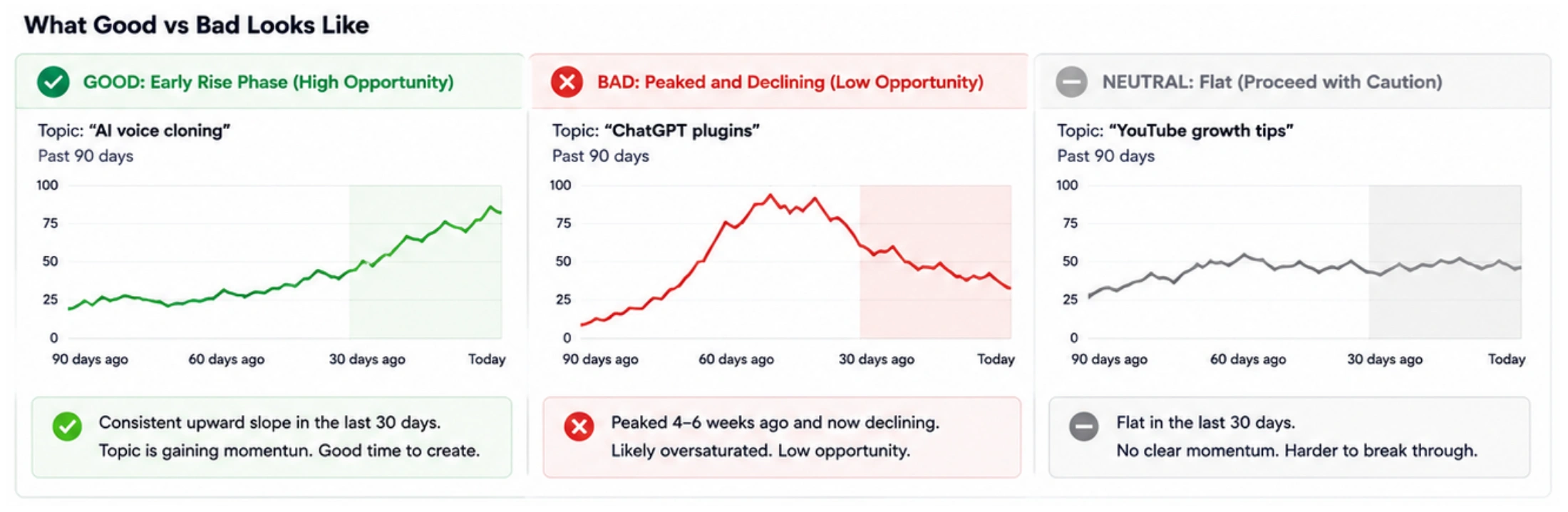
A topic at 45 out of 100 trending upward over 30 days is a better YouTube opportunity than a topic at 85 trending downward. The number doesn’t matter as much as the direction and the rate of change.
How to read it practically:
1. Go to trends.google.com. Type your candidate topic.
2. Set the time range to “Past 90 days” rather than the default “Past 12 months.” Short-range momentum is what matters for YouTube timing.
3. Look at the last 30 days of the 90-day chart. If it’s a consistent upward slope, the topic is in the early-rise phase — high opportunity.
4. If interest peaked 4–6 weeks ago and is now flat or declining, the topic has already been covered to saturation. Pass.
5. Scroll to “Related queries” and filter by “Rising.” These are search terms that are growing fastest right now in the topic cluster — each one is a potential video angle.
YouTube-specific filter
Google Trends defaults to web search. Change the search category to “YouTube Search” using the platform dropdown. This shows you what people are actively searching for inside YouTube — a meaningfully different signal from general web intent.
Turning Trend Data Into an SEO Strategy
Compare multiple topics to check their popularity and longevity. Check regional trends to tailor content for specific audiences. You can use these insights to guide your SEO strategy by identifying content opportunities aligned with real-time search demand.
3. YouTube Studio’s Trends Tab (The Hidden Niche Signal)
YouTube Studio contains trend data that most creators walk past. Under Analytics > Research, YouTube surfaces three things:
• Your viewers’ searches: What people who already watch your content are searching for. This is your most qualified trend signal — it’s showing you demand from your existing audience.
• Content gaps: Searches with high volume but low existing content on YouTube. These are the goldmine topics — strong demand, low competition.
• Trending searches: What’s rising across YouTube in the last 28 days, filtered (somewhat) by your channel’s category.
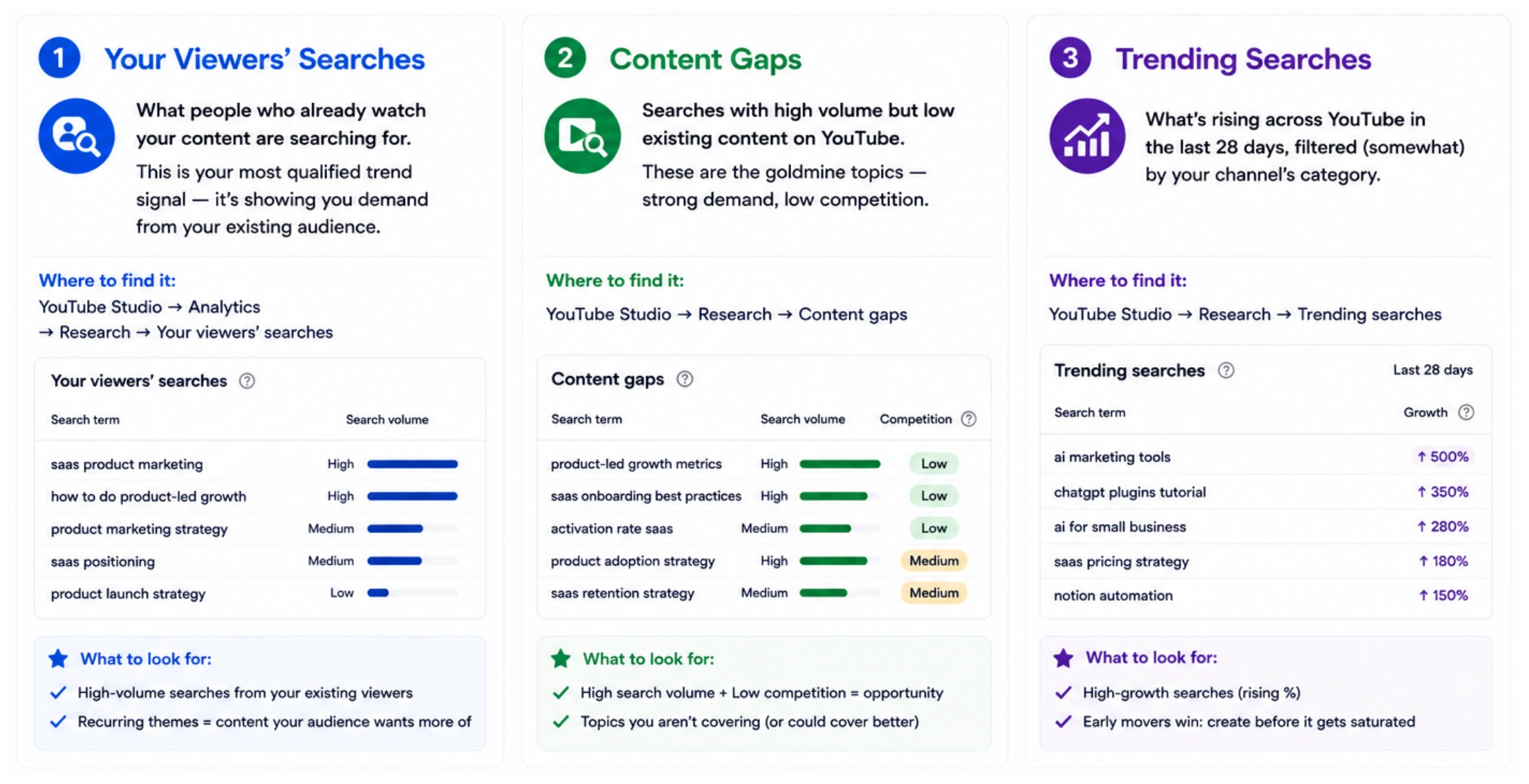
The Research tab is audience-specific in a way Google Trends can’t replicate. The limitation: it only shows meaningful data once your channel has a sufficient watch history. Channels under ~1,000 subscribers may see sparse or generic results.
4. How to Find What’s Trending in Your Niche with Favikon (Niche-First Trend Scouting)
Every method above operates at the platform level: what’s trending across all of YouTube, all of Google. None tells you what’s trending inside your specific niche. That’s a different and more useful question.
Platform-wide trending means maximum competition. Niche-trending means you’re ahead of the wave within the audience that actually matters for your channel. This method is what Favikon’s Content Search enables, and it’s the one step that most YouTube trend guides skip entirely.
What “Niche-First Trend Scouting” means
Instead of asking “what is trending on YouTube?”, the question becomes: “what content is outperforming average engagement among creators in my specific niche right now?” A topic can be spiking within the SaaS marketing creator community while showing nothing on YouTube Trending. Catching it there first, before it breaks mainstream, is where the opportunity is.
How to run it in Favikon
1. Go to Content Search in the Favikon sidebar.
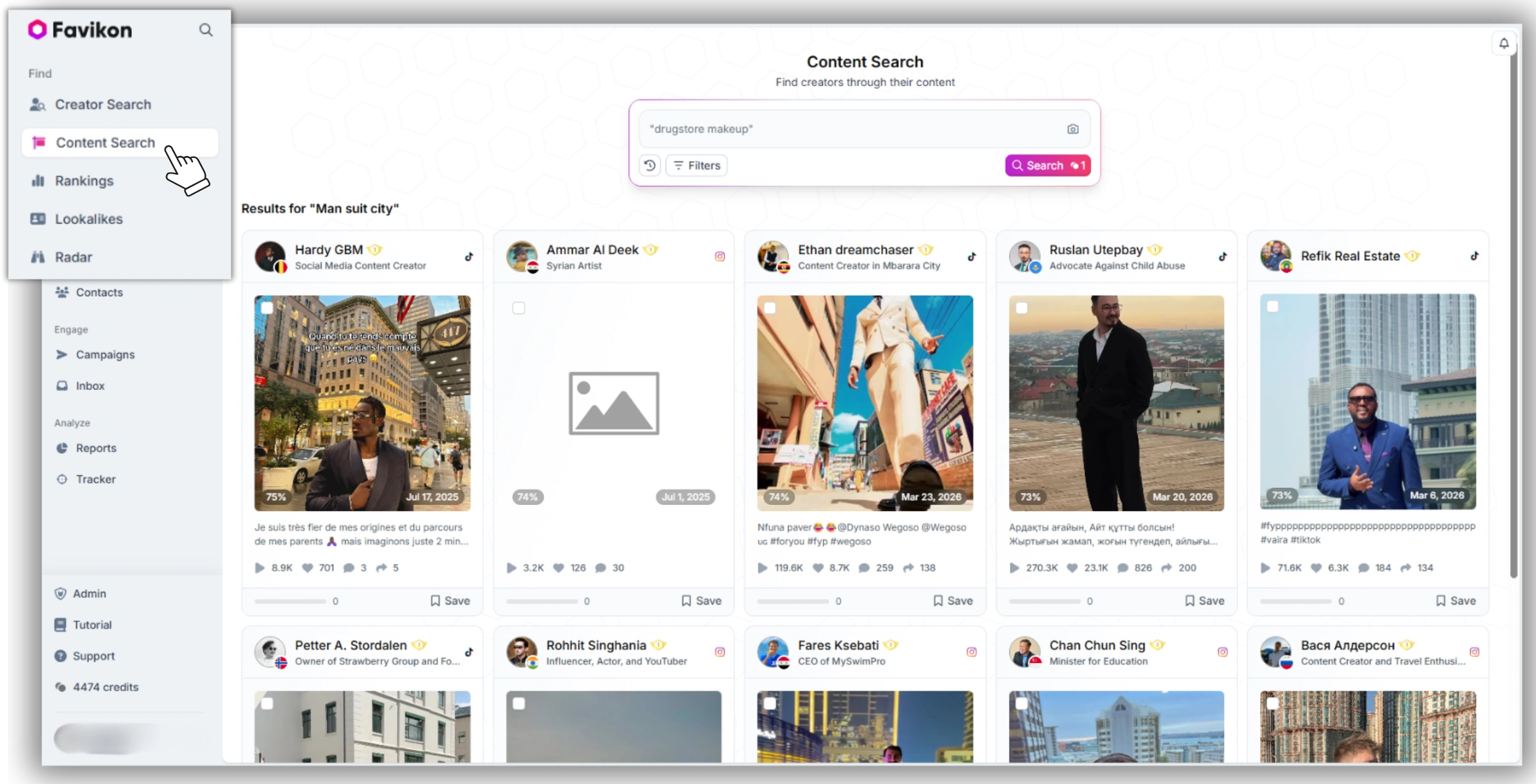
2. Type a topic prompt in plain language — e.g. “AI tools for video editing”, “YouTube monetization changes 2026”, or “LinkedIn B2B content strategy.” Favikon searches across 30M+ posts for content matching the topic.
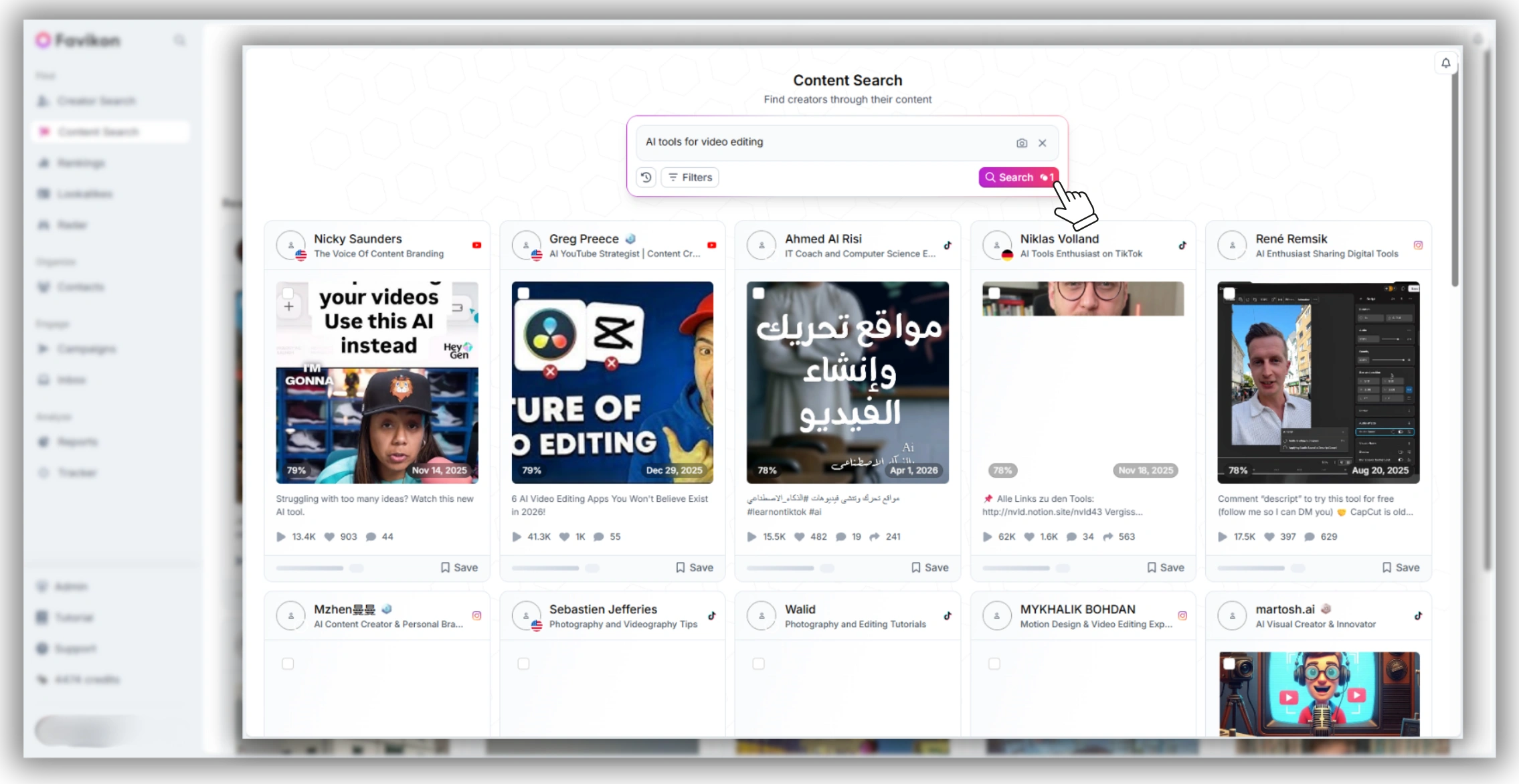
3. Filter by platform: YouTube to narrow results to video content.
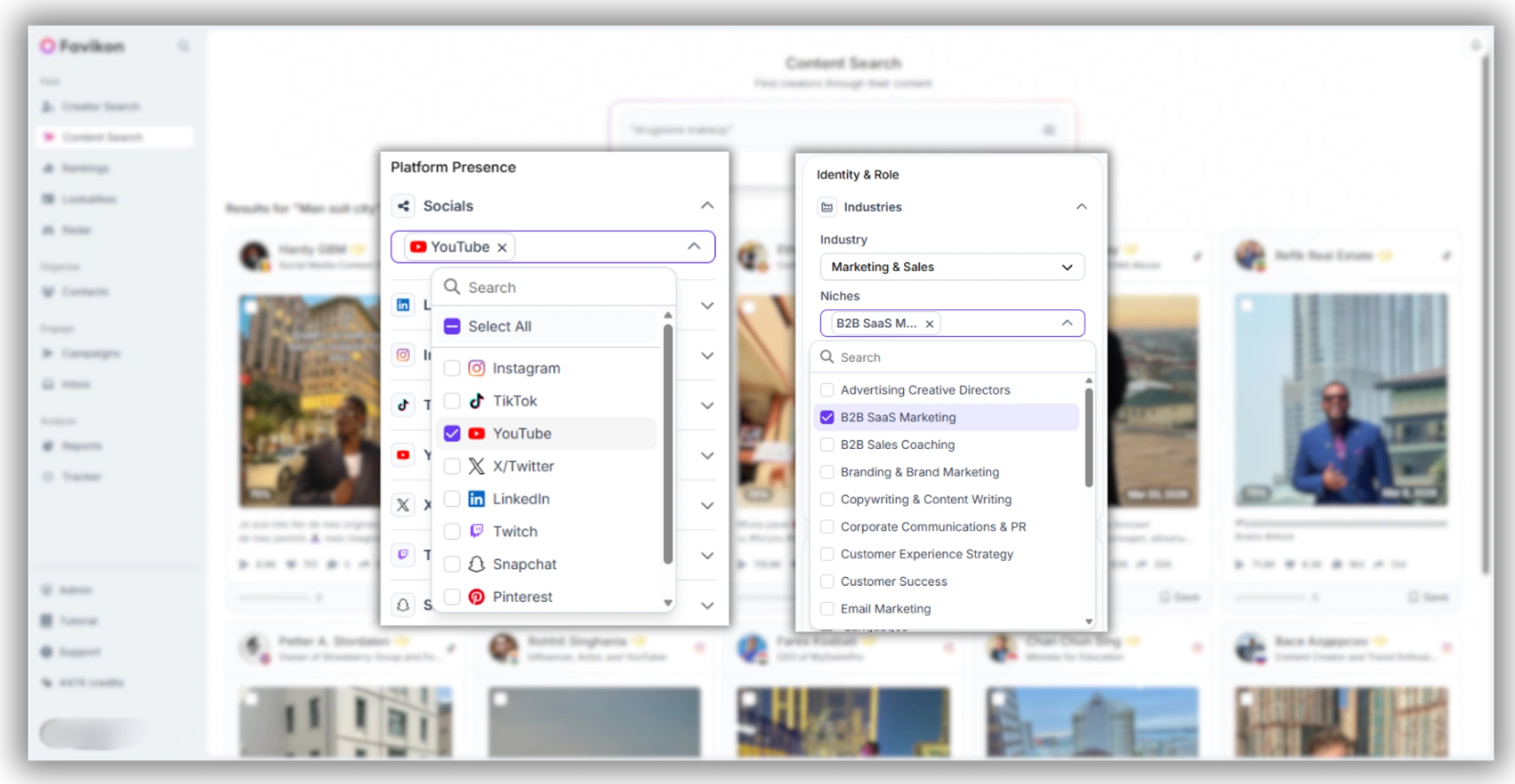
4. Filter by niche: select the category that matches your channel or brand (e.g. Marketing, Personal Finance, Wellness, B2B SaaS).
5. Scan the top 20 results. Look for: format patterns (are multiple creators making the same type of video?), angle patterns (is there a specific take that’s driving outsized engagement?), and timing (is this 3–7 days old with high engagement — i.e., still early?).
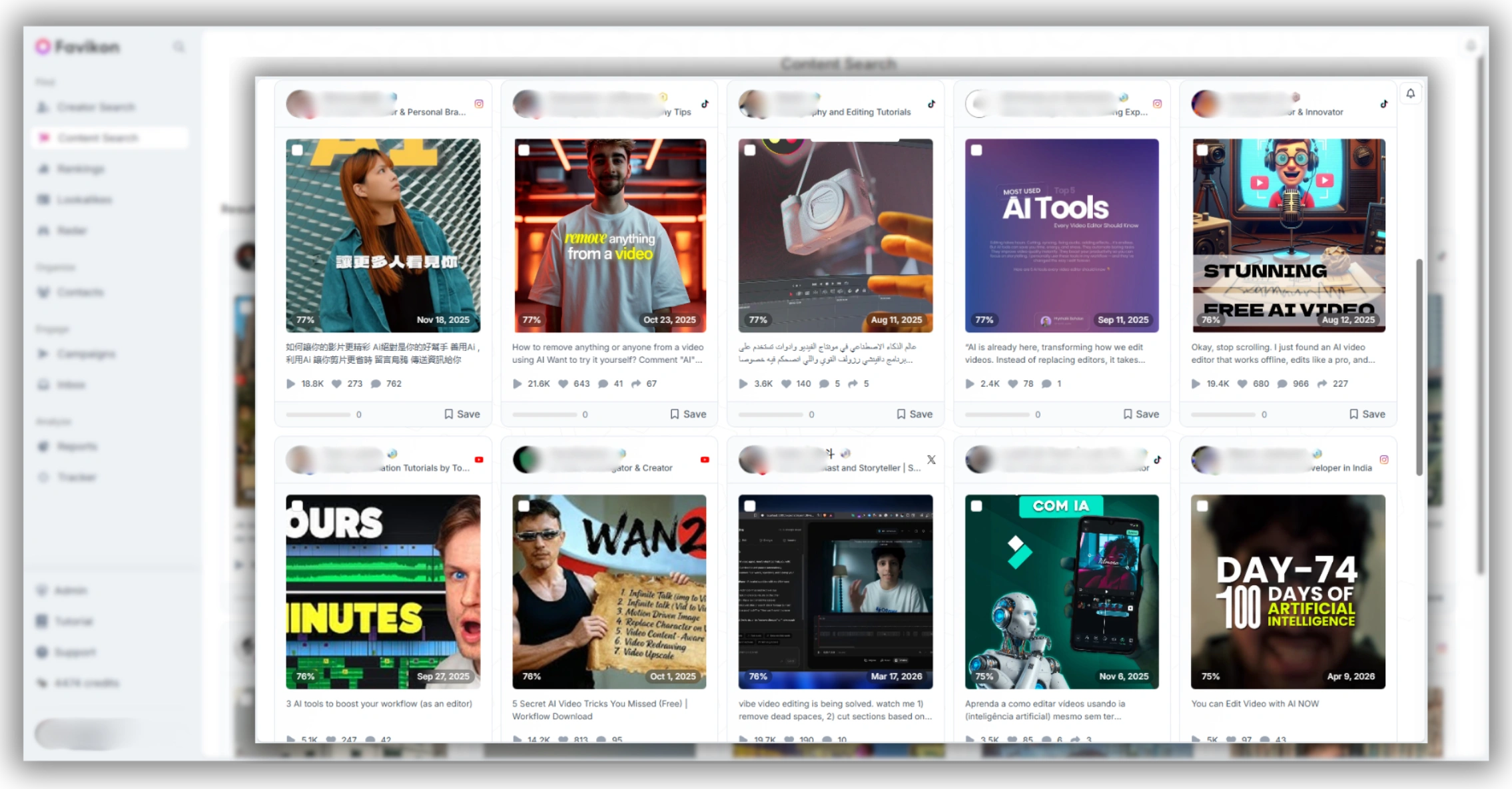
For brands and marketers: Favikon Content Search also works as a creator discovery filter. If you’re looking to find creators making trending content in a specific niche — to brief, partner with, or track — the same search shows you who is winning on that topic right now.
5. Social Platforms as Early-Warning Systems
YouTube is a discovery platform with a 24–48-hour lag on what’s genuinely breaking. Two platforms consistently surface trends 1–3 days earlier:
X (Twitter): the fastest-moving signal
.webp)
• Monitor trending hashtags in your niche daily, not just platform-wide trends. A hashtag spiking in the #FinTech or #AITools communities on X often translates to YouTube search volume 48 hours later.
• Follow the accounts your audience follows: journalists, researchers, and early adopters in your vertical. What they’re discussing today is often what your audience searches for on YouTube this week.
TikTok: the format lab
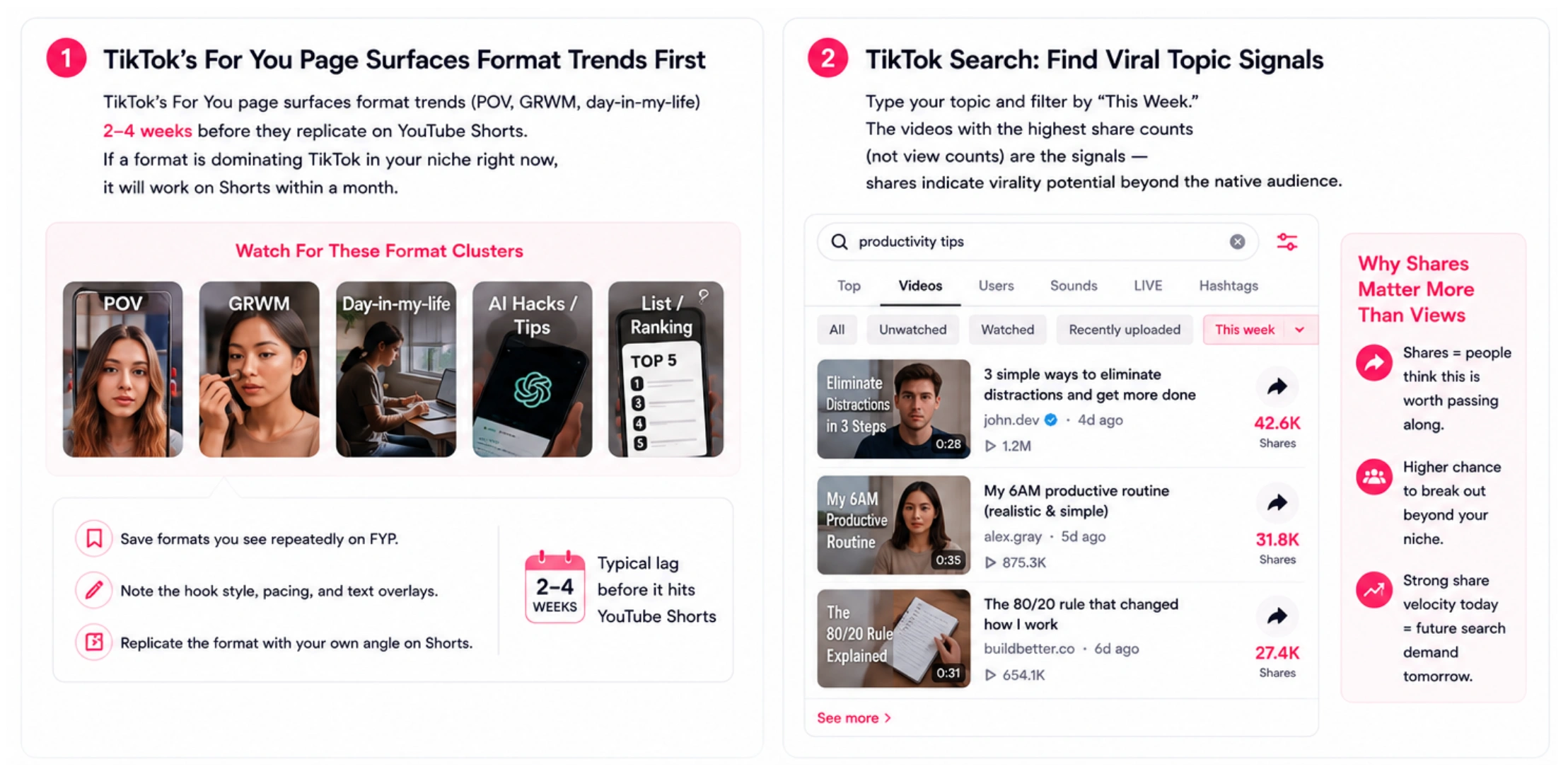
• TikTok’s For You page surfaces format trends (POV, GRWM, day-in-my-life) 2–4 weeks before they replicate on YouTube Shorts. If a format is dominating TikTok in your niche right now, it will work on Shorts within a month.
• TikTok search: type your topic and filter by “This Week.” The videos with the highest share counts (not view counts) are the signals — shares indicate virality potential beyond the native audience.
6. Competitor Creator Analysis
Watching what top creators in your niche are posting — and specifically what’s outperforming their own averages — is one of the most reliable leading indicators available. You’re not copying; you’re reading demand signals.
The specific technique:
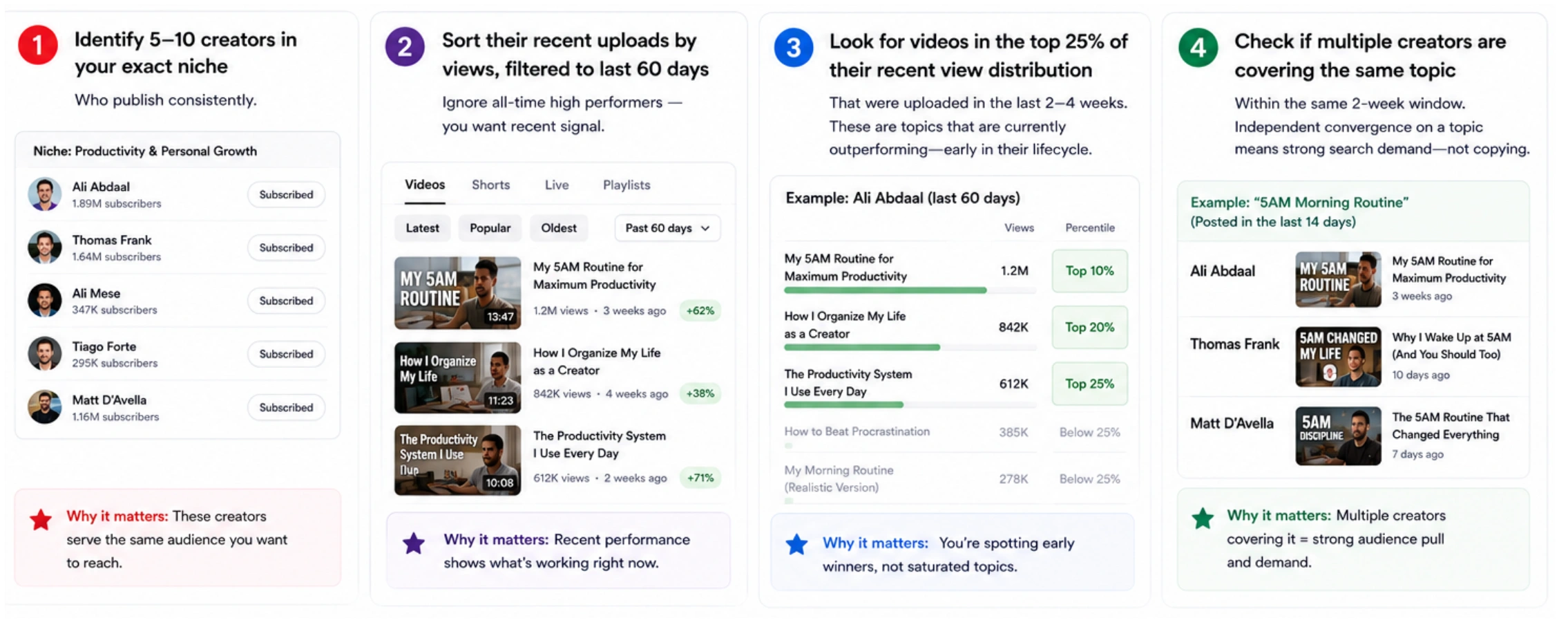
1. Identify 5–10 creators in your exact niche who publish consistently.
2. Sort their recent uploads by views, filtered to the last 60 days only. Ignore all-time high performers — you want recent signal.
3. Look for videos in the top 25% of their recent view distribution that were uploaded in the last 2–4 weeks. These are topics that are currently outperforming — early in their lifecycle.
4. Check if multiple creators in the set are covering the same topic within the same 2-week window. Independent convergence on a topic means strong search demand — not copying. This is the clearest signal that a trend has genuine audience pull.
7. Reddit and Community Forums: The Pre-Search Layer
Search engine queries are themselves a lagging indicator — people search for things after they’ve already become curious. Reddit and niche forums show curiosity forming before it becomes a search query.
The workflow:
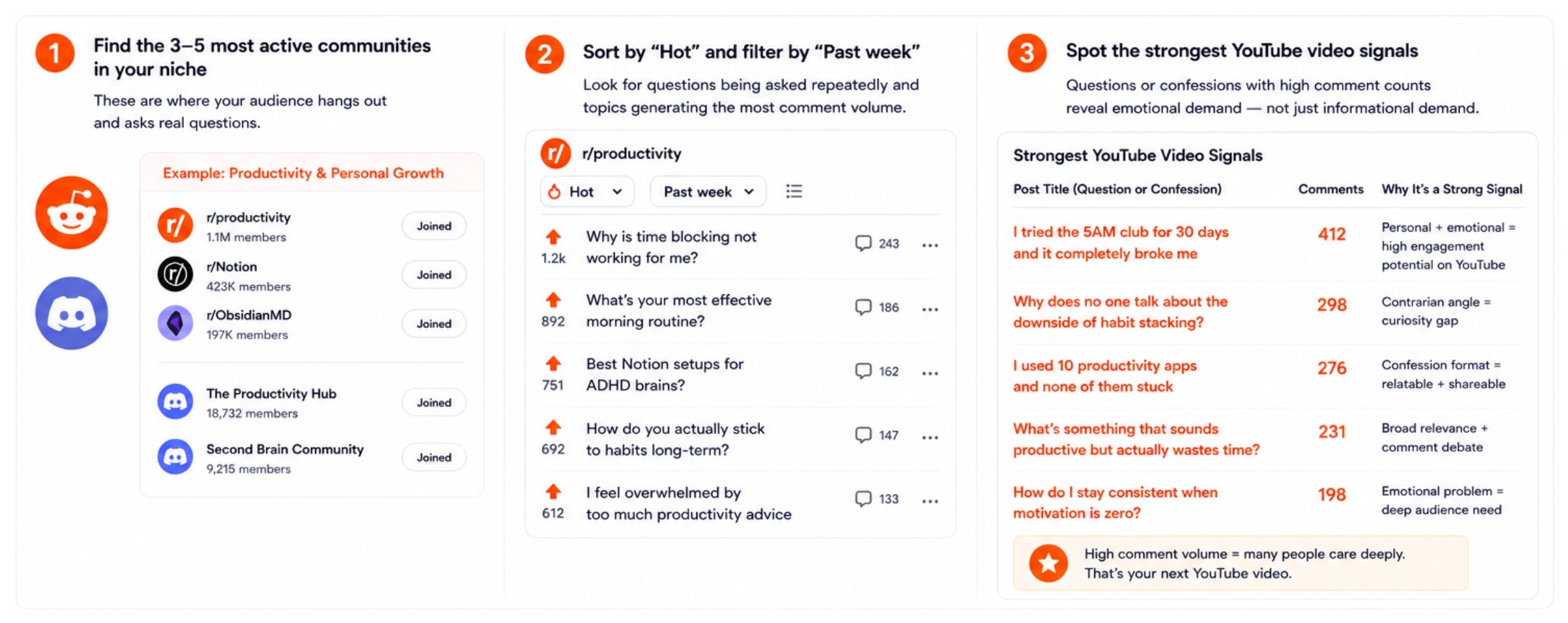
• Find the 3–5 subreddits or Discord servers most active in your niche.
• Sort by “Hot” and filter by “Past week.” What questions are being asked repeatedly? What topics are generating the most comment volume? These are the conversations your audience will soon search YouTube for.
• Post titles that are questions or confessions (“I tried X and it broke” / “why does no one talk about Y”) with high comment counts are the strongest YouTube video signals — they reveal emotional demand, not just informational demand.
8. YouTube’s “Breaking News” and Event Calendar
Some of the highest-performing YouTube videos are predictable weeks in advance. Product launches, industry conferences, regulatory announcements, annual events, and sports seasons all generate predictable search spikes. Uploading 3–5 days before the event — not the day of — is when Google and YouTube begin indexing and serving the content.
Build a simple calendar: list every event in your niche that generates search volume over the next 90 days. Map each event to a video concept. Upload 4–5 days before the event. This is one of the few trend strategies where timing is knowable in advance rather than reactive.
Putting this together: The strongest signal for a YouTube trending topic is when two or more of these methods converge on the same topic. Favikon Content Search showing niche engagement spiking + Google Trends showing rising search intent + a competitor uploading a video on the topic in the last week = high-confidence opportunity. One signal alone is noise; convergence is the strategy.
Frequently Asked Questions
Q: What is trending on YouTube right now?
A: To see what’s currently trending on YouTube, go to youtube.com/feed/trending and filter by country and category. For a faster signal, check the YouTube Shorts feed, which surfaces fast-moving topics 24–48 hours before they hit the main Trending tab. For niche-specific trending content, use Favikon’s Content Search filtered by your niche and sorted by recent engagement.
Q: How do I find trending topics for YouTube videos?
A: The most reliable method is a convergence check: use Google Trends (YouTube Search filter, “Rising” queries) to identify demand momentum, then cross-reference with Favikon Content Search to see if creators in your niche are already posting on the topic. If both signals point the same direction, the topic is rising but not yet saturated. See the full walkthrough in Method 4 above, or go to find YouTube influencers in your niche for the broader discovery approach.
Q: How do I see what’s trending on YouTube?
A: Three ways: (1) YouTube Trending tab at youtube.com/feed/trending — shows what’s already viral, filtered by country and category. (2) YouTube Studio > Analytics > Research — shows what your existing audience is searching for and content gaps in your category. (3) Favikon Content Search filtered by niche — shows what’s performing above average among creators in your specific category right now.
Q: How do I know if a YouTube trend is about to peak or decline?
A: On Google Trends, set the time range to “Past 90 days” and look at the trajectory of the last 30 days. A consistent upward slope means the trend is still rising. A plateau or decline over that window means it’s already peaked and upload competition is high. Cross-check with the YouTube search results: if the first page is full of videos uploaded within the last 2 weeks, the trend is being covered aggressively and the window is closing.
Q: What are trending YouTube Shorts topics?
A: YouTube Shorts trends move faster than long-form. The most reliable method: watch the Shorts feed in your niche for 10 minutes daily, sorted by “Latest.” TikTok’s For You page is also a 2–4 week predictor of what will work on Shorts — formats that dominate TikTok typically replicate on Shorts within a month. Google Trends with the “YouTube Search” filter surfacing a topic for short-query searches (1–3 words) usually means it’s Shorts-compatible demand.
Also See 👀
➡️ HOW TO MANAGE MULTIPLE INFLUENCER CAMPAIGNS
➡️ HOW TO MEASURE INFLUENCER MARKETING ROI
➡️ FAVIKON INFLUENCER DATABASE — 10M+ PROFILES
Others articles