How to Analyze Any Influencer for Free: Complete Step-by-Step Guide
A strong influencer analysis helps you understand audience quality, engagement, and content performance before starting a partnership. This guide shows how to review any influencer for free and make better campaign decisions with real data.
.png)
Free Influencer Analysis: Audit Any Creator Like a Pro
You can analyze any creator for free by creating a free account at app.favikon.com and using Favikon’s 7-day trial. Search any creator’s name, open their profile, and you’ll immediately see their engagement rate, Authority Score, niche ranking, posting frequency, top-performing content, and fake audience detection — across LinkedIn, Instagram, TikTok, YouTube, and X — without entering a credit card.
This guide walks through the exact process step by step, covers what each metric actually means for campaign decisions, and flags the most common analysis mistakes that cause brands to partner with the wrong creators.
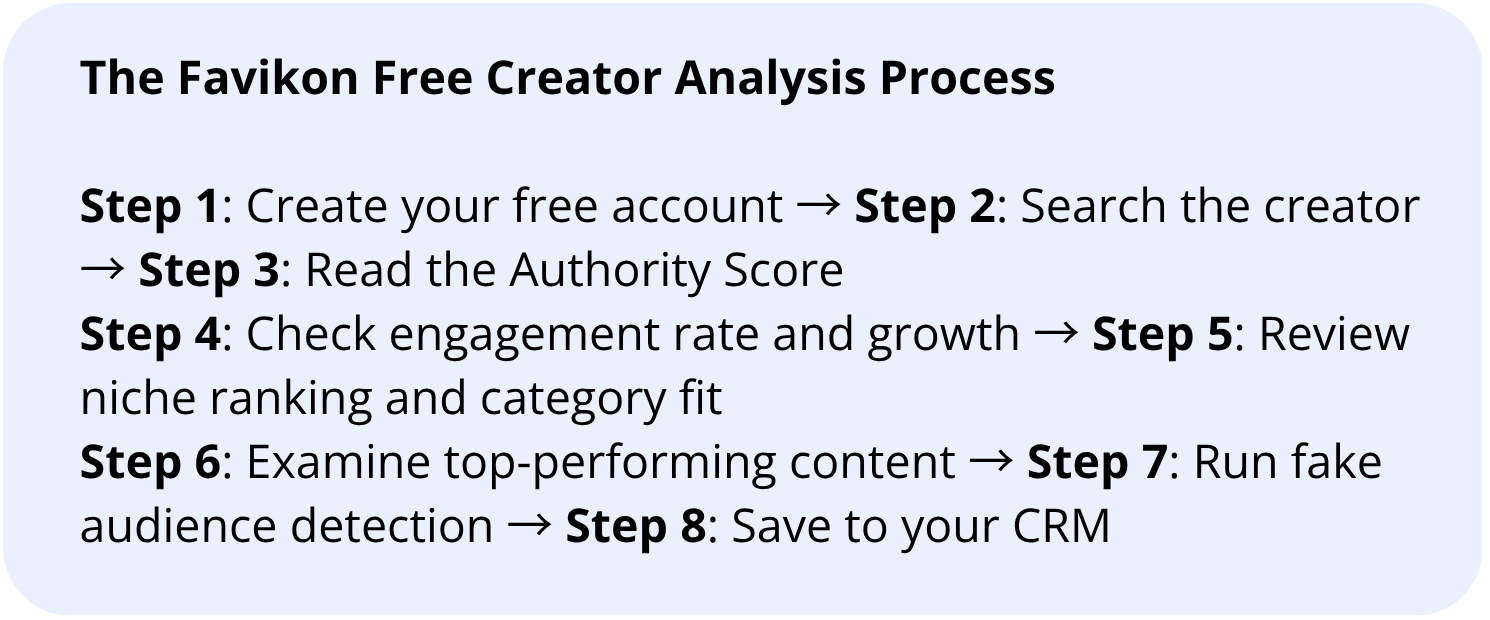
Step 1: Create Your Free Favikon Account
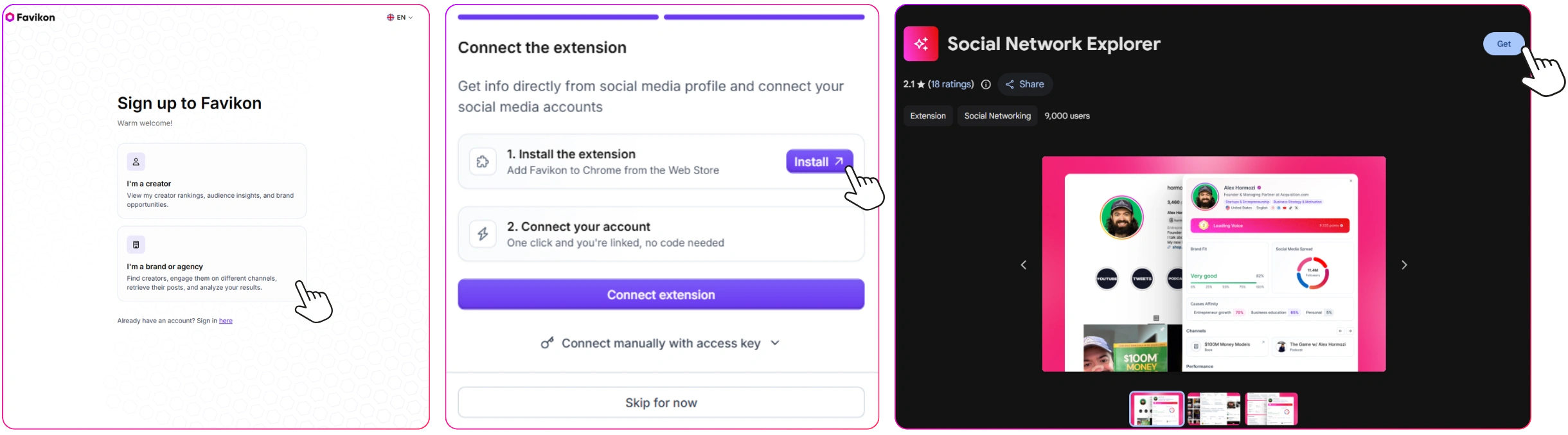
Go to app.favikon.com and sign up. No credit card is required to start the 7-day free trial. The whole signup takes under two minutes.
Once you’re in, you’ll land on the main dashboard. The creator analysis tools are available from day one of your trial — you don’t need to complete any onboarding steps before running your first profile analysis.
Watch how it works:
What the free trial gives you access to:
• Full creator profile analysis across LinkedIn, Instagram, TikTok, YouTube, and X
• Authority Scores, engagement rates, and follower growth data
• Niche rankings and category benchmarking
• Top-performing content by format
• Fake audience detection
• One-click CRM export
Step 2: Search for the Creator You Want to Analyze
From the dashboard, navigate to the influencer search tool. You can search by:
• Creator name — type their name directly into the search bar
• Handle — search their username on any platform (e.g. @stevenbartlett)
• Platform — filter results to a specific platform before searching
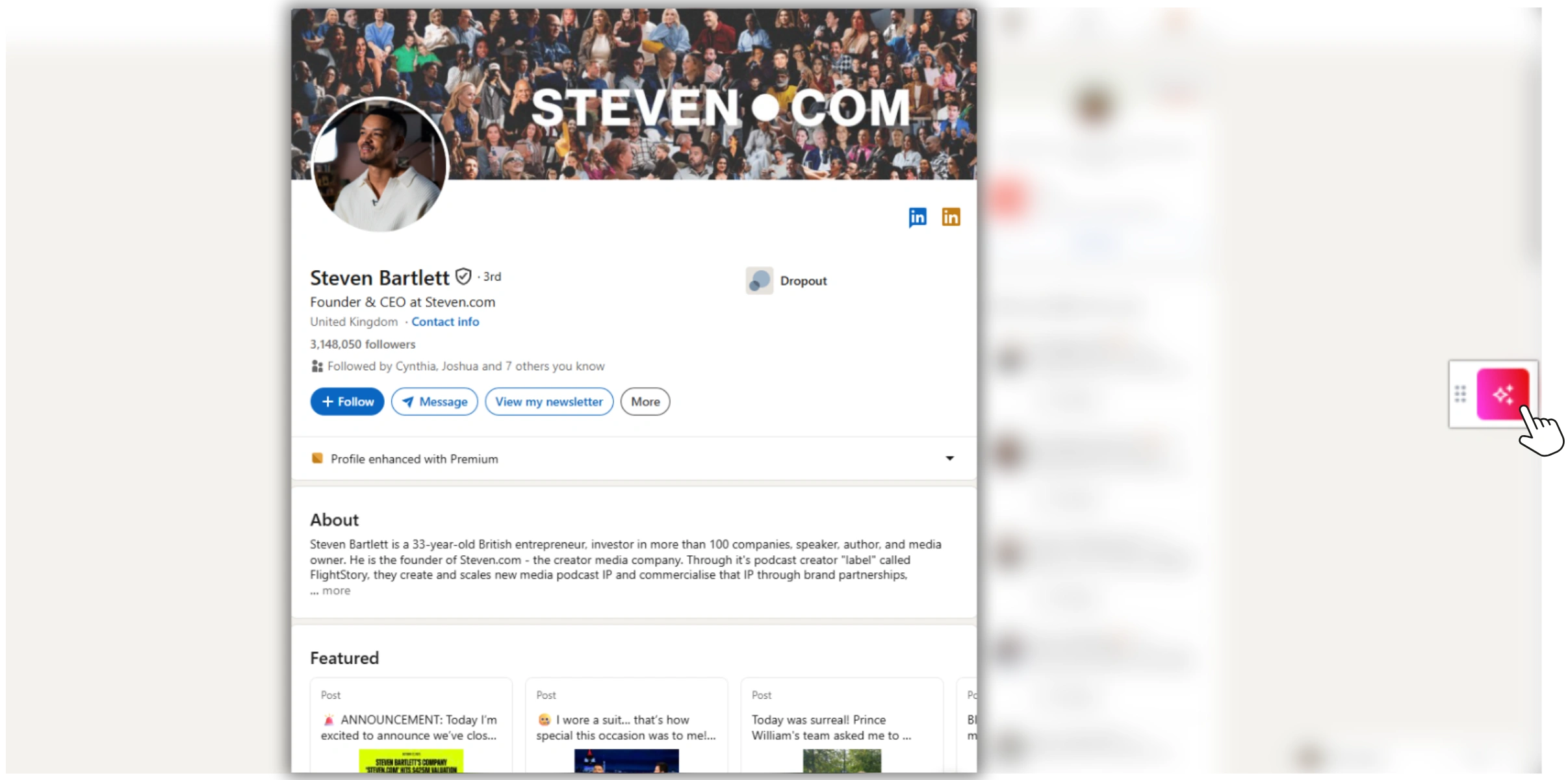
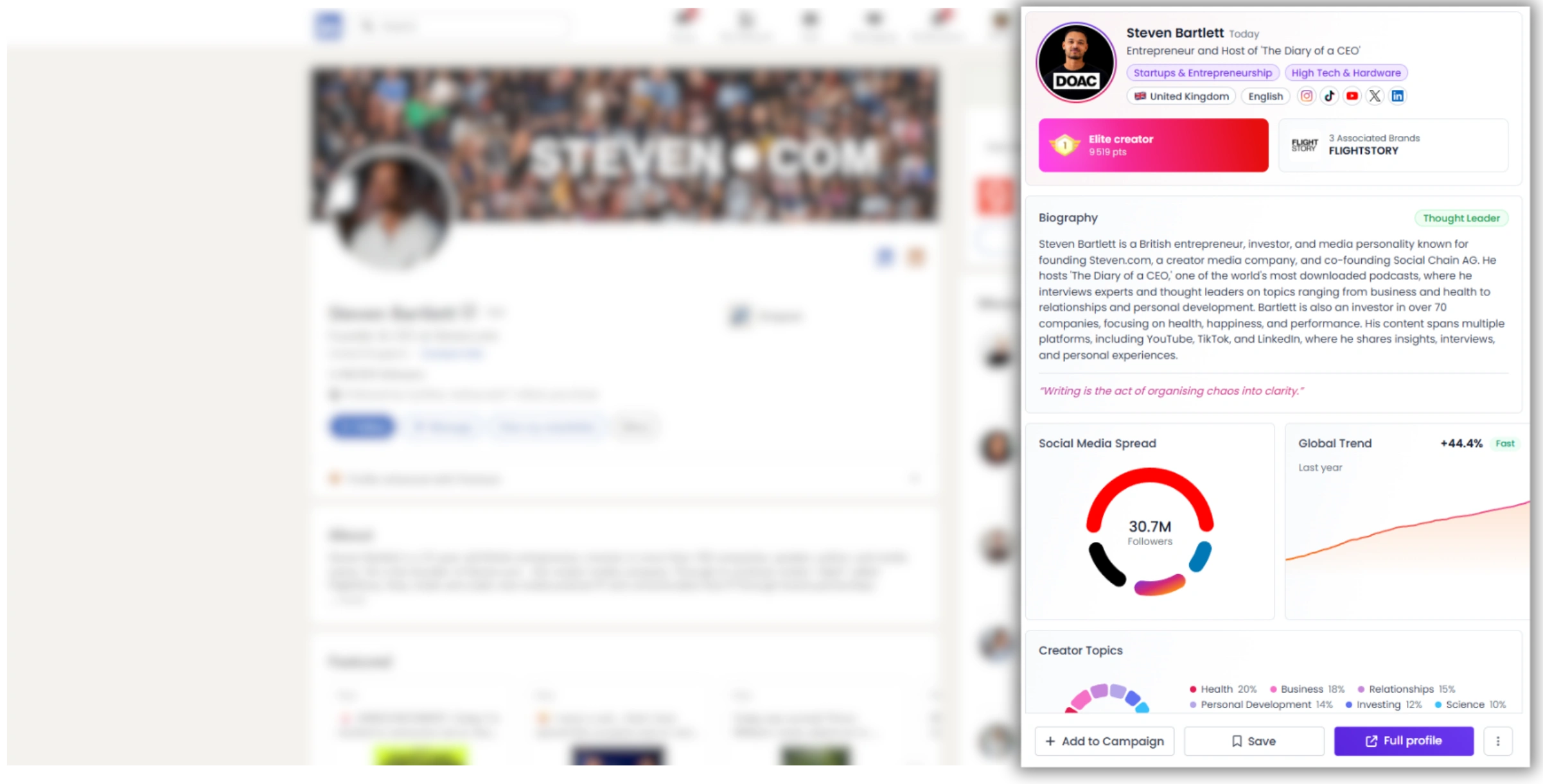
Favikon’s database covers over 10 million creator profiles. For this walkthrough, we’ll use Steven Bartlett as an example.
What if the creator isn’t in the database?
If your search returns no results, the creator may not yet be indexed. This is more common with very niche micro-creators or accounts that were recently created. In that case, you can submit a profile add request directly from the search results page, and Favikon’s team will index the account.
For most mid-tier and macro creators (10K+ followers), the profile will already be available.
Step 3: Read the Authority Score
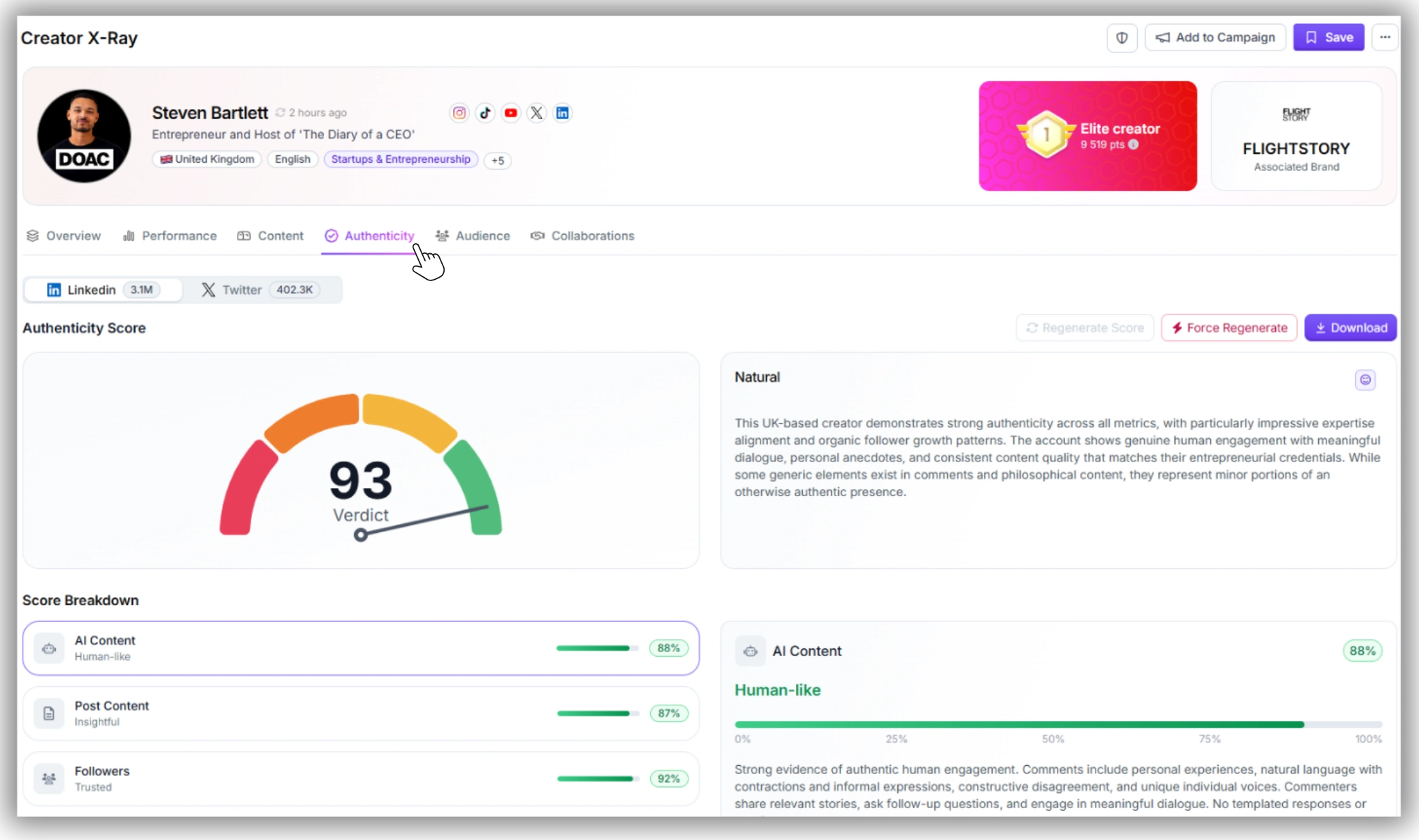
The first thing you’ll see at the top of any creator profile is their Authority Score — a 0–100 rating that benchmarks the creator against similar profiles in their niche and category.
How to read it:
• Above 70: Strong performer with meaningful niche presence. Solid baseline for campaign consideration.
• 55–70: Mid-tier creator with an engaged audience. Often the best ROI for conversion-focused campaigns.
• Below 55: Emerging or declining profile. Can still be worth partnering with for niche-specific campaigns, but warrants more scrutiny on engagement quality.
Steven Bartlett’s scores — 97.5/100 on LinkedIn, 94.6/100 on YouTube, and 92.9/100 on TikTok — reflect what a category leader looks like across multiple platforms.
The Authority Score is calculated based on audience size, engagement quality, content performance, and niche authority. It is updated regularly, so it reflects current standing — not a historical snapshot.
Step 4: Check Engagement Rate and Follower Growth
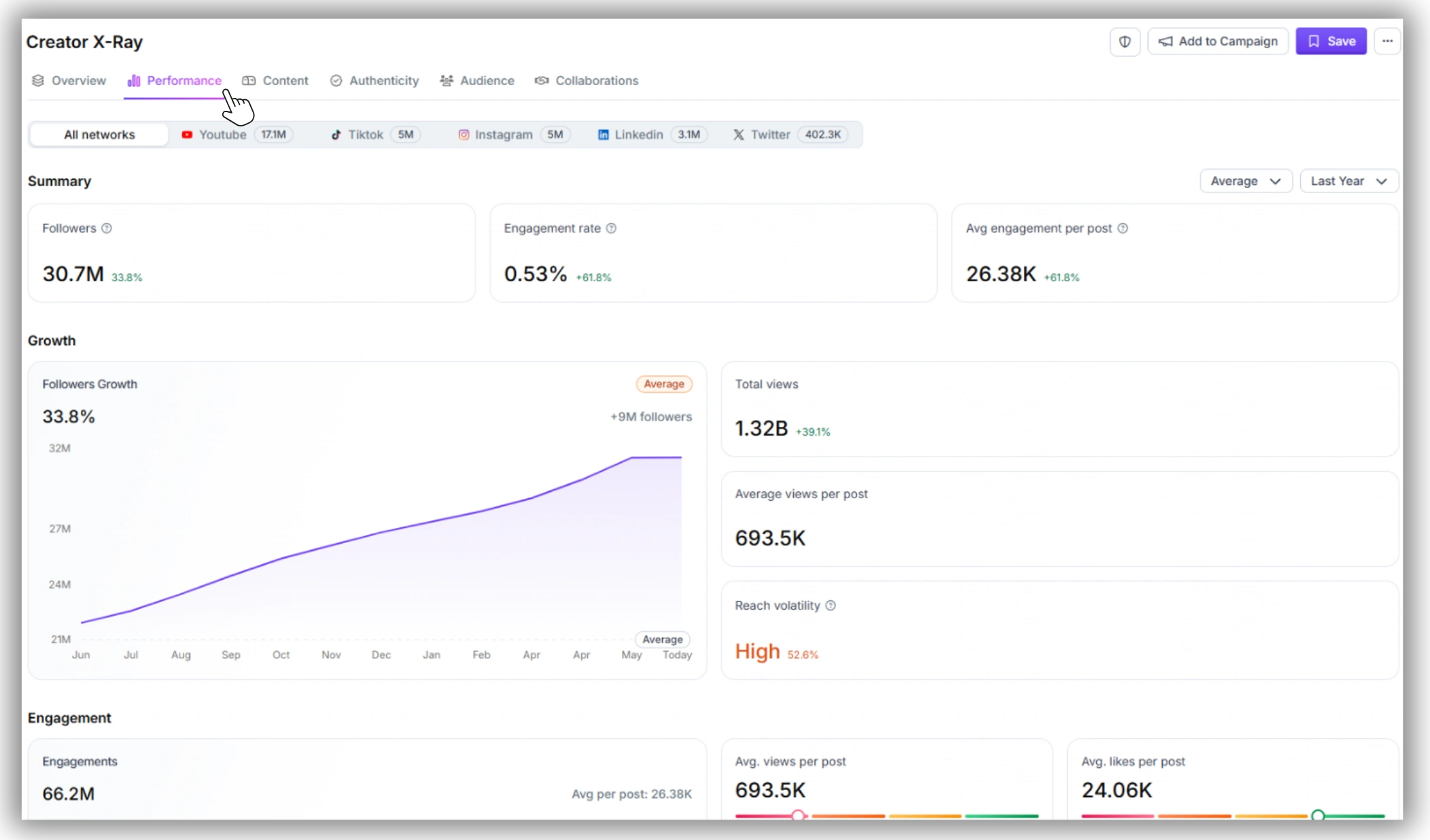
Scroll down to the performance metrics section. Two numbers matter most here:
Engagement Rate
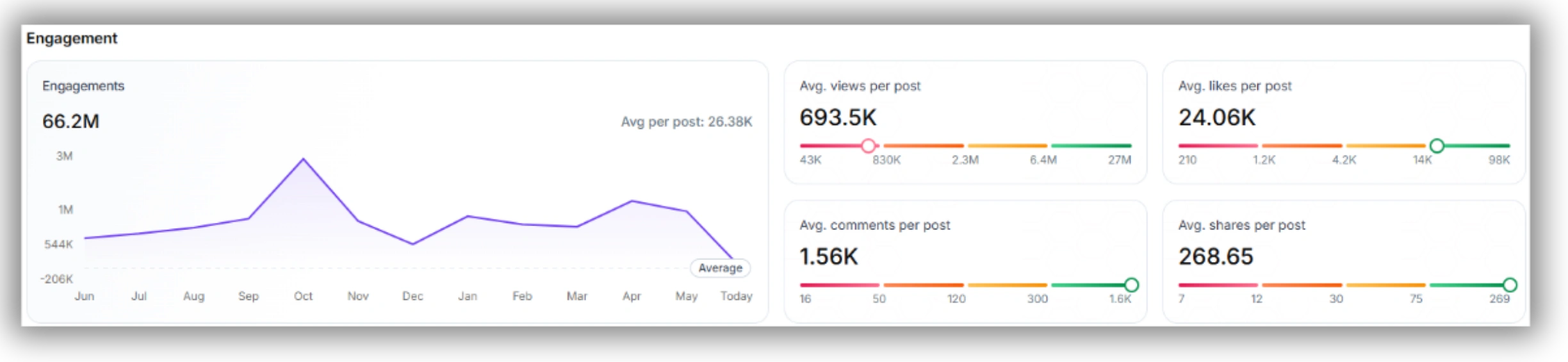
This is the percentage of the creator’s audience actively interacting with their content. It is the most important metric for predicting campaign ROI, and it is the one most teams underweight when they anchor on follower count instead.
General benchmarks by platform:
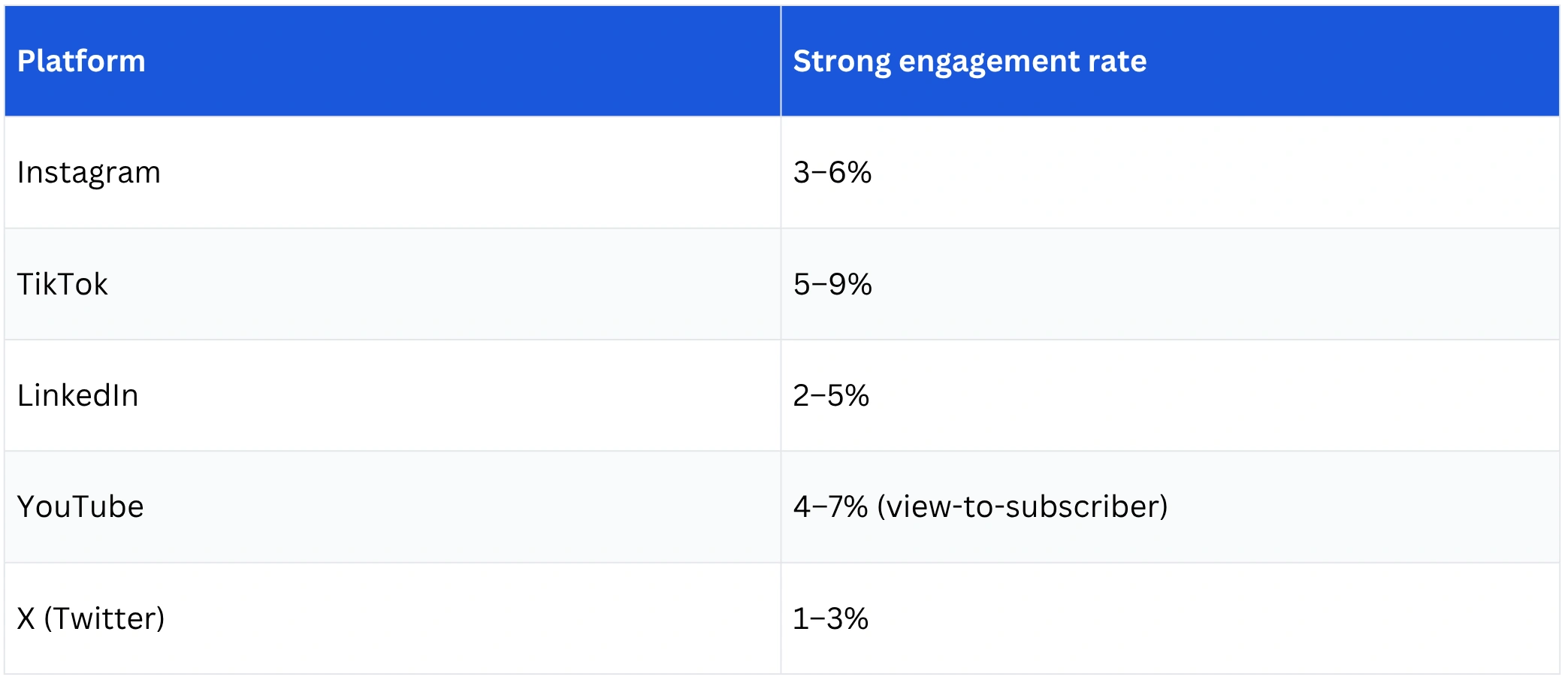
A creator with 80K followers and 6% engagement on Instagram reaches more real, active people per post than one with 500K followers at 0.6%. The engagement rate calculator on Favikon’s free tools page lets you run this comparison directly if you want to sanity-check any numbers yourself.
Follower Growth Trend
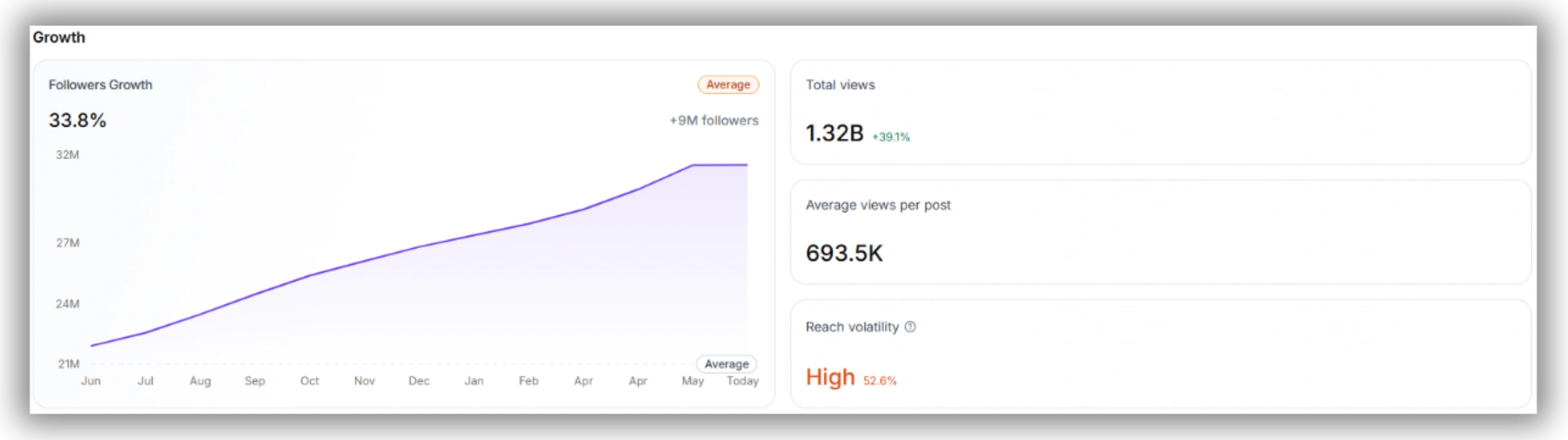
The growth chart shows whether the creator’s audience is building steadily, plateauing, or declining. Look for:
• Gradual, consistent upward curve — healthy organic growth, the account is actively gaining authority
• Flat or declining — the account may have peaked or lost algorithmic favor
• Single spike followed by plateau — often signals a one-time viral moment or purchased followers, not sustained influence
Step 5: Review Niche Ranking and Category Fit
Every profile on Favikon includes a niche ranking — a percentile score showing how the creator compares to peers in their specific category and geography.
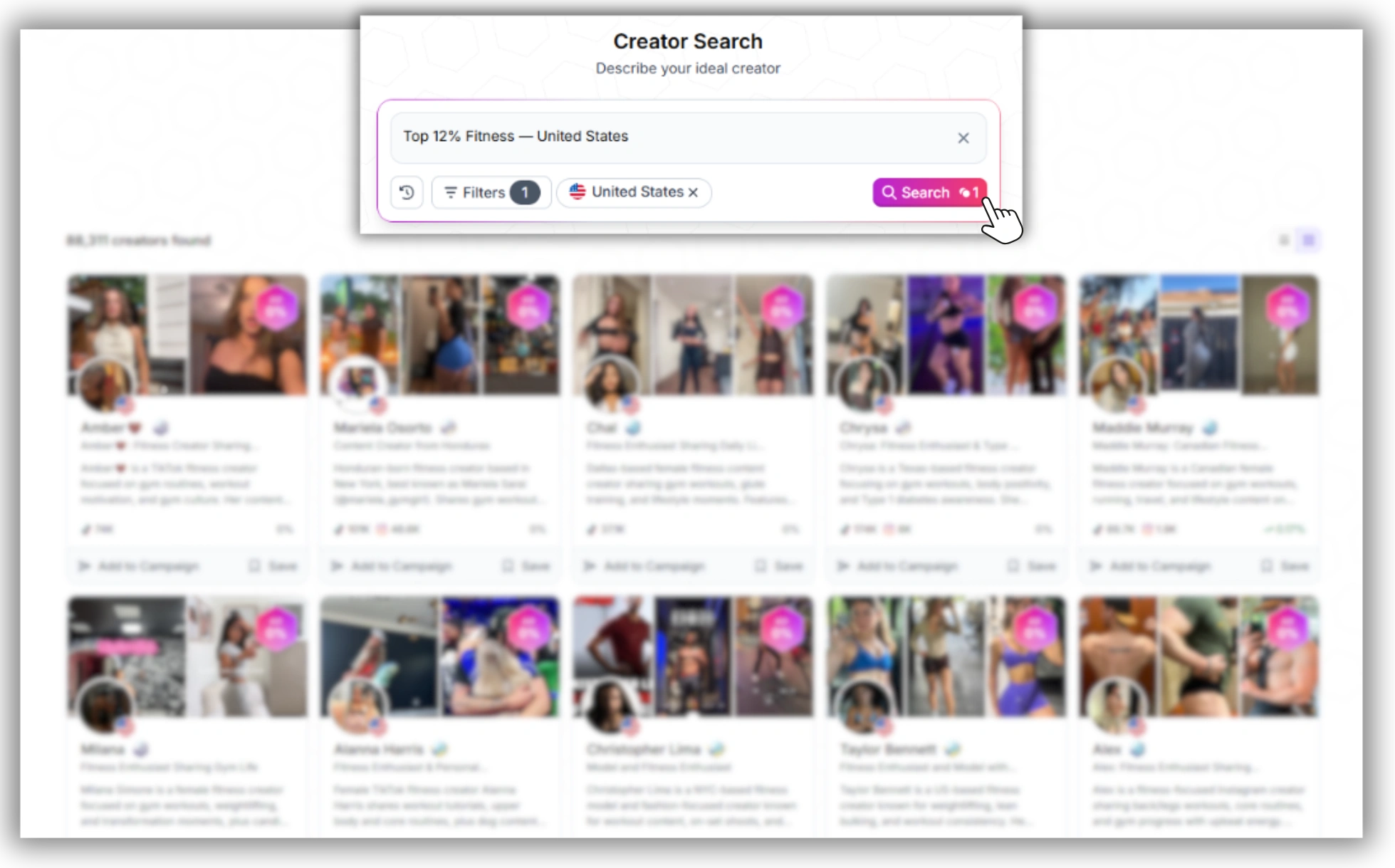
A ranking like “Top 12% Fitness — United States” tells you immediately where this creator stands without you having to manually benchmark against ten other profiles. Rankings are updated regularly based on peer performance, so they reflect the current competitive landscape.
Category tags
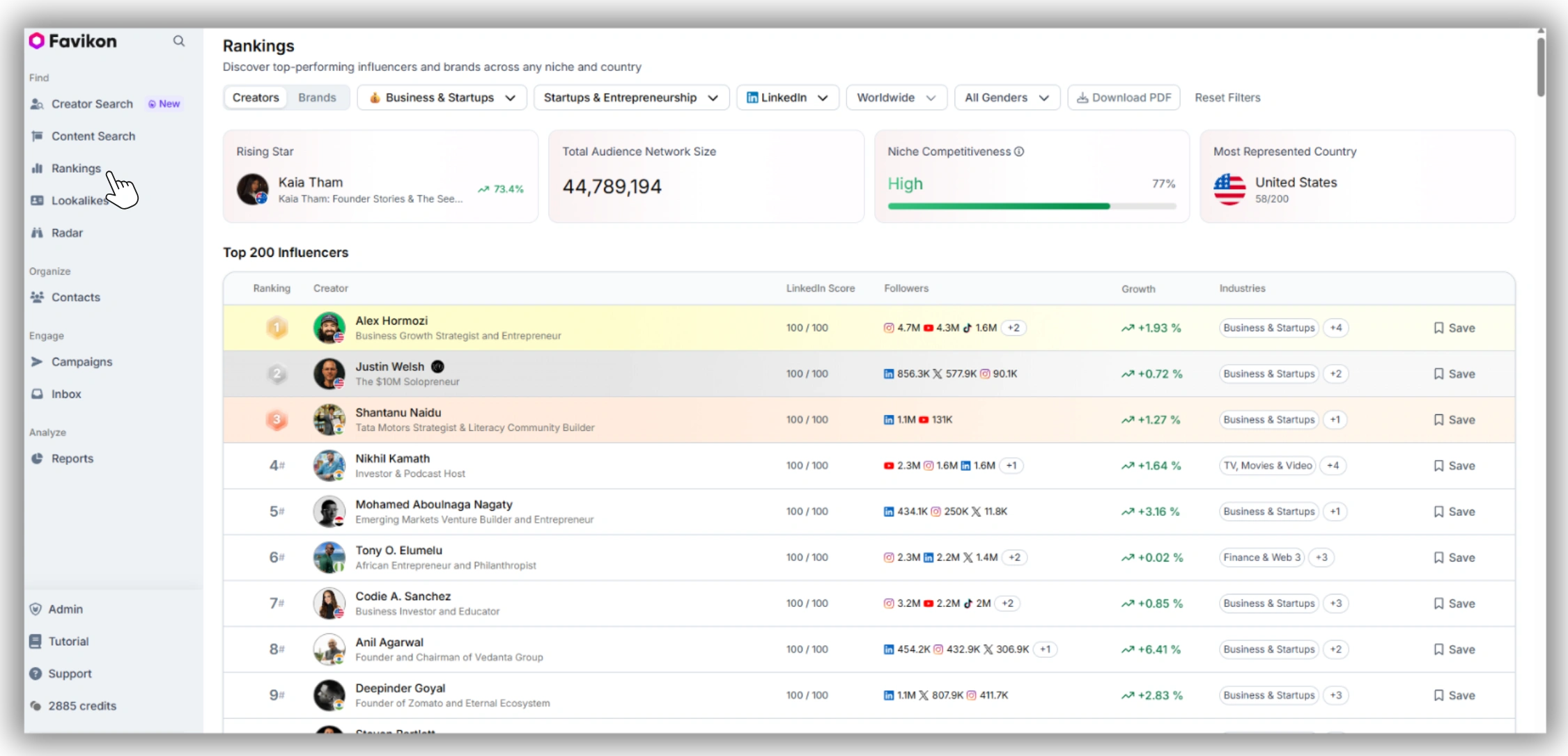
Each profile is automatically classified into relevant industry categories — Business, Technology, Health, Sustainability, Finance, and so on.
What to check:
• Do the category tags match your target audience? A creator tagged “Business, Finance, Leadership” is not a natural fit for a consumer beauty brand, regardless of their follower count.
• Multiple relevant tags indicate cross-industry appeal, which can be useful for broader awareness campaigns.
• A single, focused tag usually signals a deeply niche audience — often more valuable for product-specific or B2B campaigns.
Step 6: Examine Top-Performing Content
The content section shows the creator’s highest-engagement posts over a defined time window, broken down by format.
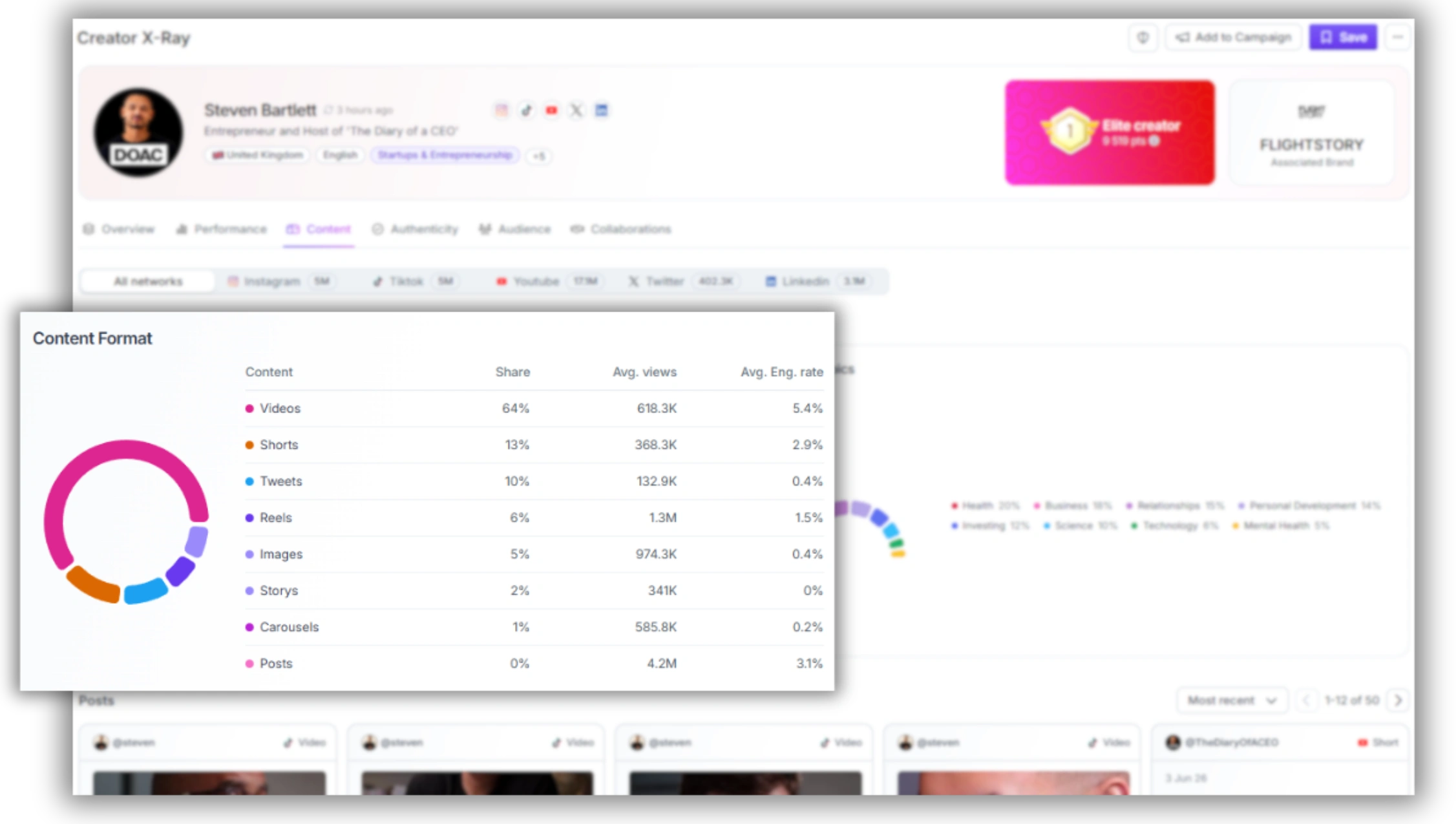
This is where numbers stop being enough. Use this section to answer questions the metrics alone cannot:
• Which formats generate the most engagement for this creator? A creator whose videos consistently outperform their static posts is telling you something important about how their audience consumes content — and what format your campaign should use.
• What topics resonate? If their top five posts are all about personal finance and your campaign is for a project management tool, that audience mismatch will show up in your campaign results even if the engagement rate looks strong.
• Does the tone match your brand? Read several posts. Is the voice educational, opinionated, entertainment-focused, or conversational? Engagement metrics measure how much an audience responds — they don’t tell you whether your brand fits the conversation.
Step 7: Run Fake Audience Detection
This step is non-negotiable for any creator you’re seriously considering.
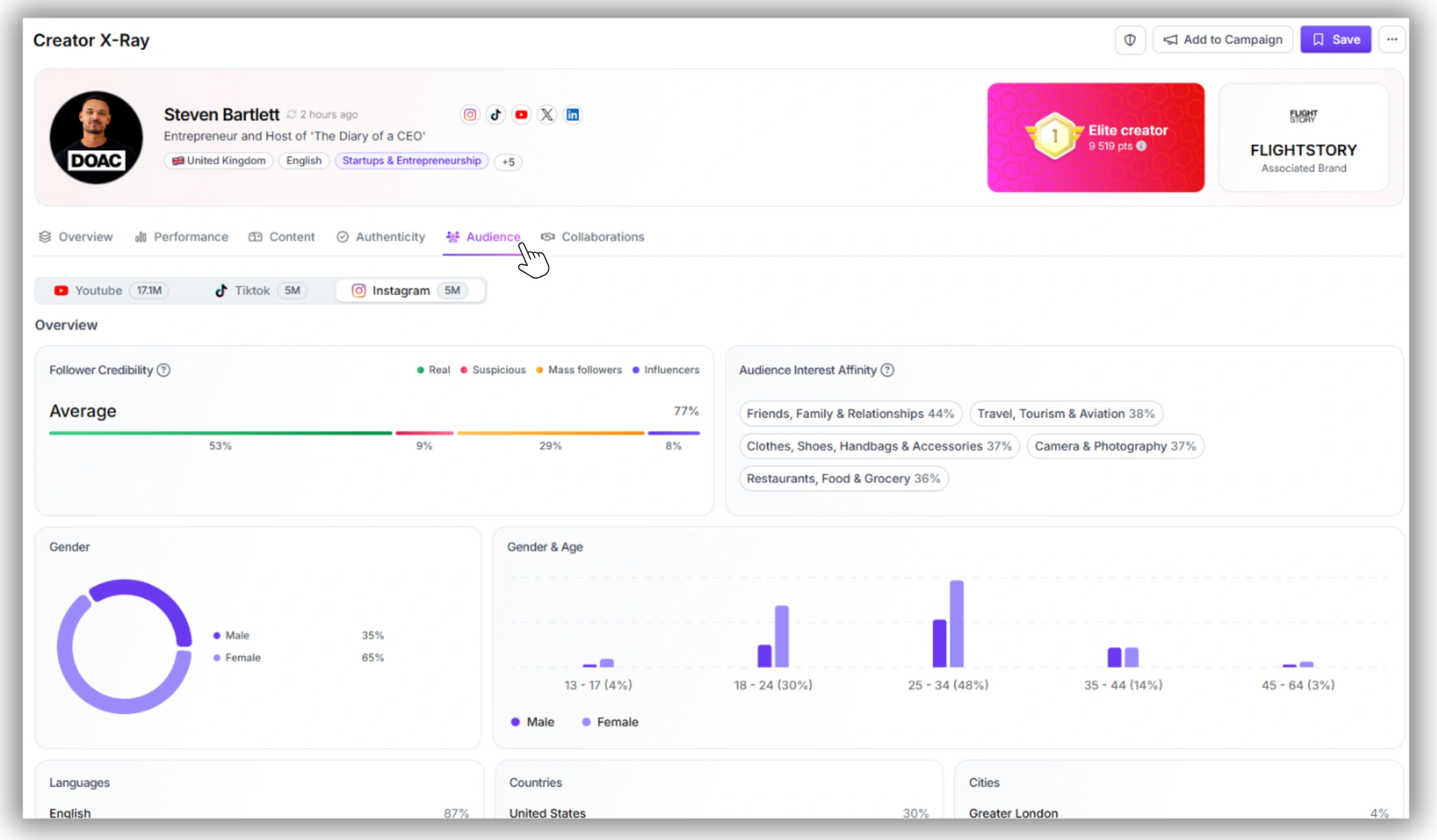
Favikon’s fake audience detection flags profiles where follower counts have been artificially inflated — through purchased followers, bot networks, or follow-unfollow schemes. It analyzes the composition of the creator’s audience and surfaces a credibility signal alongside the follower data.
Red flags to look for:
• High follower count paired with abnormally low engagement (less than 0.3% on Instagram or TikTok)
• A single-date follower spike with no corresponding viral content to explain it
• A large percentage of followers flagged as inactive, bot-adjacent, or from outside the creator’s stated audience geography
A creator with 200K followers and 30% fake audience reach is effectively a creator with 140K followers — and your CPM calculation should reflect that. Catching this before you sign a contract is worth far more than any subscription cost.
Step 8: Save to Your CRM and Build Your Shortlist
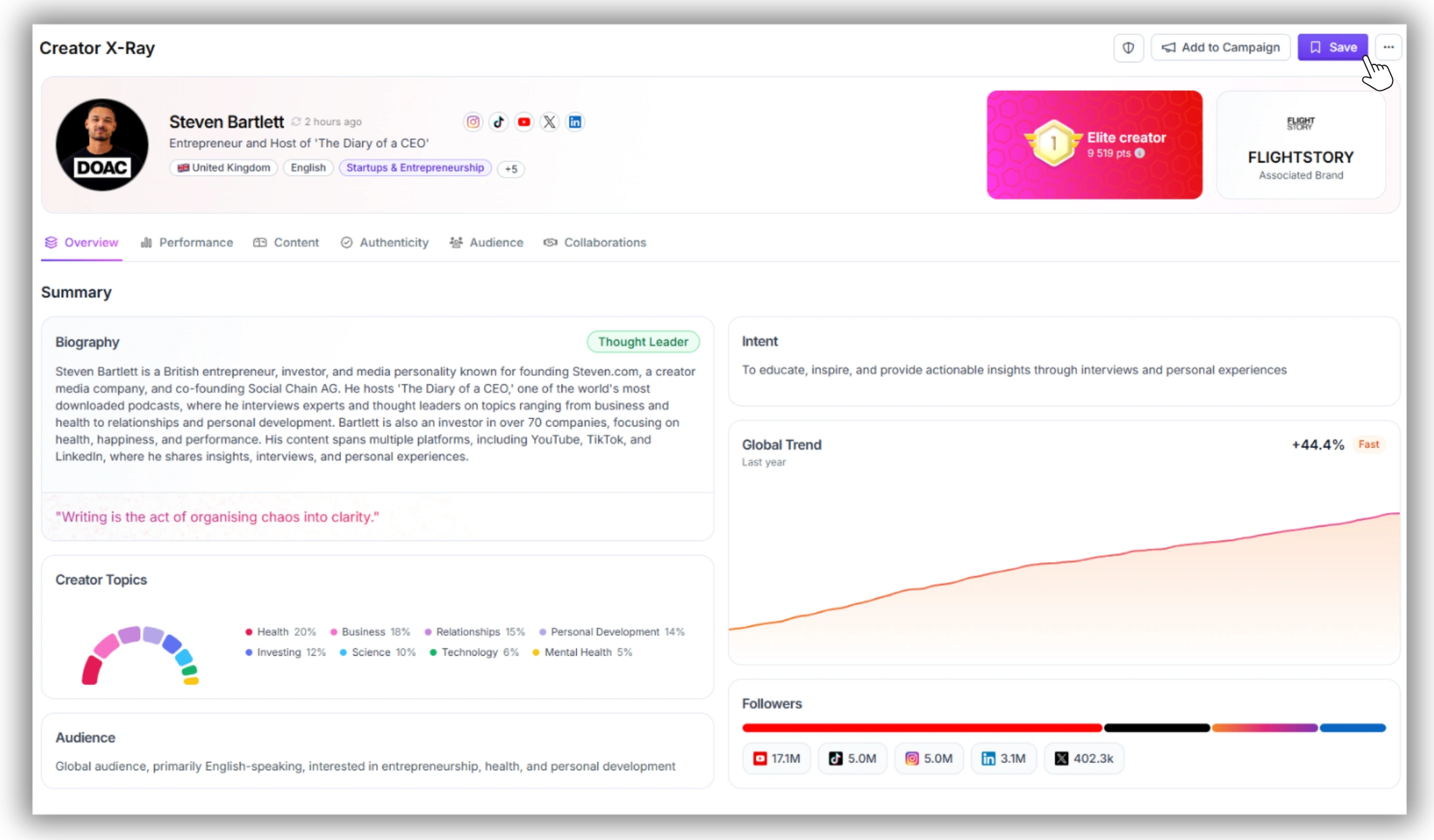
Once you’ve analyzed a profile and decided it’s worth pursuing, save it to Favikon’s built-in influencer CRM with one click. You can:
• Organize shortlisted creators into named lists by campaign
• Add internal notes on brand fit, negotiation status, or content preferences
• Export contact details for outreach (Favikon surfaces email addresses at an 82% match rate for indexed profiles)
• Compare saved profiles side by side before making final decisions
This turns a series of individual profile analyses into an organized, repeatable workflow — especially useful when you’re managing multiple campaigns or vetting 20+ creators simultaneously.
Common Mistakes to Avoid When Analyzing Creators
• Anchoring on follower count. Follower numbers are a reach ceiling, not a performance guarantee. A 50K-follower creator with 7% engagement on Instagram delivers more real interactions per post than a 300K creator at 0.8%. Always check engagement rate first.
• Ignoring growth patterns. A sudden spike on one date followed by a flat line is almost always a signal of inauthentic growth. Steady, gradual growth over several months is what genuine audience building looks like.
• Skipping the content review. Metrics tell you how much an audience engages. Reading the actual posts tells you whether your brand belongs in that conversation. Both matter before you make a decision.
• Analyzing only one platform. A creator might have average performance on Instagram but rank in the top 10% on LinkedIn for their niche. Cross-platform analysis often surfaces the best partnership angle.
• Treating the Authority Score as the only signal. The Authority Score summarizes a lot of data into one number, which makes it useful for triage. For final vetting decisions, always drill into engagement rate, fake audience detection, and content fit as separate checks.
What to Do After Your Analysis
Once you’ve completed your analysis and built a shortlist:
1. Run outreach directly from Favikon using exported contact details or in-platform messaging for creators on the Creator Plan.
2. Set up a campaign in Favikon’s campaign management tool to track deliverables, content approvals, and performance in one place.
3. Monitor performance post-live using Favikon’s reporting tools to pull engagement data, reach, and ROI metrics without manual tracking.
If you want to scale discovery — moving from analyzing individual profiles to finding the right creators proactively — Favikon’s AI Search lets you describe your ideal creator in plain language and returns a filtered, ranked shortlist across all platforms. See how to find influencers in your niche for a walkthrough of that process.
Start Your Free Analysis Now
Create your free account at app.favikon.com. The 7-day trial gives you full access to creator profiles, Authority Scores, engagement data, fake audience detection, and CRM tools — no credit card required.
Frequently Asked Questions
Is Favikon really free to use?
Favikon offers a 7-day free trial with full access to its creator analysis tools — no credit card required. You can analyze creator profiles, view Authority Scores, check engagement rates, run fake audience detection, and export to your CRM during the trial period. After 7 days, a paid plan is required to continue. Paid plans start at approximately €49/month.
What is an Authority Score on Favikon?
The Authority Score is Favikon’s 0–100 rating for any creator profile. It benchmarks the creator against similar profiles in their niche and geography based on audience size, engagement quality, content performance, and niche standing. It is updated regularly. Scores above 70 indicate a strong performer; 55–70 is mid-tier but often the best ROI range for conversion campaigns.
Can I use the Favikon Chrome Extension to analyze other creators?
No. The Favikon Chrome Extension is designed for creators who want to claim and manage their own profile from their browser. To analyze other creators’ profiles — engagement rates, Authority Scores, niche rankings — you need to use the platform at app.favikon.com, which is accessible free during the 7-day trial.
How do I check if a creator has fake followers?
Favikon’s fake audience detection runs automatically on every indexed profile. Open the creator’s profile on app.favikon.com, scroll to the audience quality section, and review the credibility signal alongside their follower data. Red flags include abnormally low engagement relative to follower count, a single-date follower spike with no viral content to explain it, and a high proportion of inactive or bot-adjacent accounts in the audience breakdown.
What’s the difference between engagement rate and Authority Score?
Engagement rate measures the percentage of a creator’s audience that actively interacts with their content. Authority Score is a composite 0–100 rating that benchmarks the creator across multiple signals including audience size, engagement quality, content performance, and niche authority. Both matter for different decisions: engagement rate is the key metric for predicting campaign ROI; Authority Score is useful for triage and comparing creators across different audience sizes.
Also See 👀
🏆 HOW TO FIND X (TWITTER) INFLUENCERS?
🏆 HOW TO FIND INSTAGRAM INFLUENCERS IN YOUR NICHE?
HOW DOES FAVIKON RANK INFLUENCERS?
Others articles