How to Build an Influencer Marketing Report
A clear influencer marketing report helps teams understand campaign performance and share results with stakeholders. This guide explains how to organize data, present key metrics, and highlight the impact of your influencer programs.
.png)

How to Build an Influencer Marketing Report (With Real Examples)
The campaign is over. Your results are scattered across creator DMs, a GA4 tab you opened three days ago, screenshots from Instagram Stories that expired, and a spreadsheet someone started and never finished. Your boss wants a report by Friday. This is the framework that turns that pile into something stakeholders can actually use — and something that makes the case for next quarter's budget.
1. What an Influencer Marketing Report Actually Needs to Do
Most campaign reports fail before they're read. They open with a table of raw metrics, bury the key result on page three, and leave the reader doing mental math to figure out whether the campaign worked. That's a data dump, not a report.
A good influencer marketing report does one thing first: it answers the question your leadership is actually asking. Did we hit our goal? Was the spend worth it? What do we do next time? Everything else is supporting evidence.
The clearest structure starts with a single headline number — your One Big Number — then builds the narrative around it. If your objective was reach, that number is total unique reach versus target. If it was conversions, it's tracked purchases or sign-ups. Lead with it. Don't make anyone hunt for it.
Your report is actually serving two different audiences, and it's worth being deliberate about that:
• Your leadership team needs the business case: did we hit the goal, what did it cost, do we do this again.
• Your own team needs the operational read: which creators outperformed, what content format worked best, what to fix in the next brief.
The sections below are structured to serve both.
2. Before the Campaign Ends: Set Up Your Tracking
The quality of your report is determined before the campaign starts, not after. If you skipped the setup work, your report will have gaps — and you'll spend most of your reporting time manually hunting for numbers instead of analyzing them.
The minimum tracking setup for any paid influencer campaign:
1. UTM parameters on every link
2. Unique promo codes per creator (for conversions without click-through)
3. GA4 linked to your campaign so web traffic is attributable
4. Every campaign post tagged in your campaign management tool before creators go live
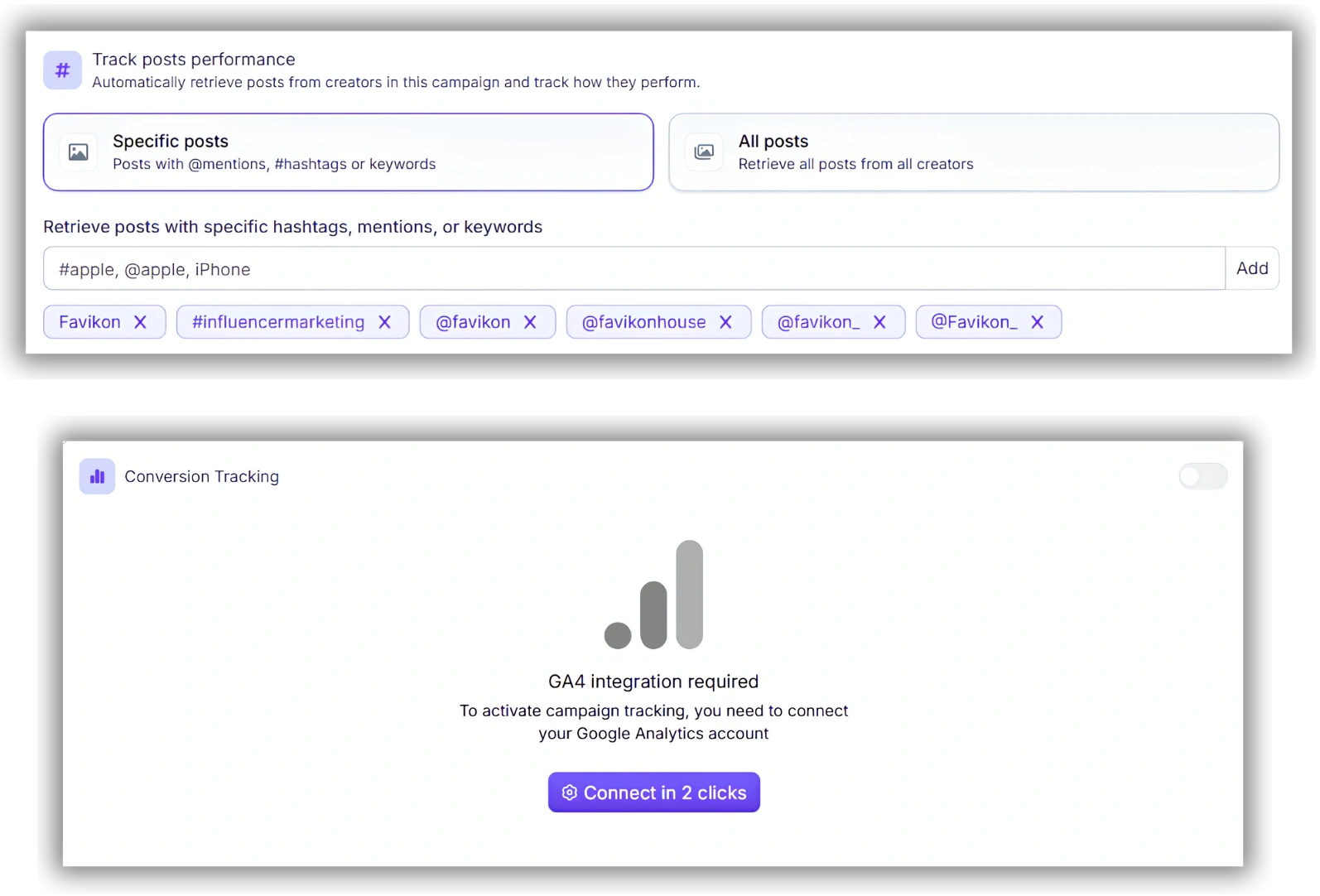
Favikon Tip: Favikon's campaign setup connects directly to GA4 before the campaign launches. Toggle the integration on, add your campaign UTMs, and every creator's tracked traffic flows into your report automatically — no manual export required.
If you didn't do this before the campaign ran, be honest in your report about where the data has gaps. Stakeholders can handle incomplete attribution. What damages credibility is presenting partial data as complete.
For future campaigns, Favikon's influencer campaign management setup handles this before a single post goes live.
3. The 5 Sections Every Campaign Report Needs
Here is the structure that works for both leadership presentations and team debriefs. Each section has a job — don't skip any of them, and don't add more until these five are tight.
Section 1: Campaign Overview
One page or one slide. Covers: campaign objective, dates, total budget, number of creators, platforms used, and — if relevant — the target audience. This is context, not results. It should take 30 seconds to read.
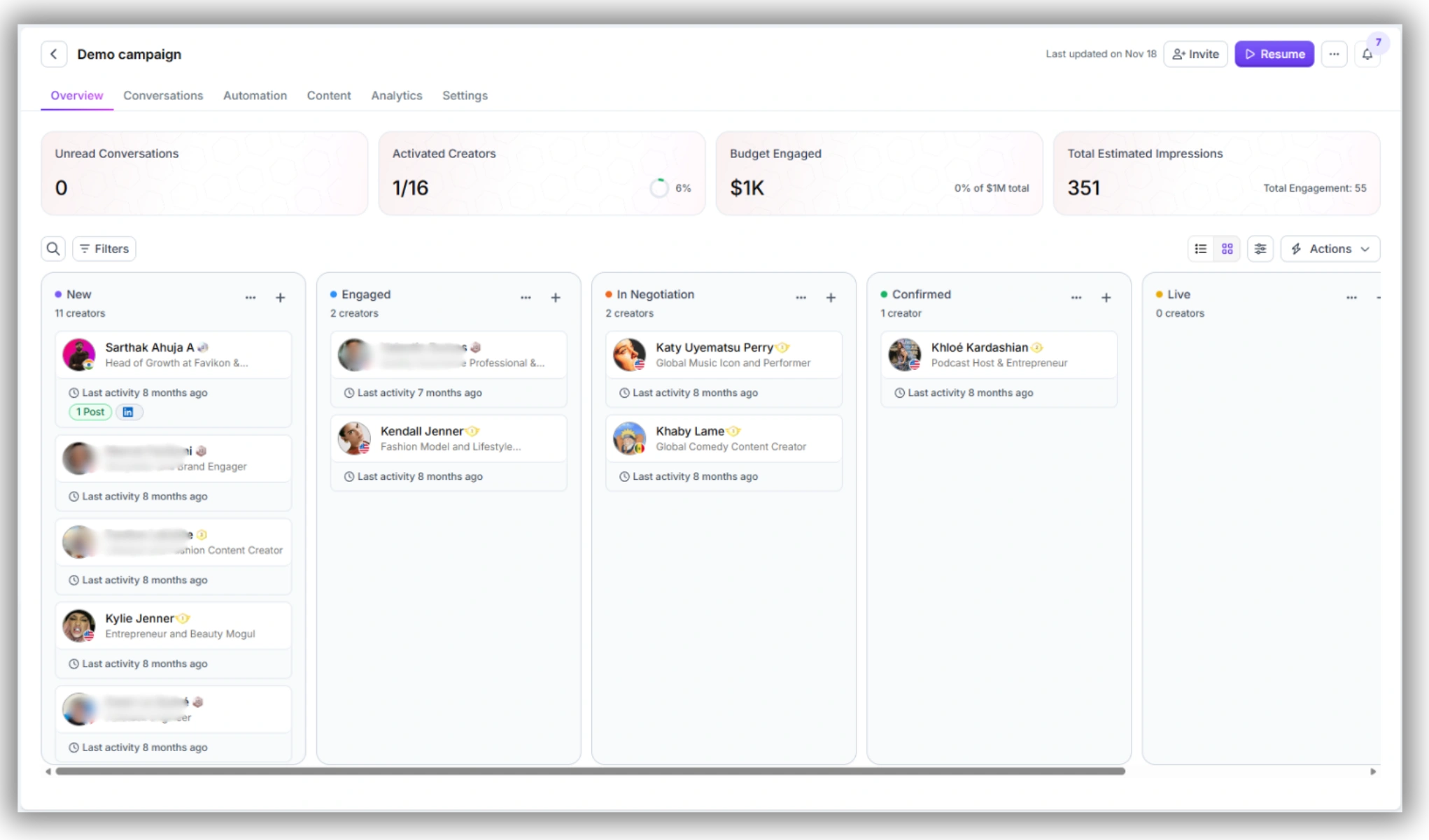
Section 2: Performance Summary
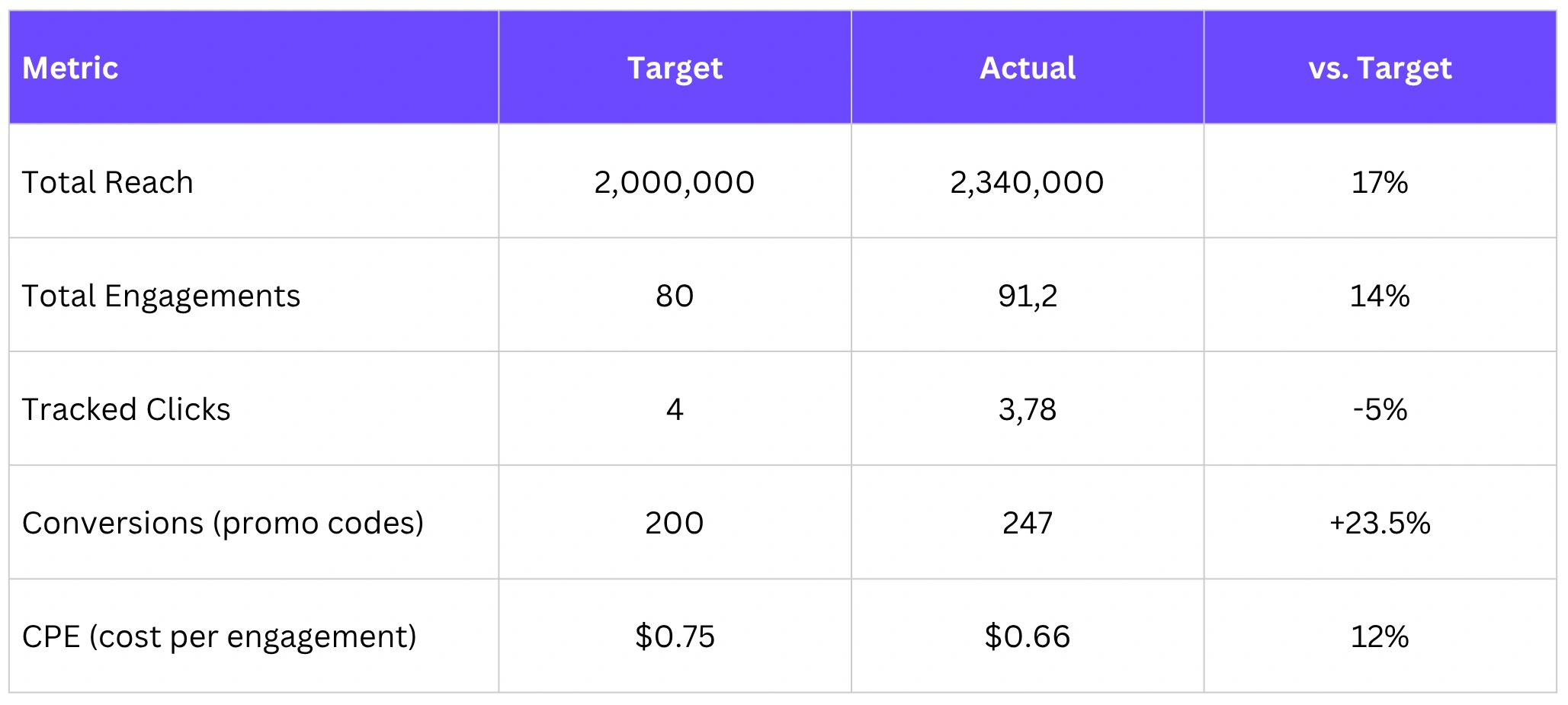
This is where your One Big Number lives. State it first, then show 4 secondary KPIs against their targets. Keep this to a table or a few clean numbers. No walls of text.
Section 3: Creator-by-Creator Breakdown
This is the data your team actually uses. For each creator, show: reach, engagement rate, tracked clicks, conversions (if applicable), and content format. Highlight top performers and underperformers — that's what informs your next creator brief.
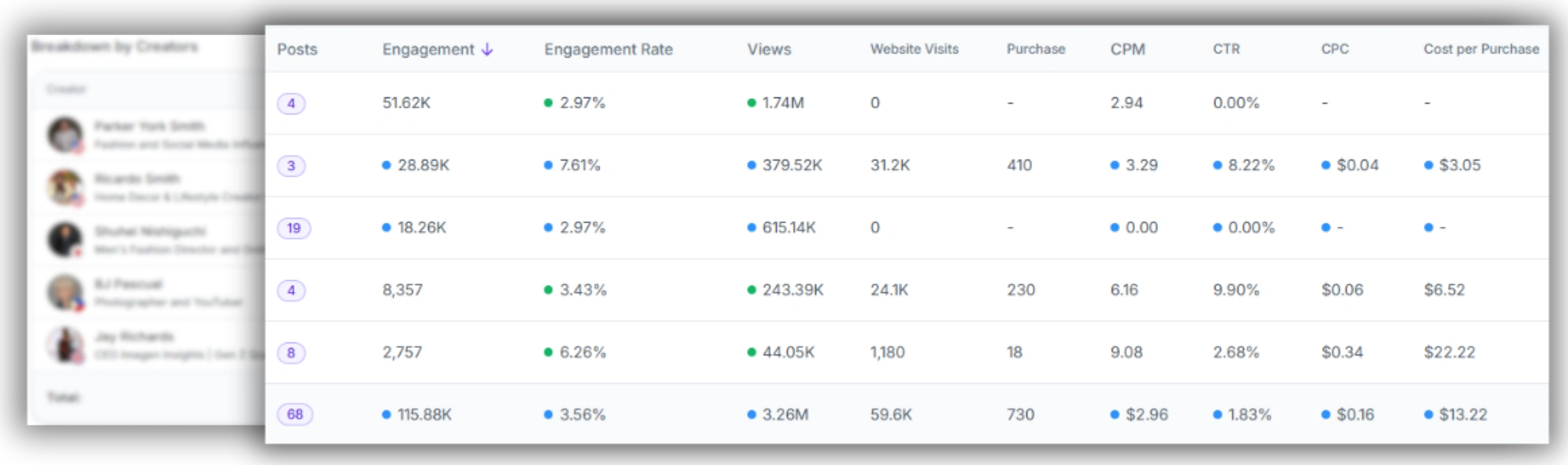
Favikon Tip: Favikon's Reports view generates this breakdown automatically from your campaign data. Each creator's performance is pulled into one view — no manual aggregation from separate DM threads or spreadsheets.
For teams managing 10+ creators across a campaign, this is where manual reporting breaks down and a platform becomes necessary. Pulling this data by hand from native analytics on Instagram, TikTok, and YouTube takes hours and still produces inconsistent numbers. For more on tracking the metrics that matter, see our guide to influencer marketing KPIs.
Section 4: Budget vs. Results
Show what you spent and what it produced. Total spend, cost per creator, CPE, and CPM (if reach was a goal). If you have conversion data, show ROAS. This section is what makes the case for next quarter's budget — or tells you which creator tiers weren't worth the rate.
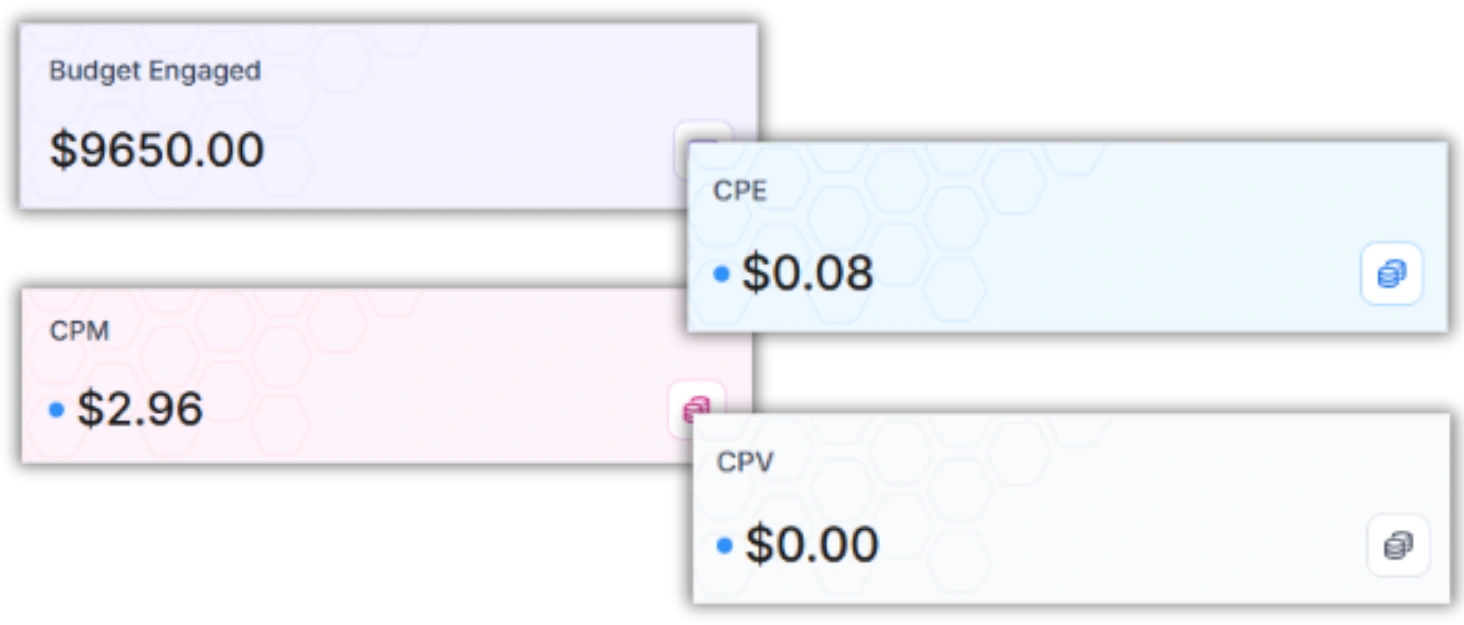
Keep this honest. If the CPE was higher than benchmark, say so and explain why (creator audience fit, content timing, brief quality). Leadership respects transparency more than optimistic spin on bad numbers.
Section 5: Learnings and Next Steps
This is the most skipped section in most reports and the most valuable one for your team. Three to five specific findings from the campaign data — not generic observations — with a direct implication for what you change in the next campaign.
• Which content format drove the highest engagement rate (and whether you should brief for it specifically next time)
• Which creator tier outperformed on a CPE basis
• Any audience overlap across creators that inflated reach figures
• What you'd change about the brief, the timeline, or the creator mix
4. How to Report for Leadership vs. Your Team
The same campaign data produces two different reports depending on your audience. Building both from one source — your campaign platform data — is how you do this efficiently.
The Leadership Version
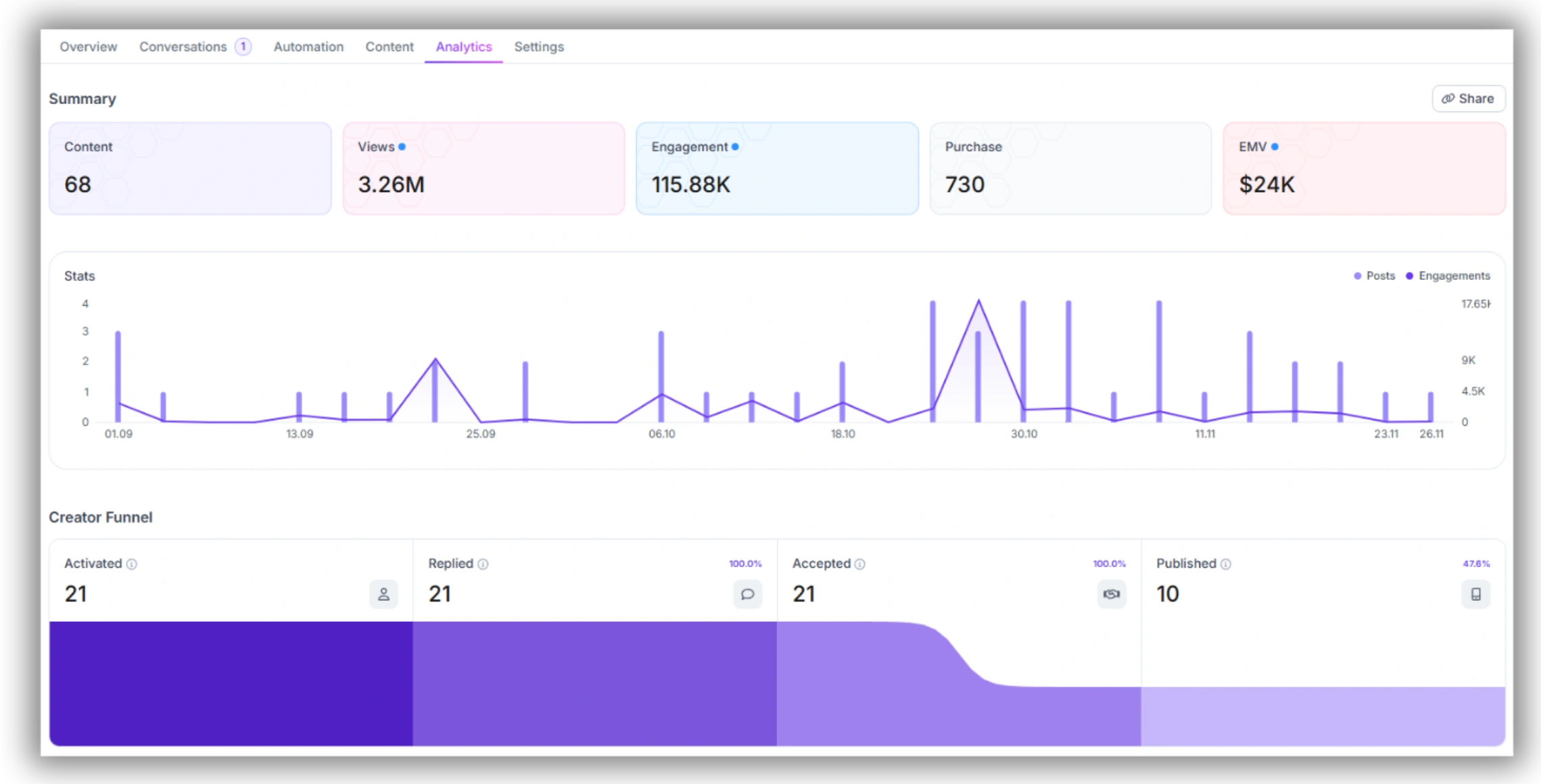
Your CMO or CFO needs three things: did we hit the goal, what did it cost per result, and should we do this again. Format this as an executive summary: one page, three numbers, one recommendation.
• One Big Number vs. target — front and center
• Total spend and cost per primary metric (CPE, CPA, or CPM depending on objective)
• One sentence recommendation: scale, adjust, or pause
.webp)
If your leadership wants more detail, they'll ask for it. Don't front-load a 15-page PDF when a one-pager with a link to the full report does the same job.
The Team Version
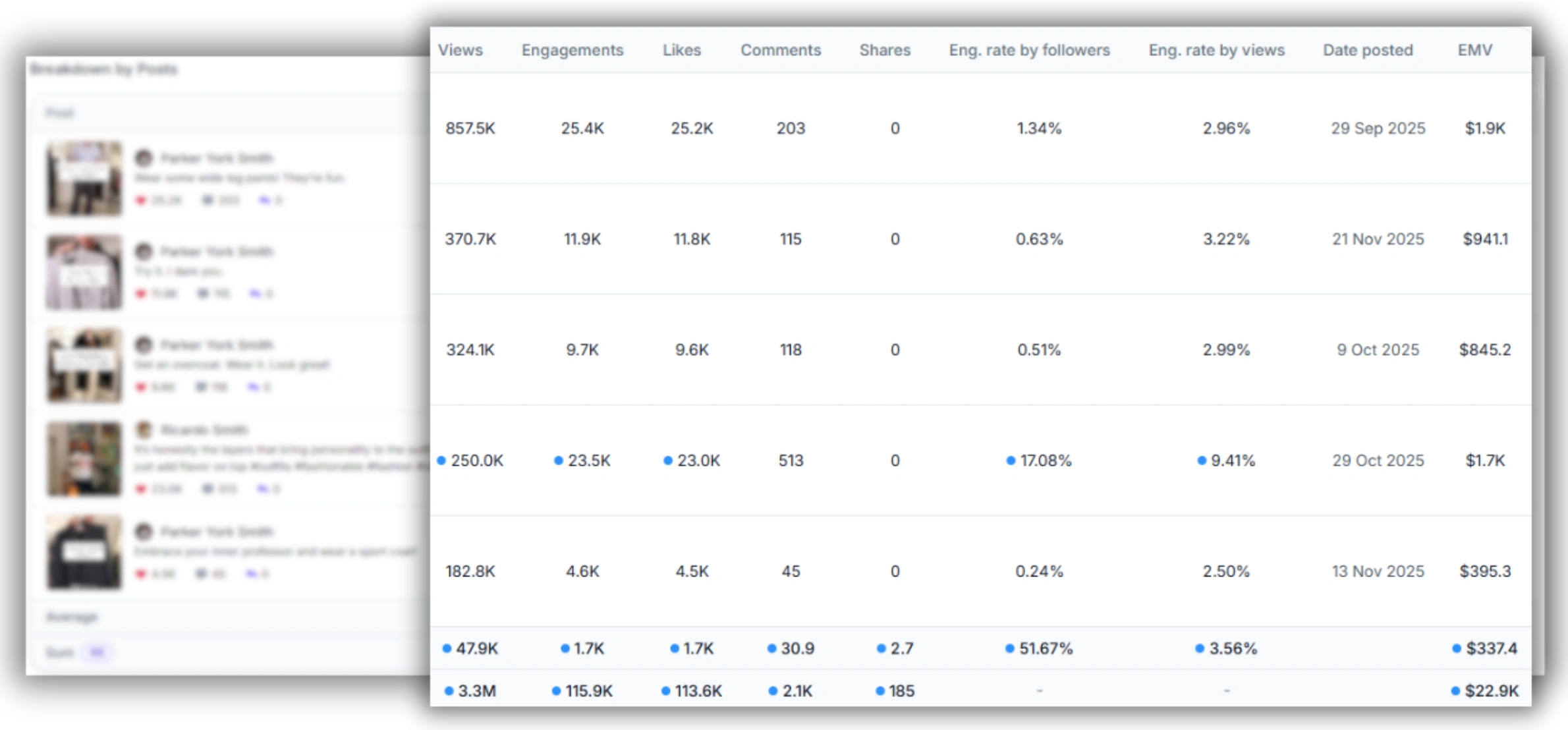
Your team report is operational. It should tell your creator manager which creators to re-book, your content strategist which formats to brief for, and your performance analyst where the attribution gaps are.
• Full creator-by-creator breakdown with engagement rates and content format tagged
• Comparison of creators in the same tier — who outperformed and why
• Attribution analysis: what percentage of conversions came from promo codes vs. tracked clicks vs. direct
• Content audit: screenshots of top 3 and bottom 3 performing posts
.webp)
Favikon Tip: Favikon's shareable report export generates both formats from the same campaign data. The summary view works for leadership; the full creator breakdown is your team's operational read.
If you're building this in a spreadsheet instead of a platform, you'll build two separate tabs manually from the same raw data. That's fine for smaller campaigns, but at 10+ creators or 3+ campaigns running in parallel, the manual version doesn't scale. At that point, the time cost of manual reporting is usually the strongest argument for adopting dedicated tooling.
For a full guide to calculating what your campaigns actually produced, see how to measure influencer marketing and our breakdown of influencer marketing ROI.
5. The Part Most Reports Get Wrong: Attribution
Attribution is where most influencer marketing reports lose credibility — or lose budget. If you're measuring conversions on a last-click model, influencer content will almost always look underperforming compared to paid search or retargeting. That's a measurement problem, not a channel problem.
Here's the honest version of how influencer attribution works:
• A viewer sees a creator's post and doesn't click, but searches your brand name two days later. Last-click gives that conversion to organic search.
• A viewer clicks the link, lands on your site, leaves, then comes back via a retargeting ad. Last-click gives it to paid.
• A viewer uses a promo code in-store or at checkout without ever clicking a tracked link. That conversion is invisible to your web analytics entirely.
This is why promo codes matter alongside UTMs. They capture intent that doesn't pass through a tracked click.
When someone in a budget review asks "how many of those sales actually came from the influencer," the honest answer is: we have a tracked number (promo codes + UTM clicks) and a likely-influenced number (uplift in branded search and direct traffic during the campaign window). Present both. The tracked number is conservative; the influenced number is indicative.
For campaigns with significant budget behind them, consider pulling GA4 data for the campaign window and comparing branded search volume before, during, and after. It won't give you a clean attribution number, but it shows the halo effect — and that's a legitimate part of the campaign's value. For a full walkthrough, see how to track ROI of influencer campaigns on Instagram.
Frequently Asked Questions
What should an influencer marketing report include?
An influencer marketing report should include: a campaign overview (objective, dates, budget, creator count), a performance summary with your primary KPI vs. target, a creator-by-creator breakdown, a budget vs. results section showing CPE or ROAS, and a learnings section with specific next steps. The most important element is leading with your One Big Number — your headline metric vs. goal — before anything else.
How do I report influencer marketing results to my boss?
Lead with the outcome, not the activity. Your boss wants to know three things: did you hit the goal, what did it cost, and what do you do next. Format the report as a one-page executive summary first, with the full data appendix behind it. State your primary metric against target in the first sentence. If you missed target, say so immediately and explain why — leadership respects directness.
How often should I report on influencer campaigns?
For ongoing always-on programs, a monthly performance report covering the previous month's creator activity is standard. For individual campaigns, report at three points: a mid-campaign check (at roughly 50% of the campaign window, when there's still time to adjust creator briefs or activate backup creators), a post-campaign report within two weeks of the final post going live, and a 30-day retrospective that includes any delayed conversion data from promo codes and branded search trends.
How do I build an influencer marketing report for leadership?
Build a one-page executive summary with: your One Big Number vs. target, total spend and cost per primary metric, and one recommendation (scale, adjust, or pause). Keep it to three numbers and one sentence of context for each. Don't include creator-level data in the leadership version unless they ask for it — that belongs in the team report. Attach the full data breakdown as an appendix or link, so they can drill in if needed.
Also See 👀
➡️ INFLUENCER MARKETING KPIs: SET, TRACK, PROVE ROI
➡️ HOW TO MEASURE INFLUENCER MARKETING ROI
➡️ FAVIKON INFLUENCER DATABASE — 10M+ PROFILES
Others articles