How to Find Influencer Email Addresses
Connecting with influencers often starts with finding the right contact information. This guide explains where to find influencer email addresses, verify contacts, and improve your outreach process.
.png)
.webp)
How to Find Influencer Email Addresses (B2B & B2C Methods)
You've found the creator. Their content niche, audience fit, and engagement rate all check out. Now you need to actually reach them — and suddenly there's no obvious way to do it.
This guide covers two distinct contact-finding workflows. If you're working with B2C creators on Instagram or TikTok, jump to Method 1 — their booking emails often live in their bio or link-in-bio page. If you're working with B2B creators on LinkedIn, YouTube, or Substack, skip to Section 3 or go straight to Section 5 for the B2B Creator Contact Stack, the fastest reliable workflow for professional creator outreach.
B2B is the primary focus here. The standard Instagram-bio advice fails completely for thought leaders, software reviewers, and industry analysts — and most existing guides don't acknowledge that.
1. Why Most "Find Influencer Email" Guides Don't Work for B2B
Every generic guide on this topic was written with an Instagram macro-influencer in mind. The advice — check the bio, use a Chrome extension, scrape from PhantomBuster — maps onto a world where creators post their booking email publicly in a 150-character field. That world ends the moment your ICP shifts to LinkedIn thought leaders, YouTube software reviewers, or Substack writers. These creators don't list a business email in their bio. Their "contact" is a generic LinkedIn message form or a company email that goes nowhere. The workflow is completely different, and the tools are too.
Method 1: Check Platform Profiles Directly
Start here before reaching for any tool. Manual profile checks take 60 seconds and succeed more often than most teams expect — for B2C creators.
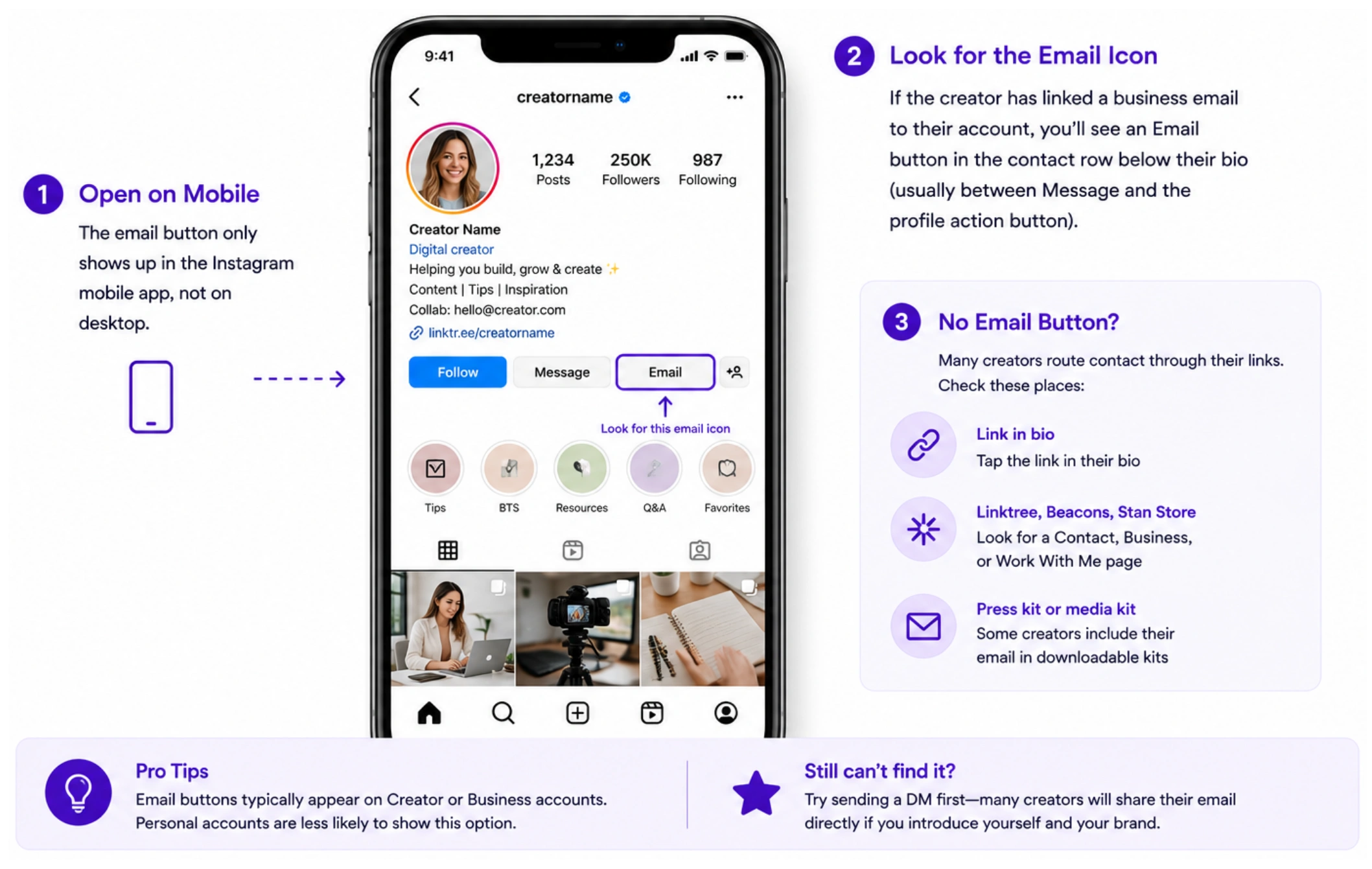
Check the email icon below the bio on mobile (Business/Creator accounts only). If it's not there, click the link in bio — Linktree, Beacons, or Stan Store pages often include a direct contact email or form. For B2C campaigns at volume, Favikon's Contact Enrichment handles the gap.
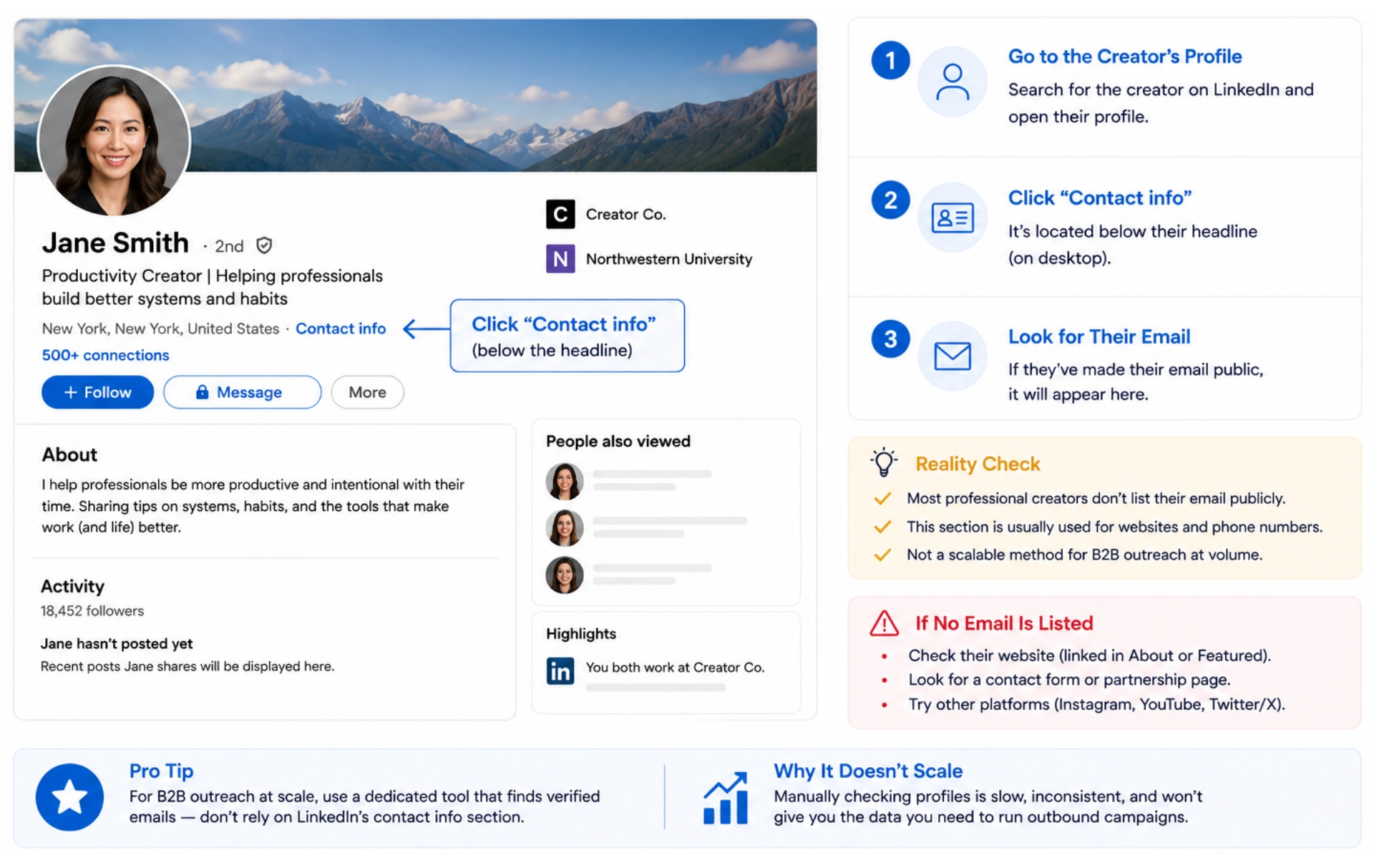
Click "Contact info" on the creator's profile. Most professional creators haven't made their email public here. For anything beyond a handful of targets, manual contact-info checks don't scale. Note that Favikon enables LinkedIn DM outreach natively inside its Campaign automation — for many B2B use cases, you don't need the email address at all.
YouTube
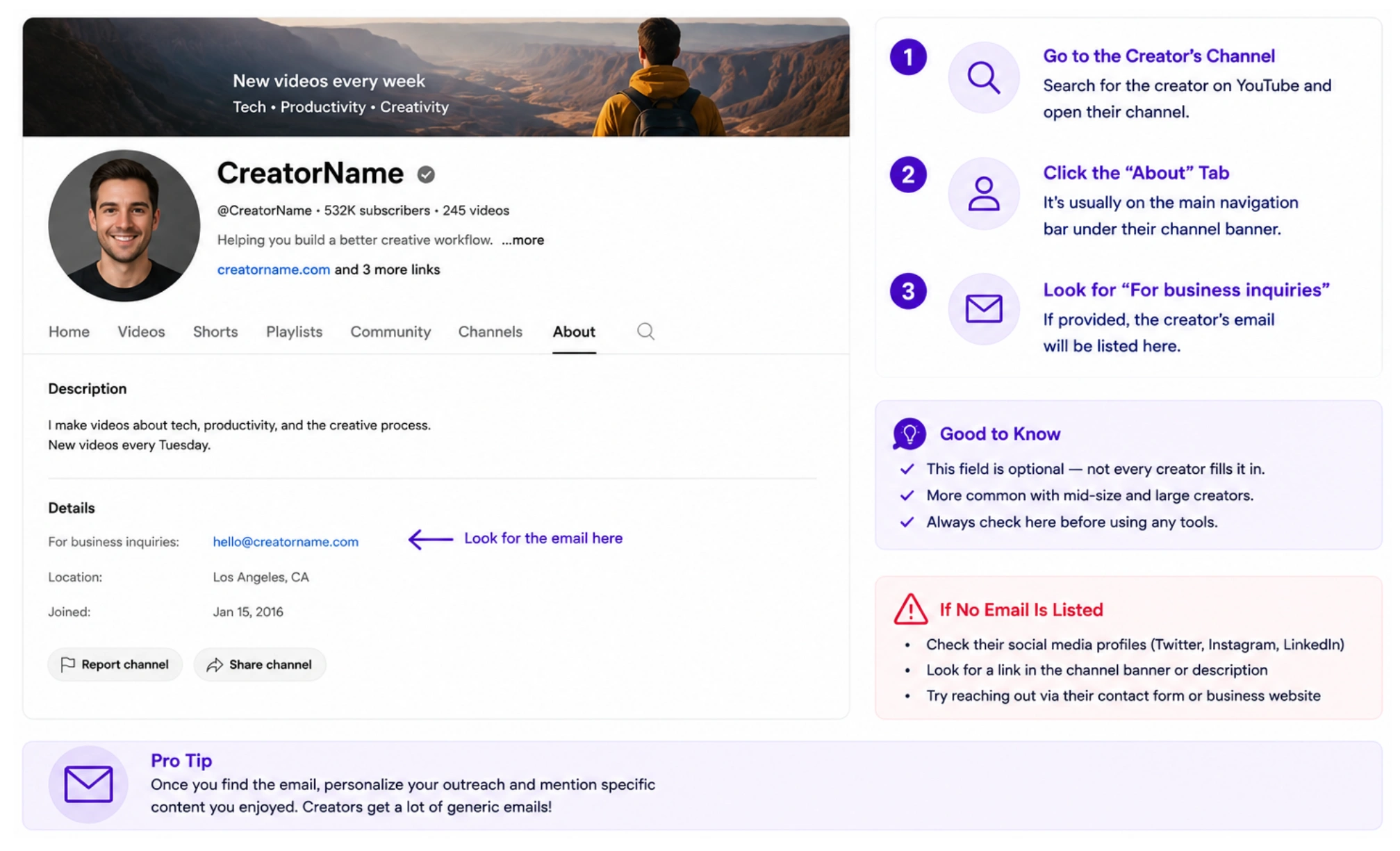
Open the channel's About tab and look for a business inquiry email. It's present on perhaps half of monetized channels. For software reviewers or B2B-adjacent creators who don't list an email, Contact Enrichment inside the Favikon influencer database is the fastest next step.
TikTok
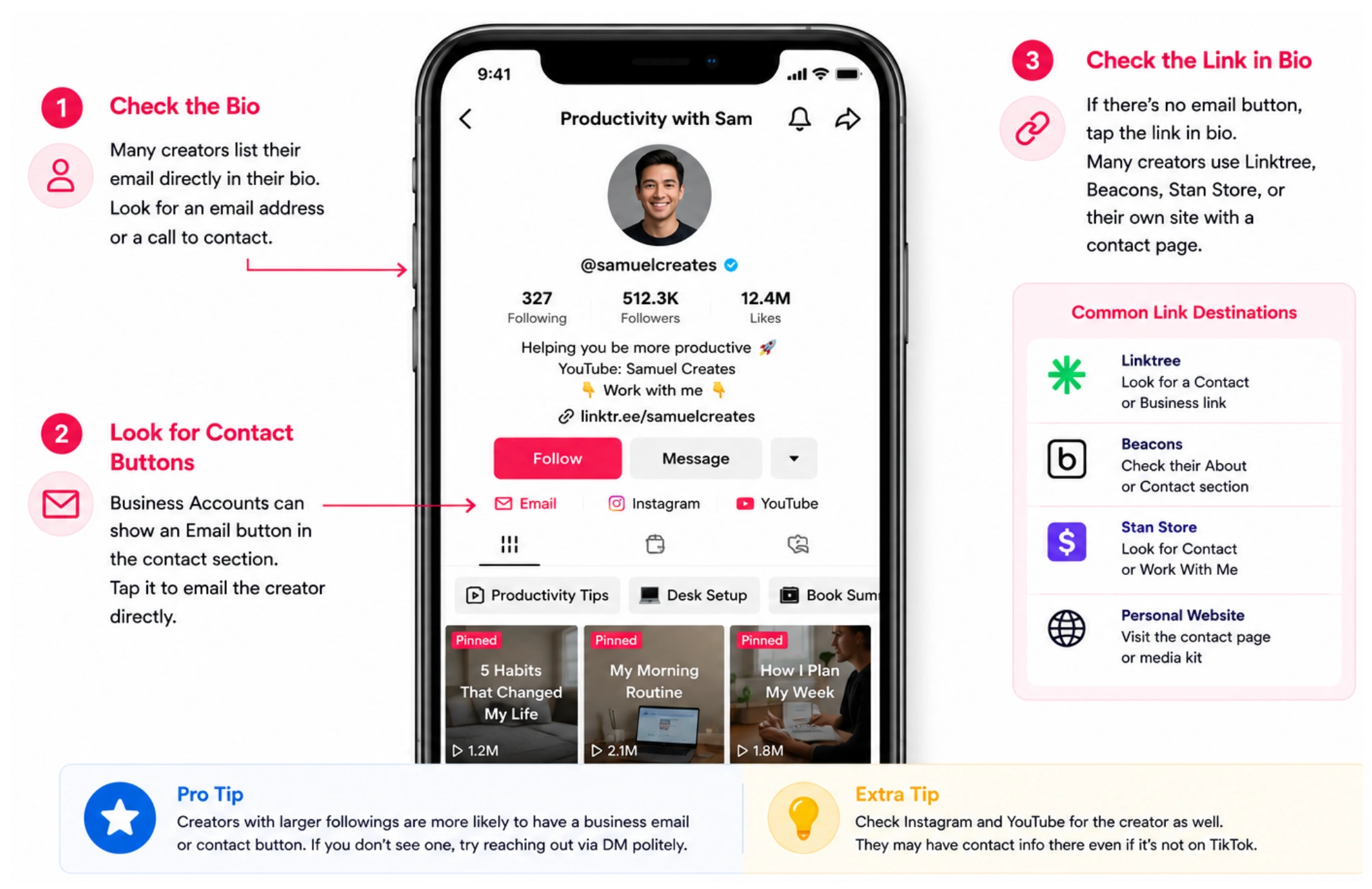
Look for an email address in the bio or a link to a Linktree-style page. TikTok Business Accounts have a contact button that surfaces an email when one is linked. TikTok creator contacts are typically more accessible than LinkedIn but less reliable than Instagram's business email infrastructure.
Method 2: Use a Platform with Built-In Contact Enrichment
When manual profile checks come up empty — and they will for most B2B creators — the fastest reliable path is a platform that handles discovery and contact retrieval in the same interface. That's what Favikon's Contact Enrichment feature does.
Favikon covers 9 platforms: LinkedIn, Instagram, YouTube, TikTok, X (Twitter), Twitch, Pinterest, Snapchat, and Substack. When you're building a campaign, you can trigger email enrichment directly inside the outreach automation setup rather than switching to a separate tool. Here's how it works:
1. Add creators to a Campaign inside Favikon. Go to Campaigns, open your campaign, and navigate to Automation > New Automation.
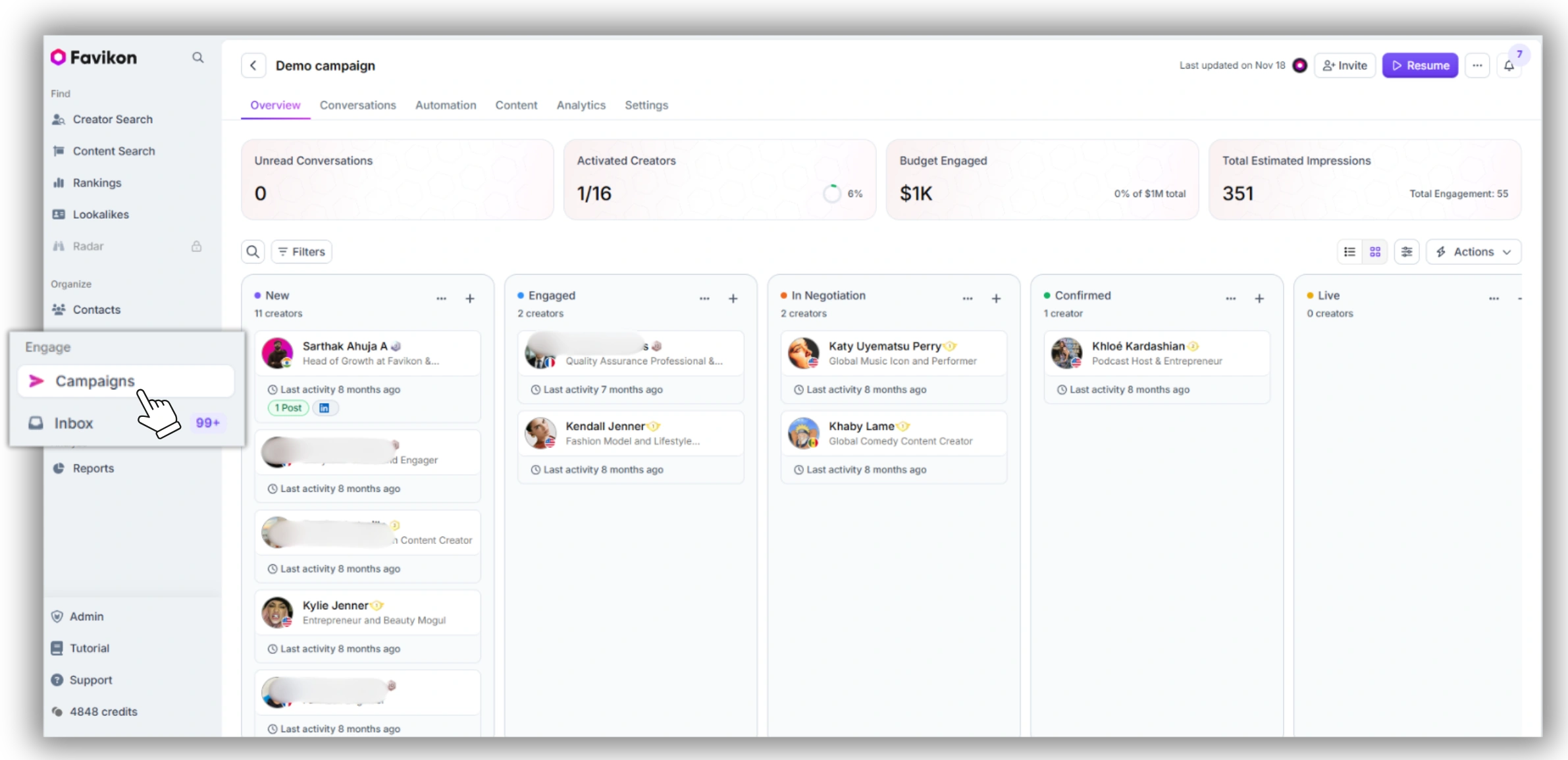
2. Select Email as your outreach channel. Favikon detects which creators in your campaign don't have emails on file and shows a prompt: "X emails need enrichment."
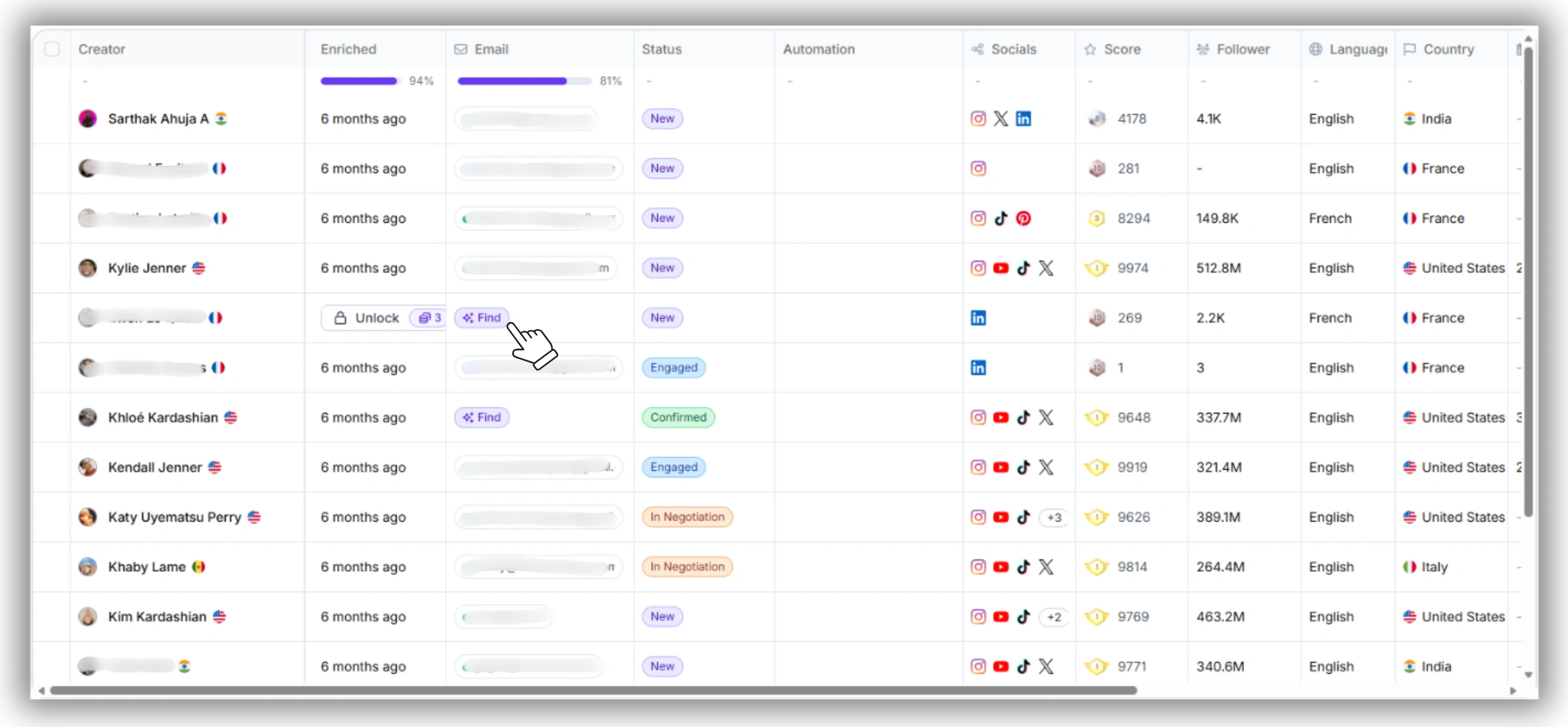
3. Confirm enrichment. Each email enrichment costs 1 credit. If Favikon cannot locate the email automatically, you can manually enter it before proceeding.
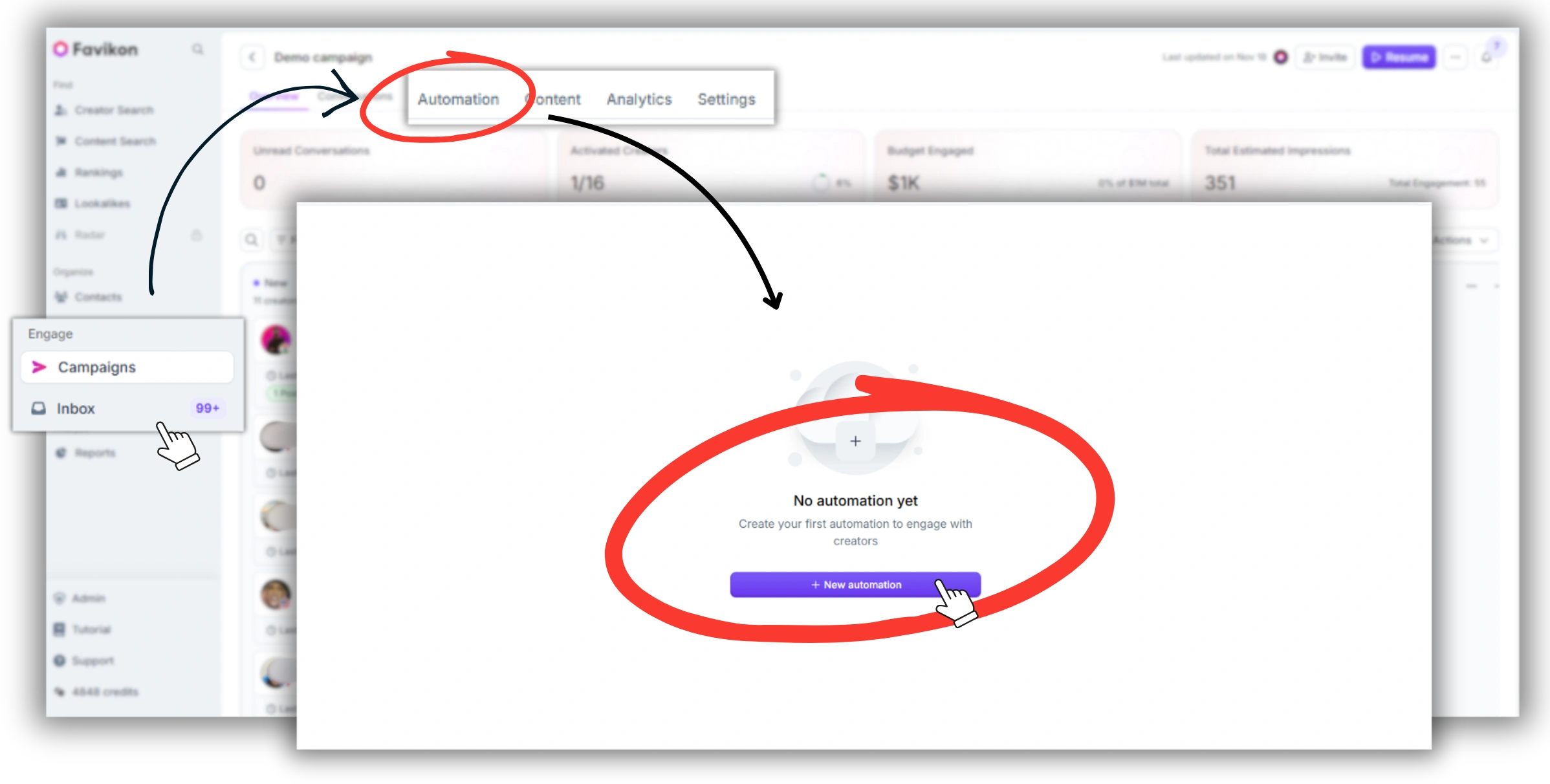
4. Send. After enrichment, outreach goes out directly from the platform — no CSV exports, no switching tools.
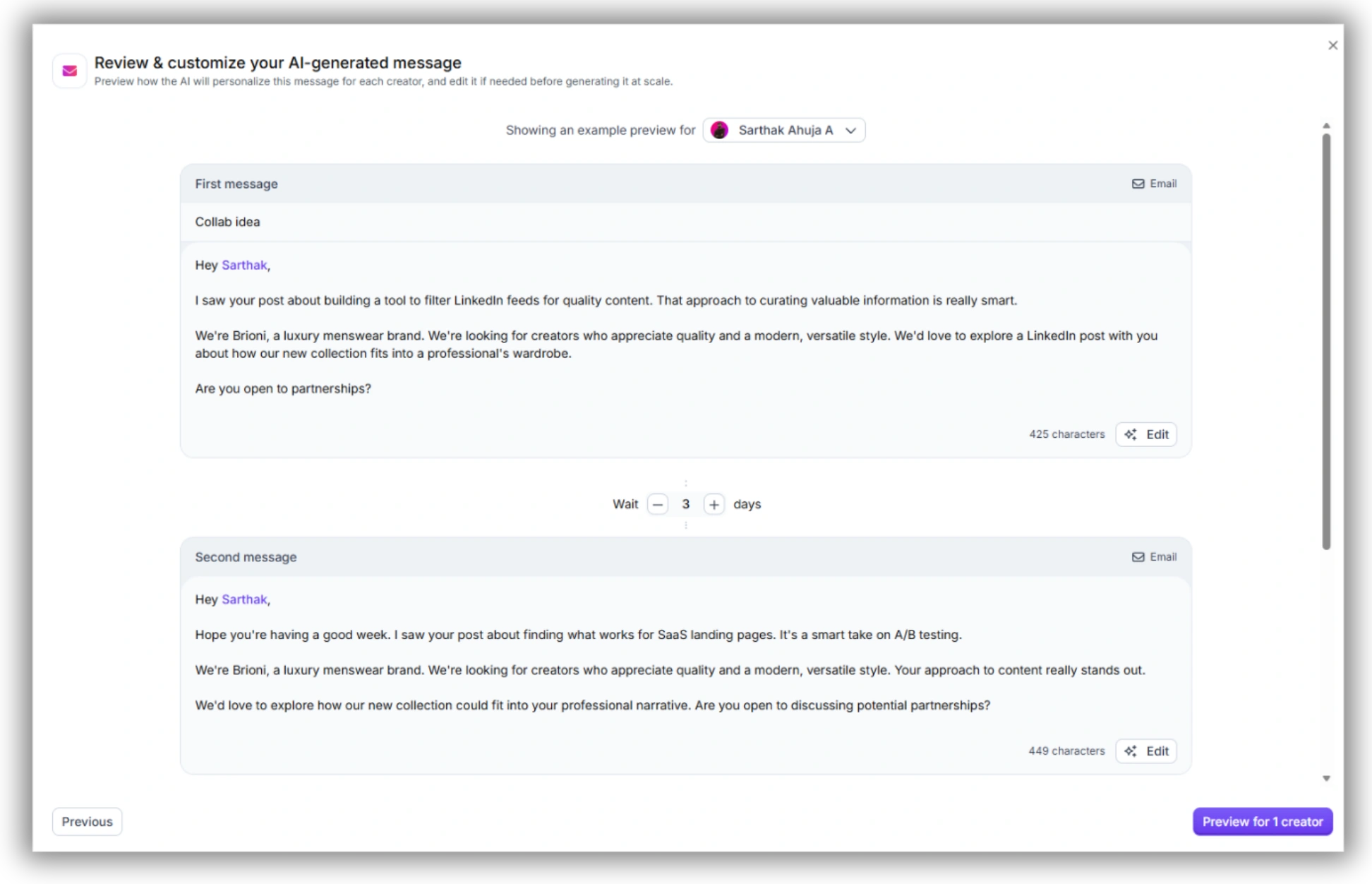
Ready to find and contact creators from one platform? Try Favikon.
Method 3: Third-Party Email Finders (For Edge Cases)
If you have a creator's name and LinkedIn URL but are working outside of Favikon, tools like Hunter.io or Skrapp can return an email address. These tools work by matching a name against a known company domain — for example, if a creator works at a SaaS company and their LinkedIn shows their employer, Hunter may surface a matching address.
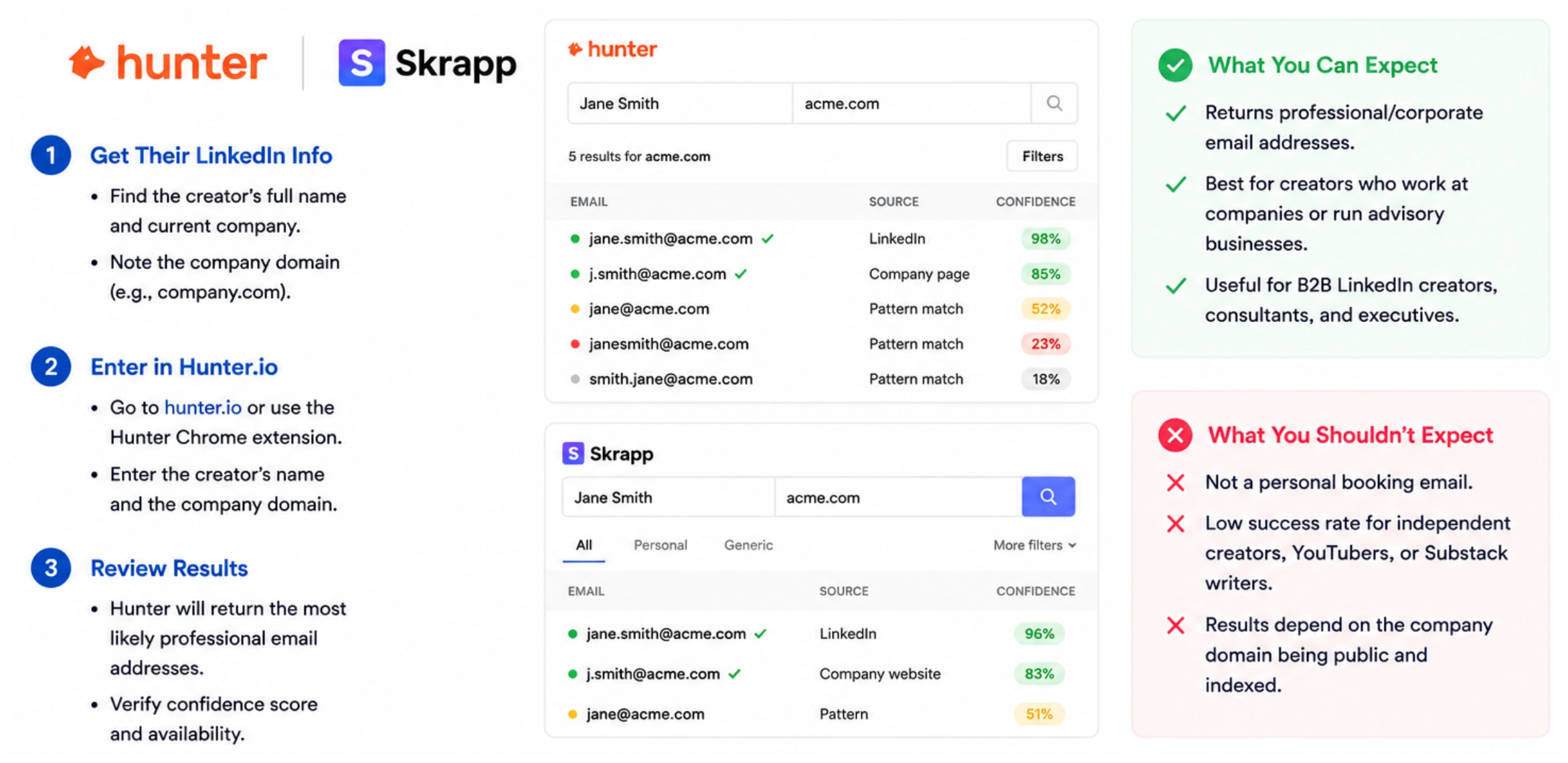
Be honest about what this returns: a corporate or professional domain email, not a creator's personal booking contact. For a B2B LinkedIn creator who runs their own advisory practice, this could be exactly right. For a YouTuber or independent Substack writer, it's far less likely to produce a working contact.
Use third-party finders as a supplementary layer when you have very specific, high-value targets and the enrichment step hasn't returned a result. They're not a scalable primary workflow.
2. The B2B Creator Contact Stack
For B2B influencer marketing teams — those targeting LinkedIn thought leaders, YouTube software reviewers, and Substack writers — this is the only workflow that closes the full loop from discovery to sent message without leaving the platform.
1 — Discover / Favikon Search
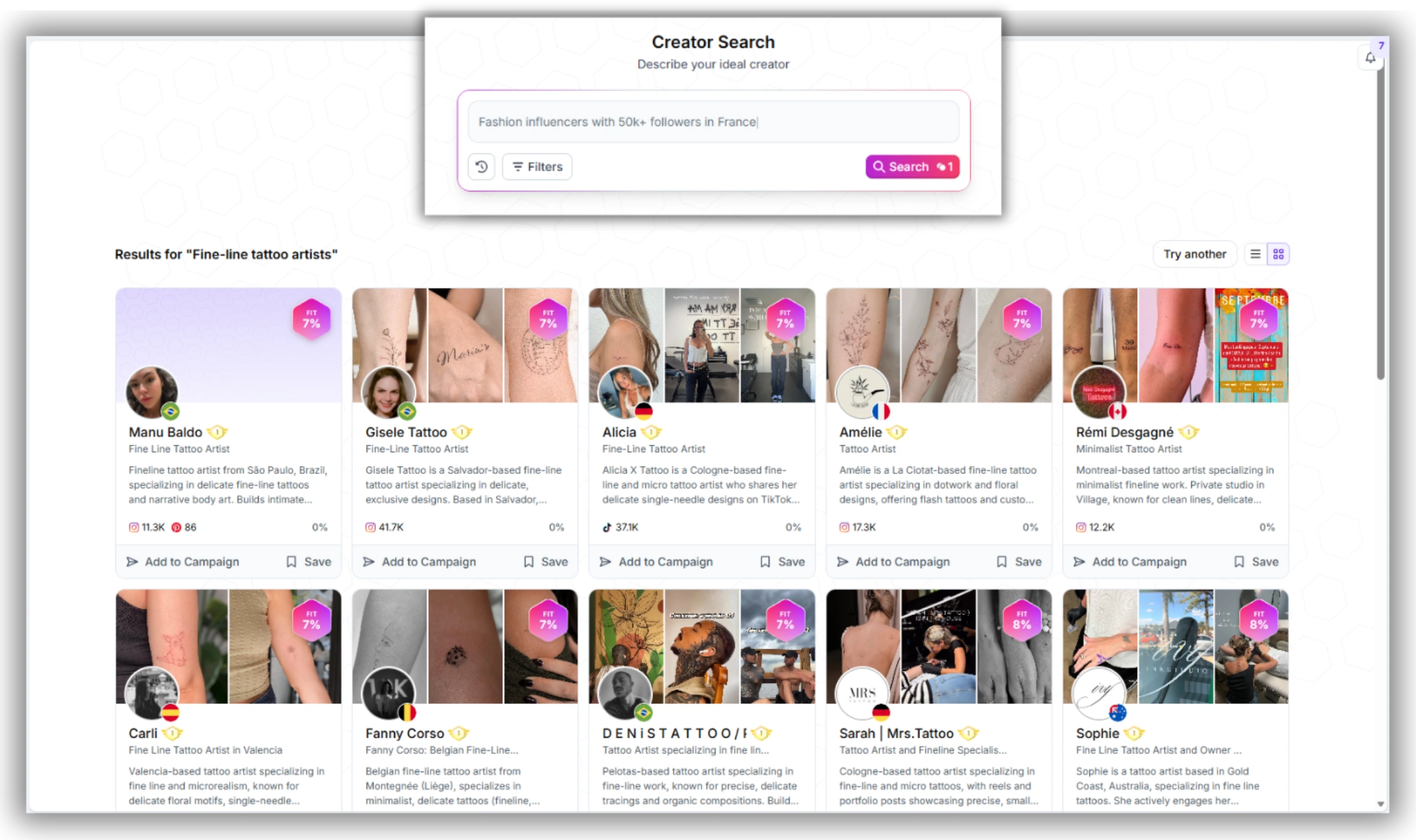
Run a content-based AI search on Favikon across LinkedIn, YouTube, or any of the 9 supported platforms. Filter by niche, follower range, engagement score, and audience demographics.
2 — Enrich / Contact Enrichment (1 credit/email)
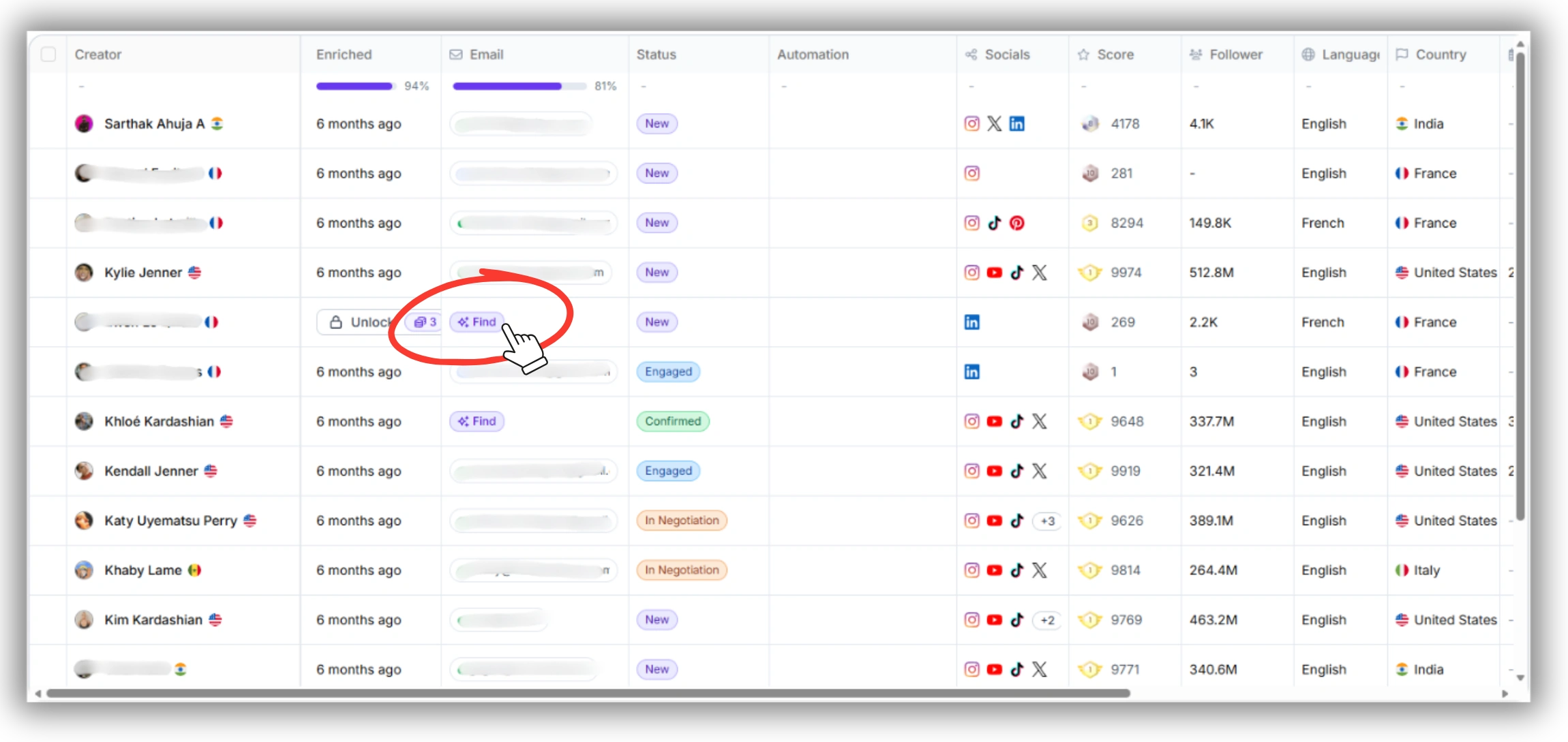
Inside Campaigns > Automation > New Automation, Favikon detects which creators are missing emails and prompts you to enrich. Each enrichment costs 1 credit. If automated lookup fails, add the email manually.
3 — Outreach / Favikon Outreach Automation
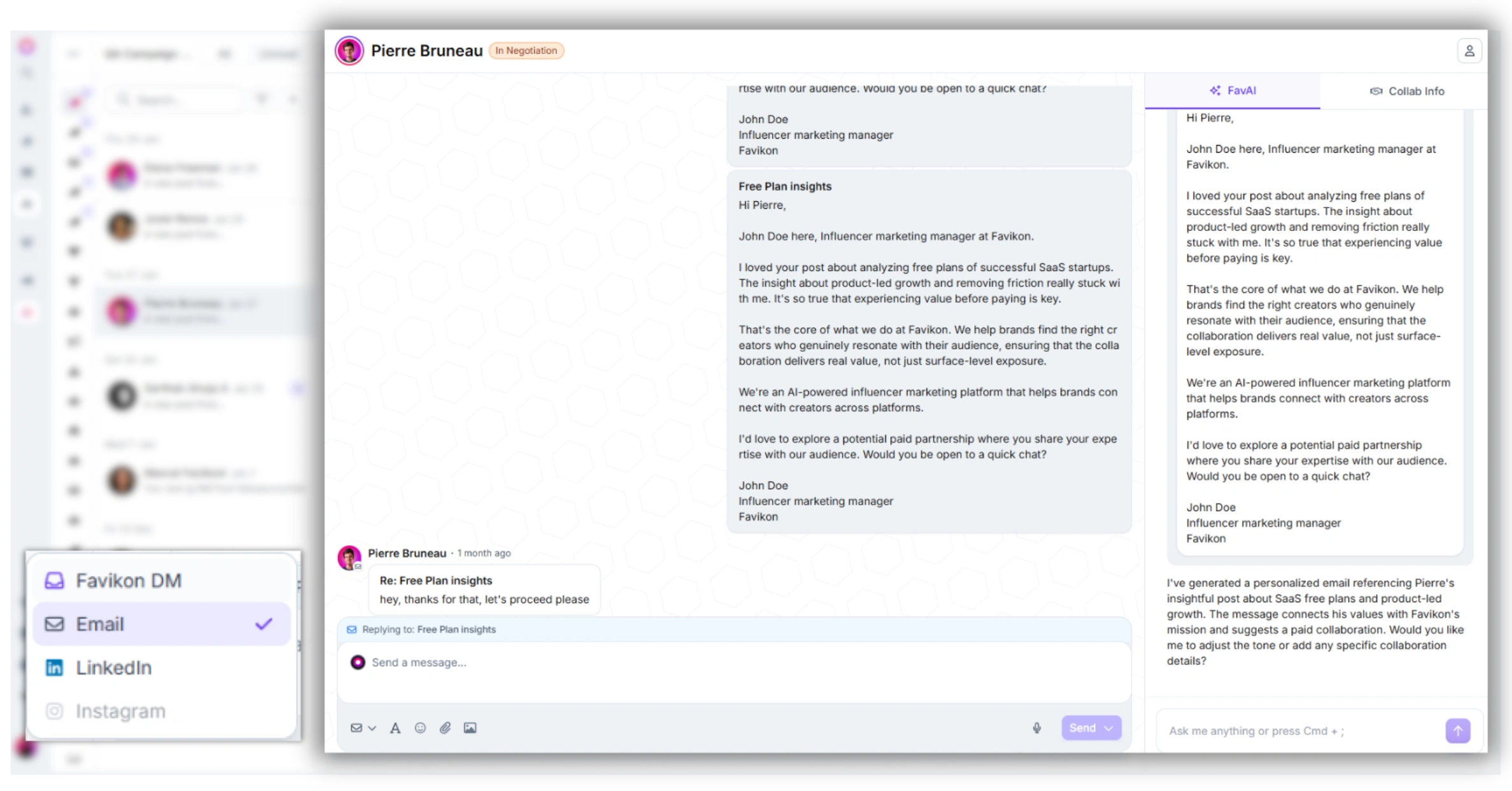
Send via email, Social Media DM, or Favikon DM — all from the same automation interface. Schedule follow-ups and configure tone/language per creator.
What makes this different from every other method in this article: step 3 doesn't require an email at all. For LinkedIn creators specifically, Favikon's outreach automation supports LinkedIn DM and Favikon DM natively. If email enrichment fails for a LinkedIn creator, you can outreach directly via LinkedIn DM from the same interface — eliminating the email dependency entirely.
If you're running outreach at scale across multiple B2B creators simultaneously, this stack prevents the tool-switching and manual CSV management that kills efficiency at volume.
Once you have contact information confirmed, the next step is crafting the message. See influencer outreach templates for copy-paste-ready frameworks organized by platform and use case.
Frequently Asked Questions
How do I find an influencer's email on Instagram?
Open the creator's profile on mobile and look for an email icon directly below the bio. This appears on Business and Creator accounts when the creator has linked a booking email. If the icon isn't there, check their link-in-bio page (Linktree, Beacons, or similar). For creators who don't surface an email through either channel, Favikon's Contact Enrichment can retrieve a verified address for 1 credit inside your Campaign automation.
What is the best free influencer email finder tool?
Hunter.io has a free tier that allows a limited number of domain-based email lookups per month. It works reasonably well when you have a creator's name and employer domain. The limitation is that it surfaces professional domain emails, not personal booking contacts — which matters if you're trying to reach an independent creator or solopreneur rather than an in-house brand ambassador. For finding creator-specific booking emails at any real volume, a dedicated platform is more reliable than free lookup tools.
How do I find a LinkedIn creator's contact email for outreach?
Click "Contact info" on their profile first. If that's empty, use Favikon's Contact Enrichment inside your Campaign automation to retrieve a verified email for 1 credit. For LinkedIn-specific outreach, Favikon also supports LinkedIn DM natively, so you may not need the email at all — the DM channel often outperforms cold email for professional creator outreach anyway.
What do I do if an influencer doesn't have a public email?
Three options in order of effort: (1) Use Contact Enrichment inside your Favikon Campaign — Favikon attempts to locate a verified email automatically. (2) If enrichment returns nothing, manually add the email inside the automation step if you have it from another source. (3) Switch channels — for LinkedIn and Instagram creators, Favikon supports LinkedIn DM and Social Media DM respectively, removing the email requirement entirely for initial outreach.
How do I verify an influencer email before sending?
Email enrichment through Favikon returns verified addresses — the platform handles verification before surfacing the contact. If you've sourced an email manually or via a third-party tool like Hunter.io, run it through a verification service like NeverBounce or ZeroBounce before sending to protect your sender reputation. Sending to invalid addresses at scale damages deliverability across your entire domain.
Also See 👀
➡️ INFLUENCER OUTREACH TEMPLATES THAT ACTUALLY GET REPLIES
➡️ INFLUENCER OUTREACH AT SCALE: HOW TO DO IT WITHOUT SOUNDING LIKE A BOT
➡️ FAVIKON INFLUENCER DATABASE — 10M+ PROFILES
Others articles