How to Automate Influencer Content Tracking (And What You Still Can't)
Tracking influencer content manually takes time, especially when campaigns run across multiple platforms. Learn which parts of influencer content tracking you can automate, where platform limits still apply, and what requires creator permission.

How to Automate Influencer Content Tracking (And What You Still Can't)
I run influencer campaigns at Favikon, and I also spend a lot of time tracking campaigns that have nothing to do with us. Competitor activations, creator programs in adjacent categories, anything I can learn from. Over two years of doing that, the thing I keep running into is not a tooling problem. It is an expectations problem.
Every guide on this topic reads the same way. Here are nine influencer marketing tasks you can automate, and here is our platform. Nobody tells you what breaks. Nobody tells you that the Instagram Story you are about to automate will give you a view count and nothing else, or that if a creator forgets your hashtag the whole system quietly misses the post, or that no tool on earth will recover a post that got deleted before your tracker refreshed.
So I want to do this differently. I will show you exactly what is trackable, exactly what is not, and then how to automate the part that is. The order matters, because almost every bad influencer reporting setup I have seen started with someone automating a number they did not understand.
This is also why measurement stays the hardest part of the job. Linqia surveyed over 200 enterprise marketers for its 2026 State of Influencer Marketing report and found 79% still struggle to measure ROI, with 48% naming attribution as the single biggest gap. That gap is not a tooling shortage. It is a mismatch between what people assume is visible and what actually is.
What Is Automated Influencer Content Tracking?
Automated influencer content tracking is the process of continuously collecting creator posts and their public performance metrics without manually checking profiles or asking creators for screenshots. A tracker monitors a defined set of creators or a defined set of signals, pulls new content on a schedule, and stores the metrics in one place you can filter, export and report on.
That is the whole idea. Three things have to be true for it to work:
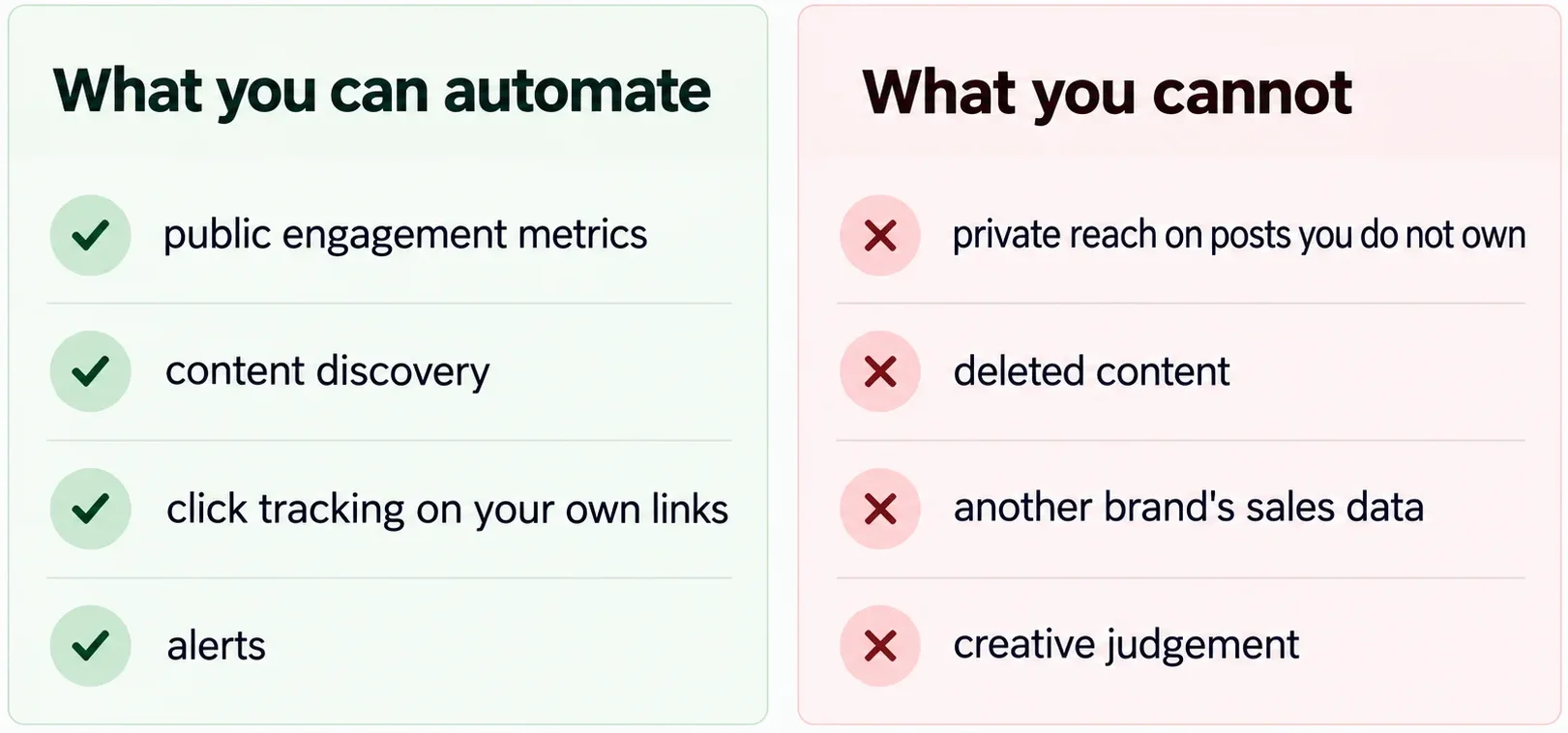
- The content has to be publicly visible. A private account is invisible to every tool, including ours.
- The tracker has to be able to find it. Either you named the creator, or the post carries a signal the tracker is watching for.
- The metric has to be public. Likes and comments are. Reach on a post you do not own usually is not.
Miss any one of those and automation does not partially work. It silently returns nothing, which is worse, because you report a zero as if it were a result.
The rest of this guide is organised by what you are actually trying to do. Pick your case.
What You Can Track Without Ever Contacting a Creator
If a profile is public, you can track it. That holds on every platform. What changes by platform is which numbers are exposed.
The line to hold in your head is this: anything a logged-out visitor can see on the post, a tracker can collect. Anything that lives behind the creator's own analytics tab needs their permission, full stop.
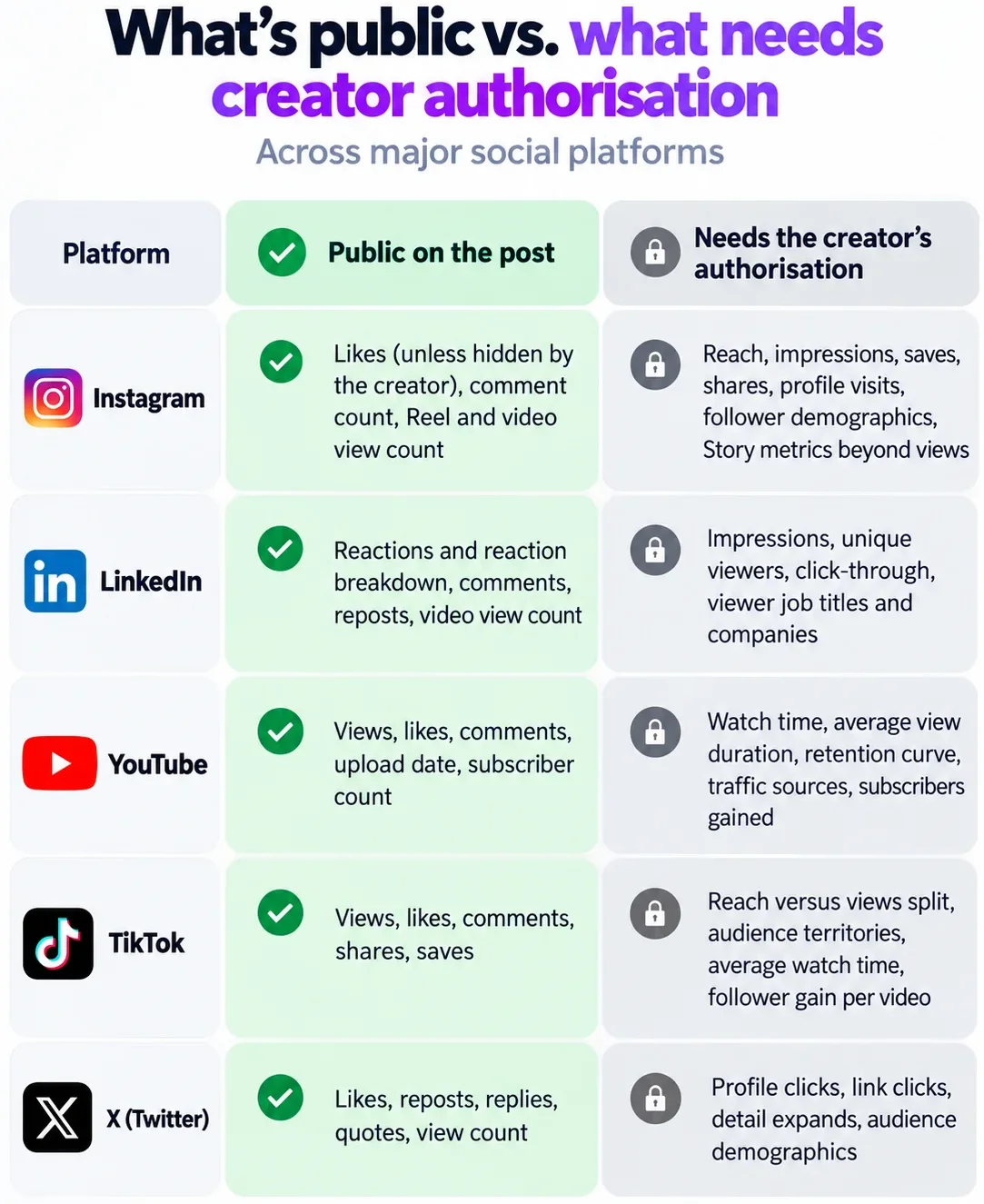
Two things worth flagging. First, a creator can hide like counts on Instagram, and some do. When that happens the number is gone for everyone, including every tool. Second, YouTube removed public dislike counts in 2021, so any tool still showing you a dislike figure is estimating it.
If you want to go deeper on which metrics are worth reporting at all once you have them, I wrote a separate breakdown of influencer marketing KPIs that covers which numbers actually predict outcomes.
Case 1: You Know the Creators and Want to Track How Their Content Performs
This is the most common one. You have a list of handles, either because you are working with them or because you want to watch them, and you want their posts and numbers in one place without opening fifteen tabs.
There are two routes.
The build-it-yourself route: Apify plus Claude
Apify runs scrapers for most social platforms. You connect it to Claude, hand it the profile URLs or handles, and it returns the posts and their public metrics. For a one-off pull across twenty creators, this is genuinely fast and I use it when I want something ad hoc.
It stops being the right tool in three situations:
- Long windows. Scraping cost scales with volume. Pulling two years of history across a roster gets expensive quickly.
- Ongoing tracking. A scraper run is a snapshot. It does not know a creator posted yesterday unless you tell it to run again, which means building and maintaining schedules.
- Reliability. Scrapers break when platforms change their markup. You find out when your report is empty.
If your window is under three months and you only need it once, this is fine. Past that, you are maintaining infrastructure instead of running campaigns.
The platform route
I work at Favikon so take the recommendation with that in mind. Modash and others do a version of this too, and I have written up where we differ. Here is the setup in our tool, which takes about four minutes:
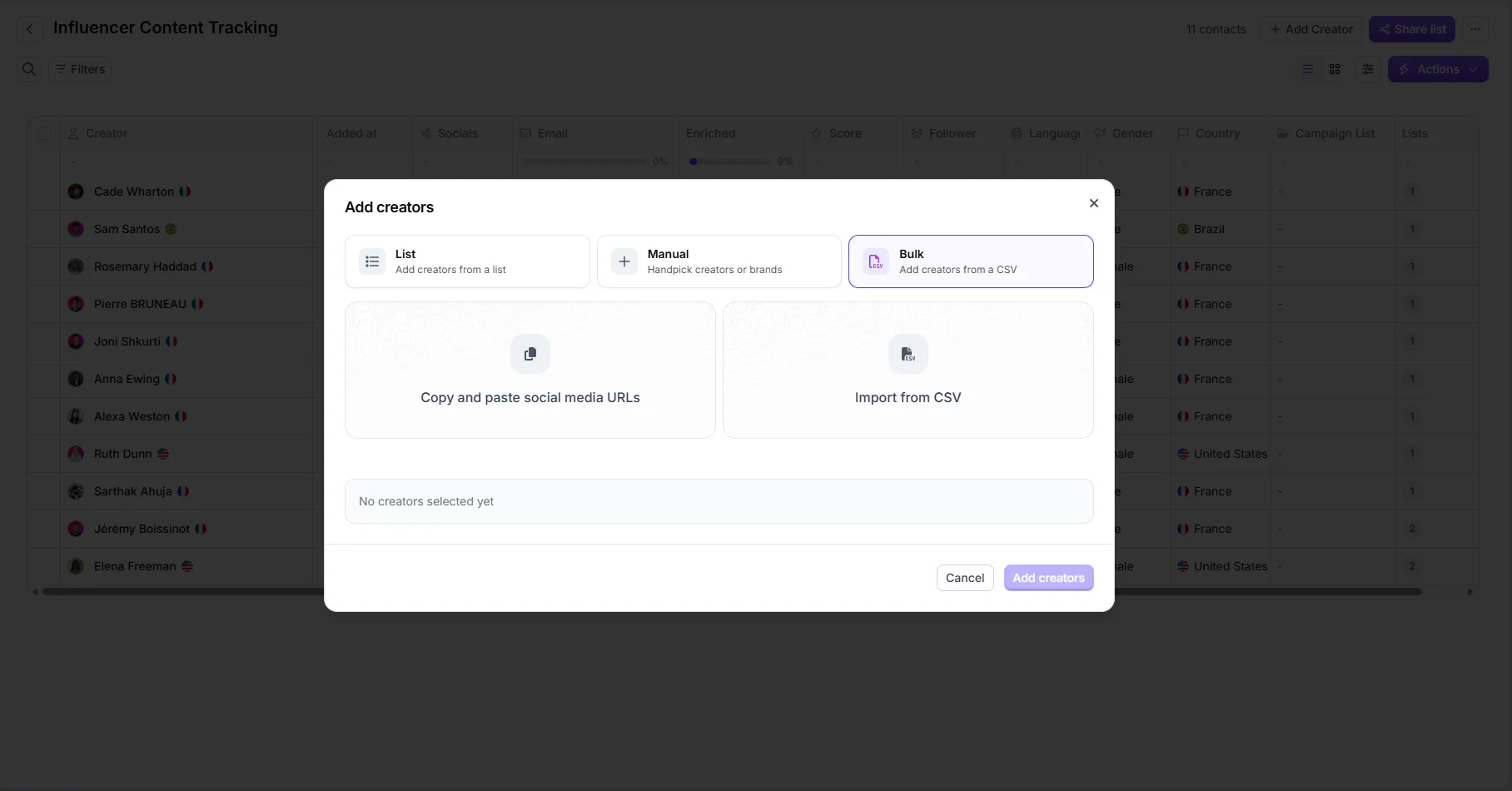
- Create a new list.
- Add the creators, either by pasting URLs and handles or by pulling them from the database.
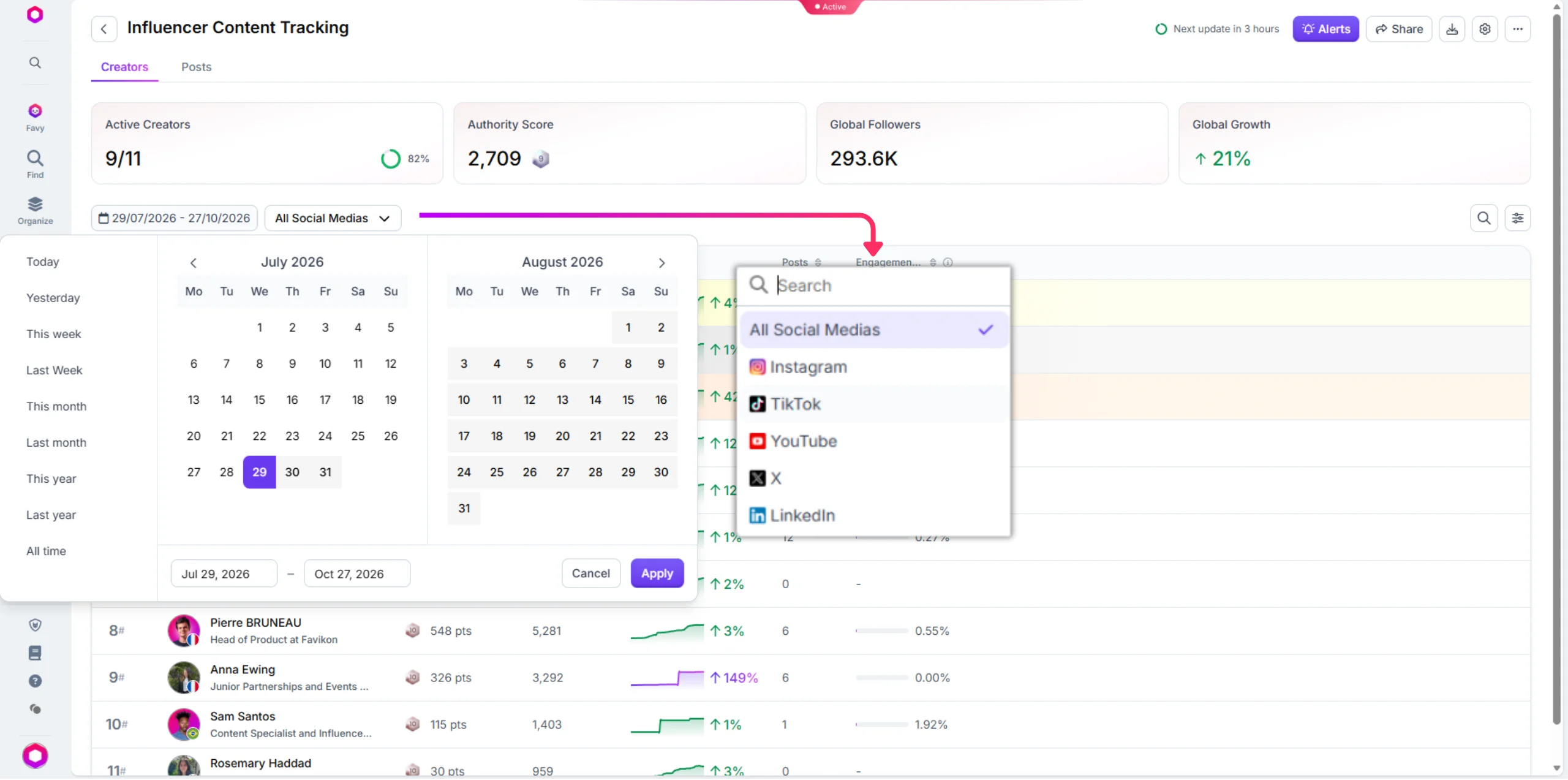
- Create a tracker from that list.
- Pick your date range and the platforms you care about.
That is it. From there you have every post and its public metrics, filterable by creator and by hashtag, exportable to CSV, and shareable with colleagues or clients without giving them a seat.
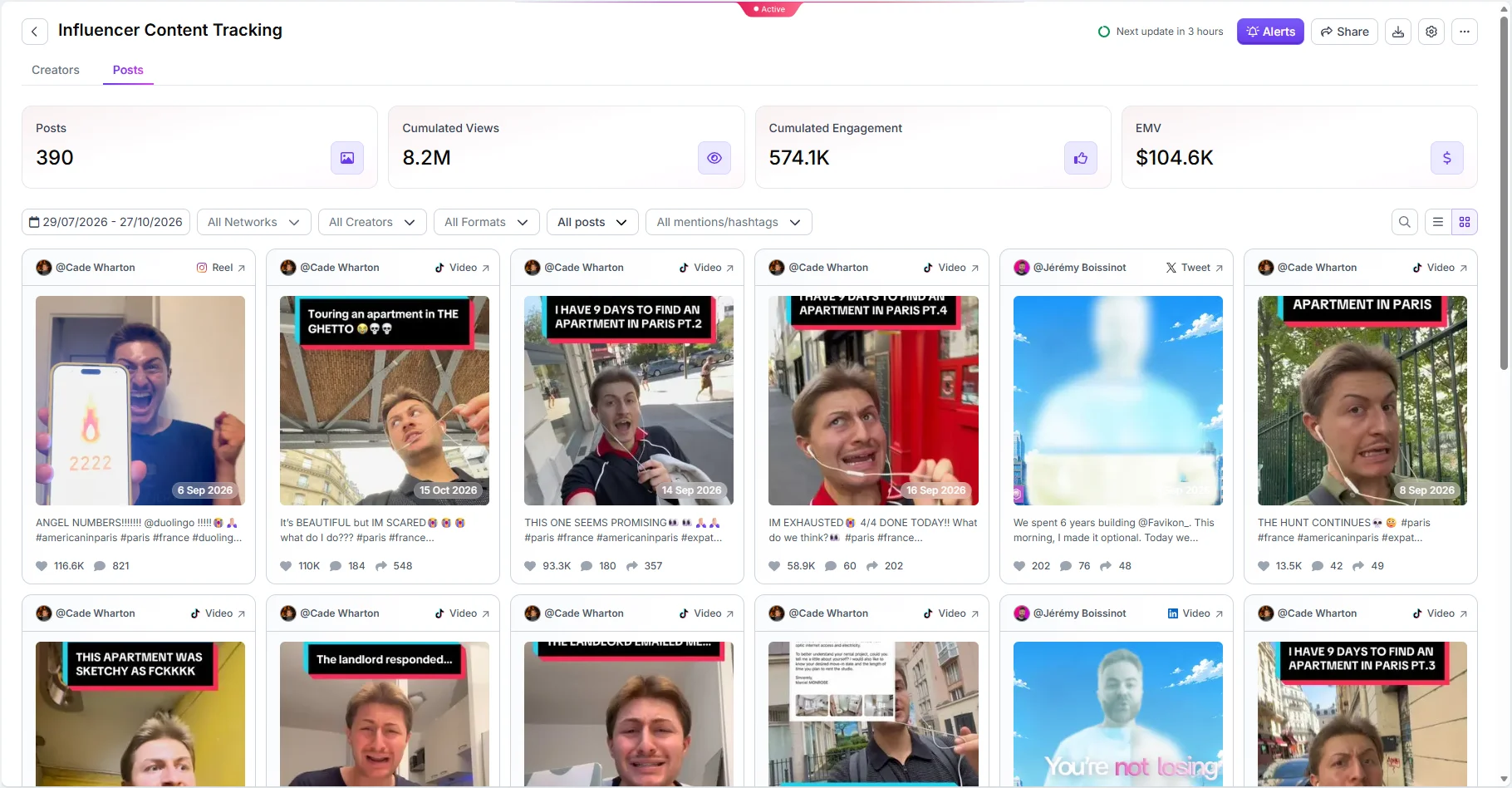
Set up your first tracker in four minutes.
Case 2: You Want to Track What a Campaign Sent to Your Website or App
This is your own campaign, so you control the links. That changes everything, because now you are not limited to what the platform exposes.
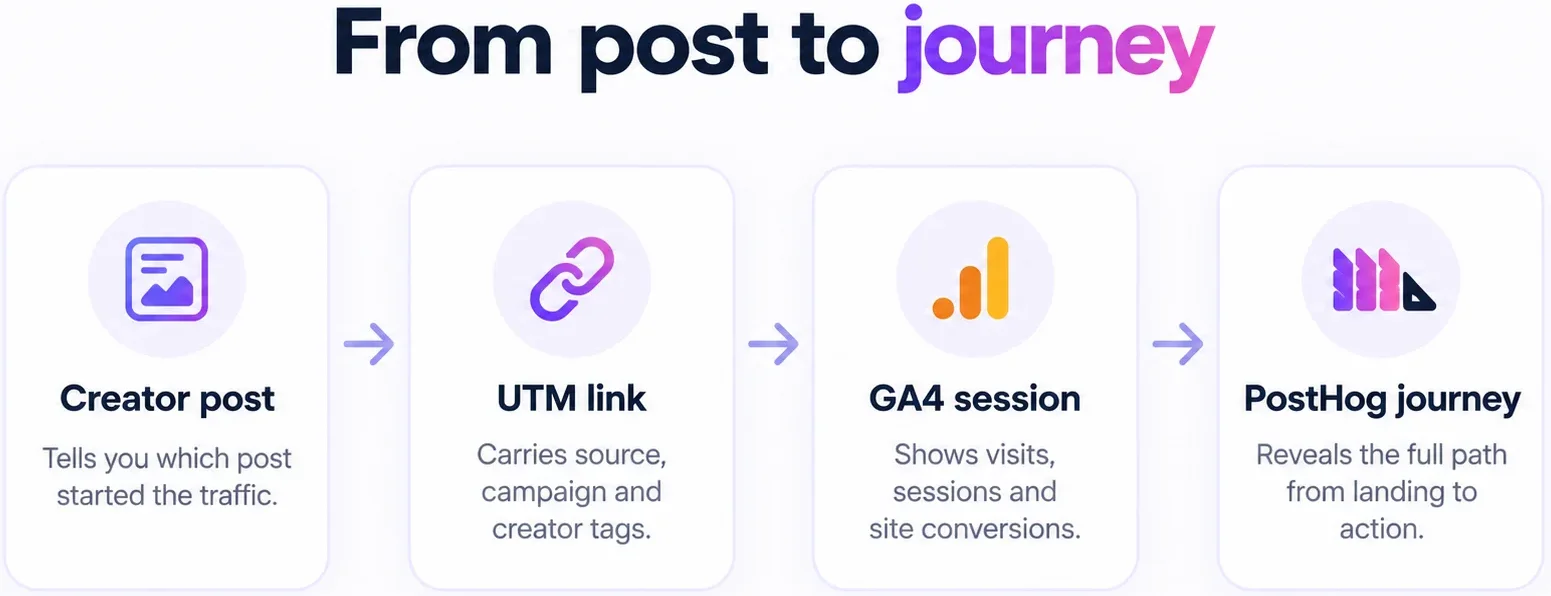
Start with UTMs, and give every creator their own
A UTM is a tag appended to your URL that tells your analytics where a visitor came from. The convention I use is simple: utm_source is the platform, utm_medium is influencer, and utm_campaign is the campaign name. The one that matters most is utm_content, which I set to the creator's handle. One creator, one unique link, every time.
The reason to be strict about this is that creator-level attribution is the entire point. Campaign-level UTMs tell you the campaign worked. Creator-level UTMs tell you which creator to re-book.
UTMs have known limits. Dark social breaks them, because someone who screenshots your link and pastes it into a group chat arrives as direct traffic. iOS privacy changes and in-app browsers strip parameters inconsistently. I go through the models that compensate for this, including promo codes, post-purchase surveys and holdout testing, in our complete guide to influencer marketing attribution. The short version: no single method is complete, so you triangulate two or three and accept a margin.
Then layer on what happened after the click
UTMs tell you someone arrived. They do not tell you what that person did.
- GA4 gives you sessions, pages, and conversions by source. It is the baseline and it is free.
- PostHog or any session-level product analytics tool shows you the individual journey. Which pages, in what order, where they dropped. I use PostHog on my own campaigns and it is consistently the strongest signal I get, because it tells me whether creator traffic behaves like qualified traffic or like curiosity.
That distinction is the one that changes decisions. Two creators can send identical click volumes and produce completely different downstream behaviour, and you only see it at the session level.
Inside Favikon you can track the KPIs you have defined for the campaign alongside clicks and their source, so content performance and traffic sit in the same view rather than in two tools you manually reconcile. If you are running several campaigns at once, I have written separately on managing multiple influencer campaigns simultaneously.
Case 3: You Want to Track Someone Else's Campaign
This is the one I do most, and it is the one with the hardest ceiling.
You can automate a surprising amount. You can identify which creators a brand is working with, when the posts went live, what the engagement looked like, how the creative was structured, and whether the activation was a one-off or a sustained program. All of that is public and all of it is collectible. I walked through the full method in how to analyze any influencer campaign using Claude, which pairs campaign content with Claude to code the creative choices rather than just count the likes. If you are tracking a competitor specifically, how to track competitor influencer partnerships is the more direct playbook.
Here is where it stops.
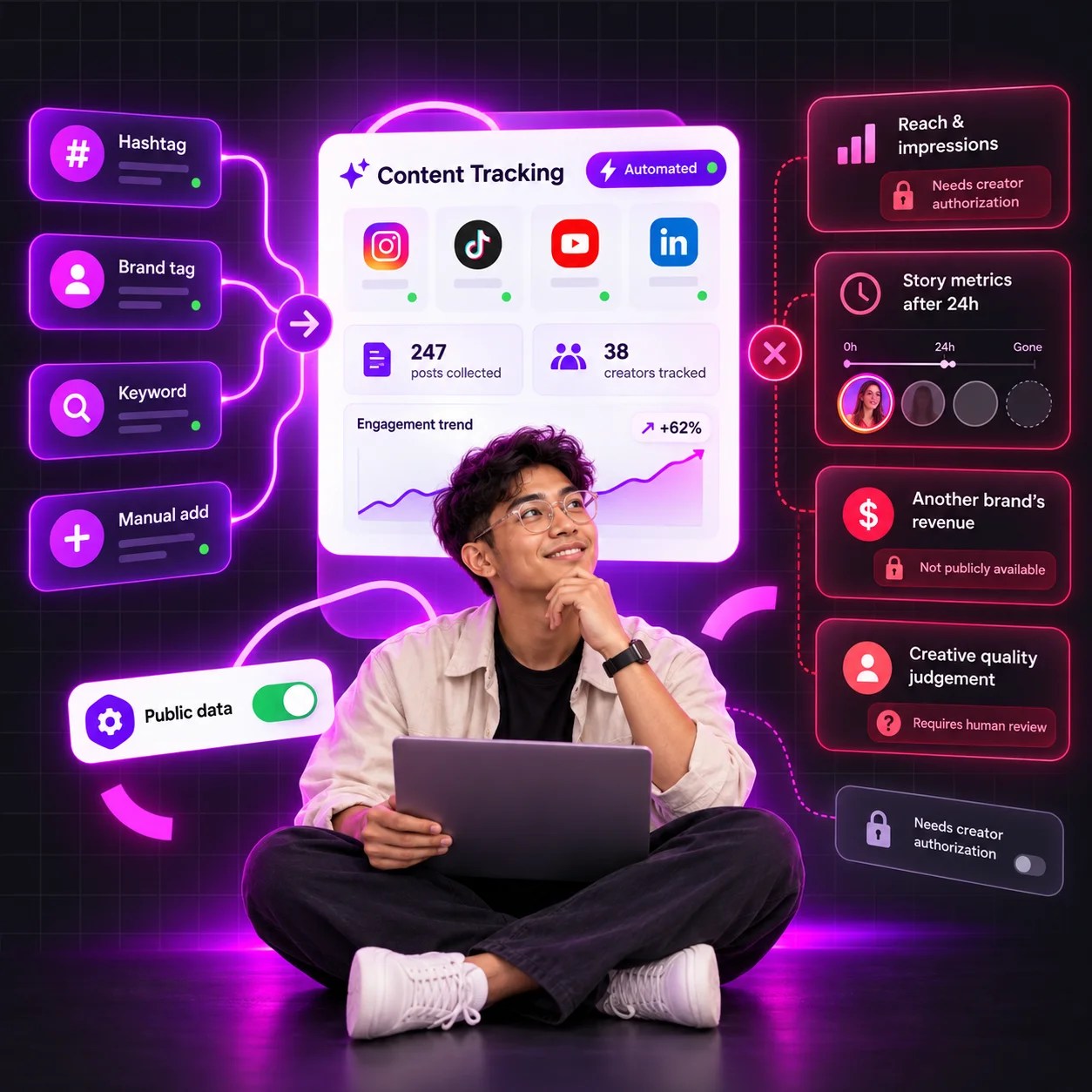
You cannot see clicks on someone else's links. You cannot see their promo code redemptions, their conversion rate, their revenue, or their cost per acquisition. None of that is public, none of it will ever be public, and any tool claiming to give it to you is modelling, not measuring.
The honest answer for the real numbers is to ask. I have had decent success reaching out to the creator or the influencer marketing manager directly, especially when the campaign is a few months old and the commercial sensitivity has faded. Creators in particular are often willing to share their side, because it is their performance data too. You will not get a yes every time. You will get one often enough that it is worth the five minutes.
What I do not do is guess and present the guess as a finding. If I only have engagement data, I say I only have engagement data.
Case 4: You Want to Track a Trend, Not a Creator
The first three cases all start with a named creator or a named campaign. This one does not. Here you are asking a different question: what is happening in my category right now, and who is driving it.
That is social listening, and it is the case most tracking guides skip entirely.
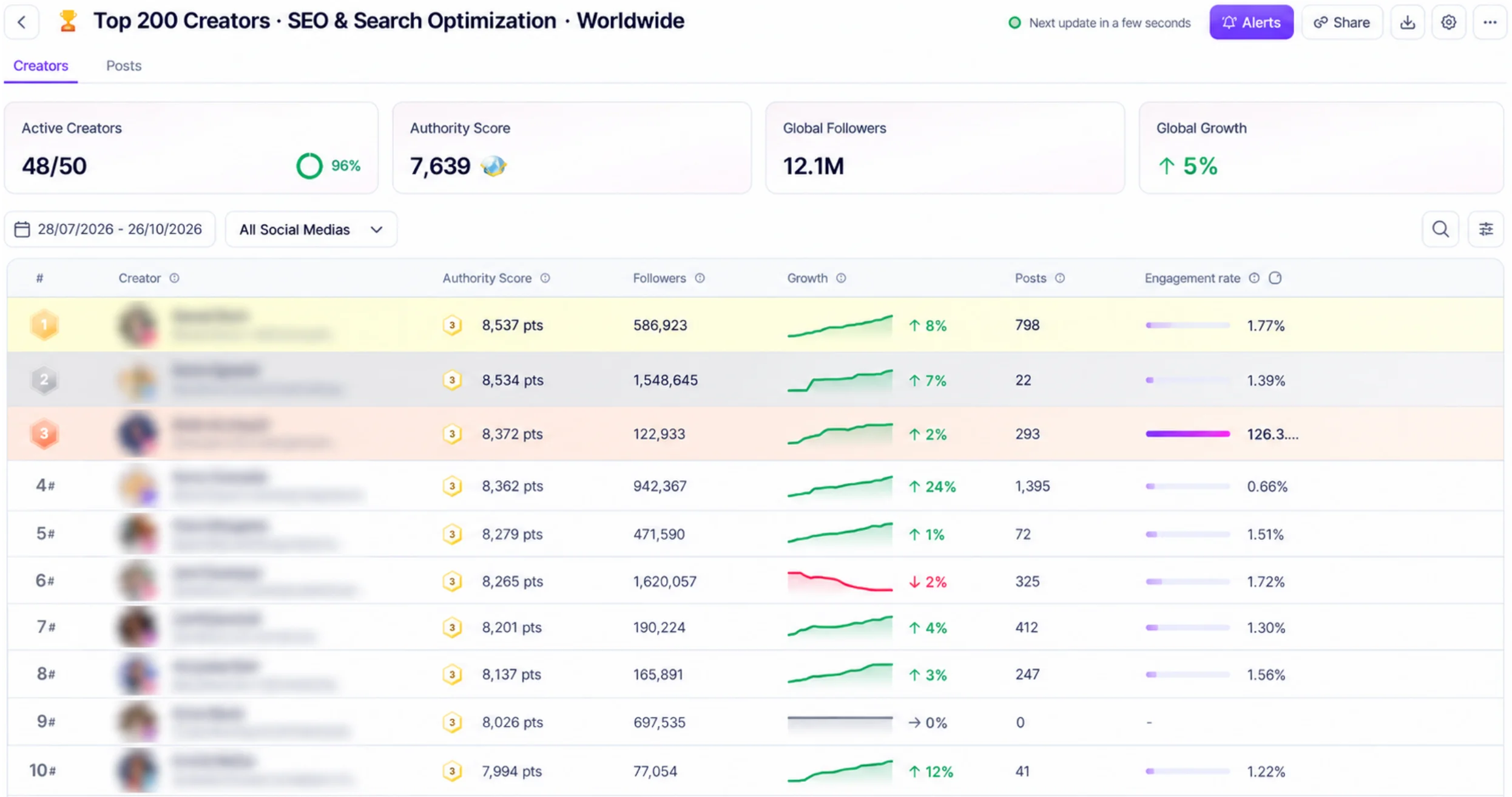
The mechanic is different. Instead of adding ten handles, you track an industry. In Favikon that means following hundreds of creators in a defined space at once, then watching what surfaces: which topics are accelerating, which formats are being copied, which creators are gaining ground, which brands are suddenly appearing in creator content.
I use this in three ways:
- Format detection. When the same structural choice shows up across unrelated creators in the same month, that is a signal worth testing, not a coincidence.
- Competitor early warning. A brand ramping up creator partnerships shows up in industry tracking weeks before it shows up anywhere else.
- Creator discovery with proof. Someone consistently outperforming the category average is a better shortlist candidate than someone with a big follower count.
The caveat is scope. Industry tracking tells you what is visible on social. It does not tell you what is being discussed in private communities, in newsletters, or in Slack groups. LinkedIn in particular is harder than it looks, and I wrote about what is realistic to monitor there given the API constraints. Those constraints are structural, not temporary. LinkedIn's public API has been restricted to a narrow set of scopes for years, and that is not changing.
What Happens When a Creator Forgets Your Hashtag
This is the failure mode nobody writes about and everybody hits.
Most tracking setups listen for one signal, usually a campaign hashtag. The creator posts, forgets the hashtag, and the post never enters your report. You find out at the end of the campaign when your post count does not match your contract.
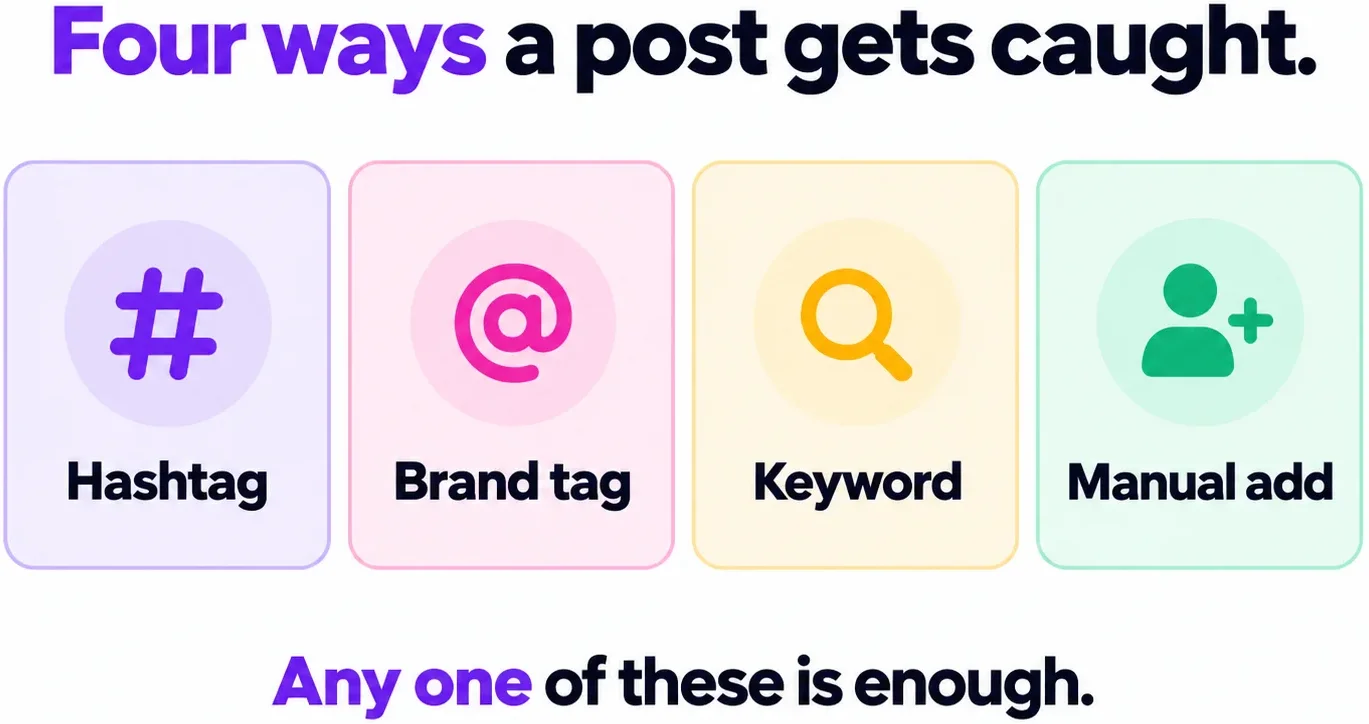
When you are working with a creator directly, Favikon checks content four ways, not one:
- Hashtag. The campaign hashtag, the obvious one.
- Brand tag. The creator tagging your account, which they often do even when they forget the hashtag.
- Keyword. A product name or phrase in the caption, which catches posts that carry neither tag.
- Manual add. If all three miss, you add the post URL yourself and it joins the tracker with its metrics intact.
The fourth one matters more than it sounds. Every automated system needs a manual override, because the edge cases are not rare. A creator spells your brand name wrong. A post goes up as a collab. Someone publishes from a second account. The override is what turns a tracker from a system that mostly works into one you can report from.
My practical advice regardless of tooling: put the required tags in the brief in writing, and do not rely on them. Build the keyword catch as a backstop on day one, not after the first campaign where you lost three posts. If you want the brief template, we have one on how to develop an influencer brief that gets results.
Instagram Stories: What Automation Actually Captures
Stories are the single biggest gap between what people expect from automated tracking and what they get.
Here is the honest position. Stories can be tracked automatically. You will see that the Story went up, and you will see a view count. That is the extent of it.
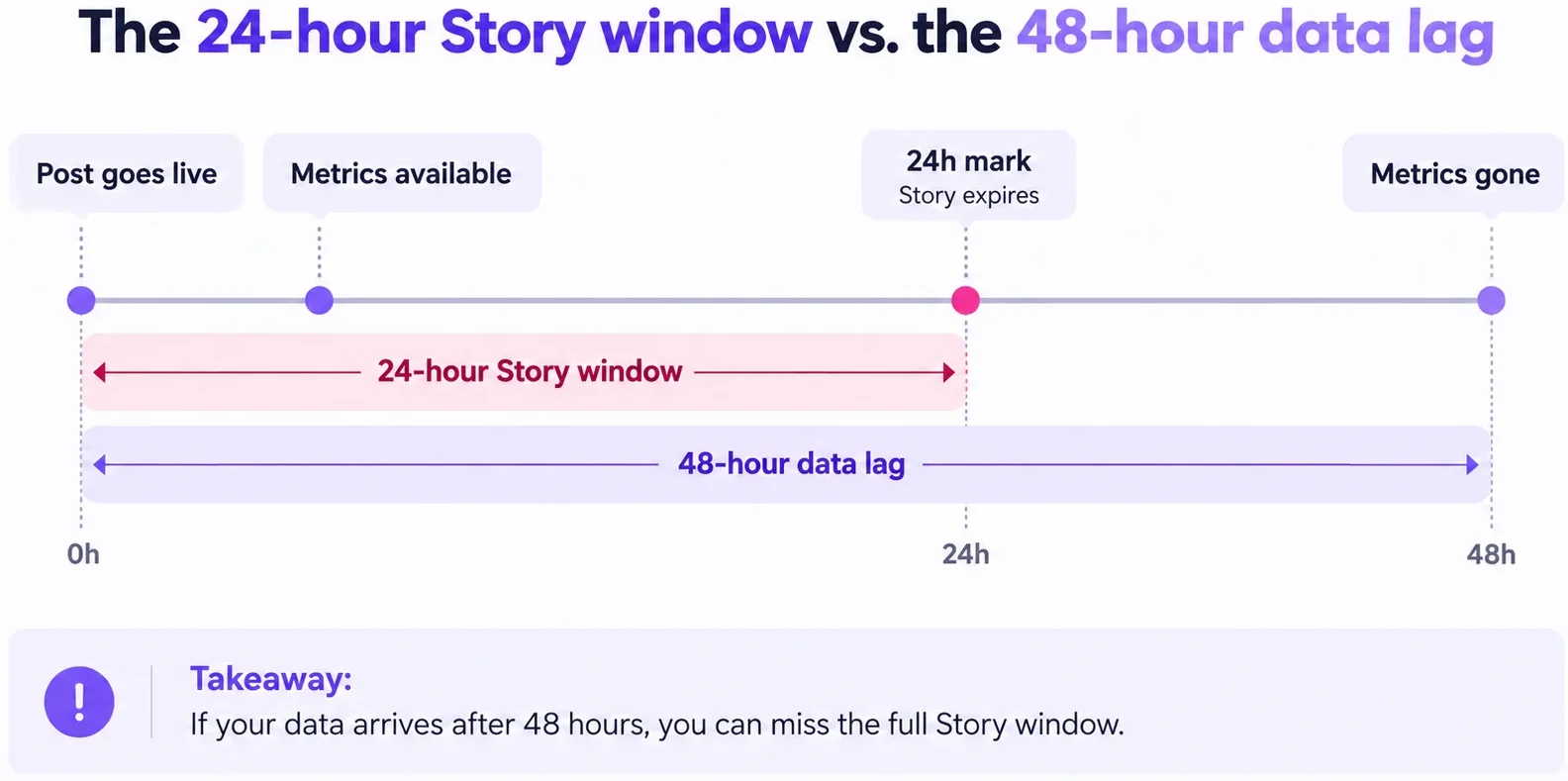
You will not get taps forward, taps back, exits, replies, sticker taps or link clicks unless the creator gives you access to their own analytics. And even then there is a hard clock. Meta's own documentation is explicit that Story insights are only available for 24 hours, even if the Story is archived or added to a highlight. Miss the window and the data is gone, not delayed.
A few more constraints from the same documentation that are worth knowing before you promise anyone a Story report:
- Story metrics with fewer than five viewers return an error rather than a number.
- Insights data can lag by up to 48 hours, so a same-day report is a provisional report.
- Media metrics are retained for up to two years, account-level metrics for 90 days.
- For Stories posted by users in Europe and Japan, the replies metric returns zero.
What I do in practice: I treat Story view count as a reach proxy and nothing more, and if Story performance genuinely matters to the campaign I write screenshot delivery into the contract. Asking a creator to send two screenshots within 24 hours of posting is a reasonable ask. Expecting a tool to recover data the platform deleted is not.
How Often Trackers Refresh, How Far Back They Reach, and What They Lose
Three questions worth asking any tool before you commit a campaign to it.
How often does it refresh? Ours refreshes every 24 hours. That is the right cadence for almost every reporting use case and the wrong one if you need real-time. If a post goes viral at 9am, you are seeing that at 9am the next day. Plan your reporting rhythm around it rather than refreshing a dashboard hoping for different numbers.
How far back can it go? In a good scenario we pull around two years of history, and often considerably further. That matters more than people expect, because it lets you benchmark a campaign against a creator's own baseline rather than against a category average. A post doing 40% above that creator's median is a real result. The same post compared to an industry benchmark tells you nothing.
What does it lose? Deleted content, permanently. If a creator takes a post down, no tracker recovers it. The metrics collected before deletion stay in your tracker, but the post itself is gone and you cannot re-verify it.
That last point has a practical consequence. If a post is contractually required, or if you are building a case study, or if you are tracking a competitor who may clean up their feed later, archive it yourself at the time. A screenshot and the URL in a folder costs you ten seconds and saves the entire record.
I learned this the expensive way on a competitor teardown where three of the posts I was analysing disappeared between my first pass and my write-up.
Automation Without Alerts Is Just a Dashboard
A tracker that collects content perfectly and tells you nothing is a dashboard you have to remember to open. That is not automation, that is a chore with better formatting.
The alerts that actually change behaviour are narrow:
- A tracked creator posted. This is the one that matters most. You find out when the content goes live, not when you next log in, which means you can amplify it the same day while the algorithm is still distributing it.
- A creator missed their window. If a post was due and nothing appeared, you want to know before the campaign ends, not during reconciliation.
- A post is outperforming. Worth catching early because that is your paid amplification candidate.
We have alerting in the product, and my honest take on alerts generally is to turn on fewer than you think you need. An alert you stop reading is worse than no alert, because you now have a false sense of coverage. I run two: new post from a tracked creator, and missed deliverable. Everything else I look at on a weekly rhythm.
Get notified the moment a creator posts.
Automate Tracking With Claude: Four Prompts You Can Copy
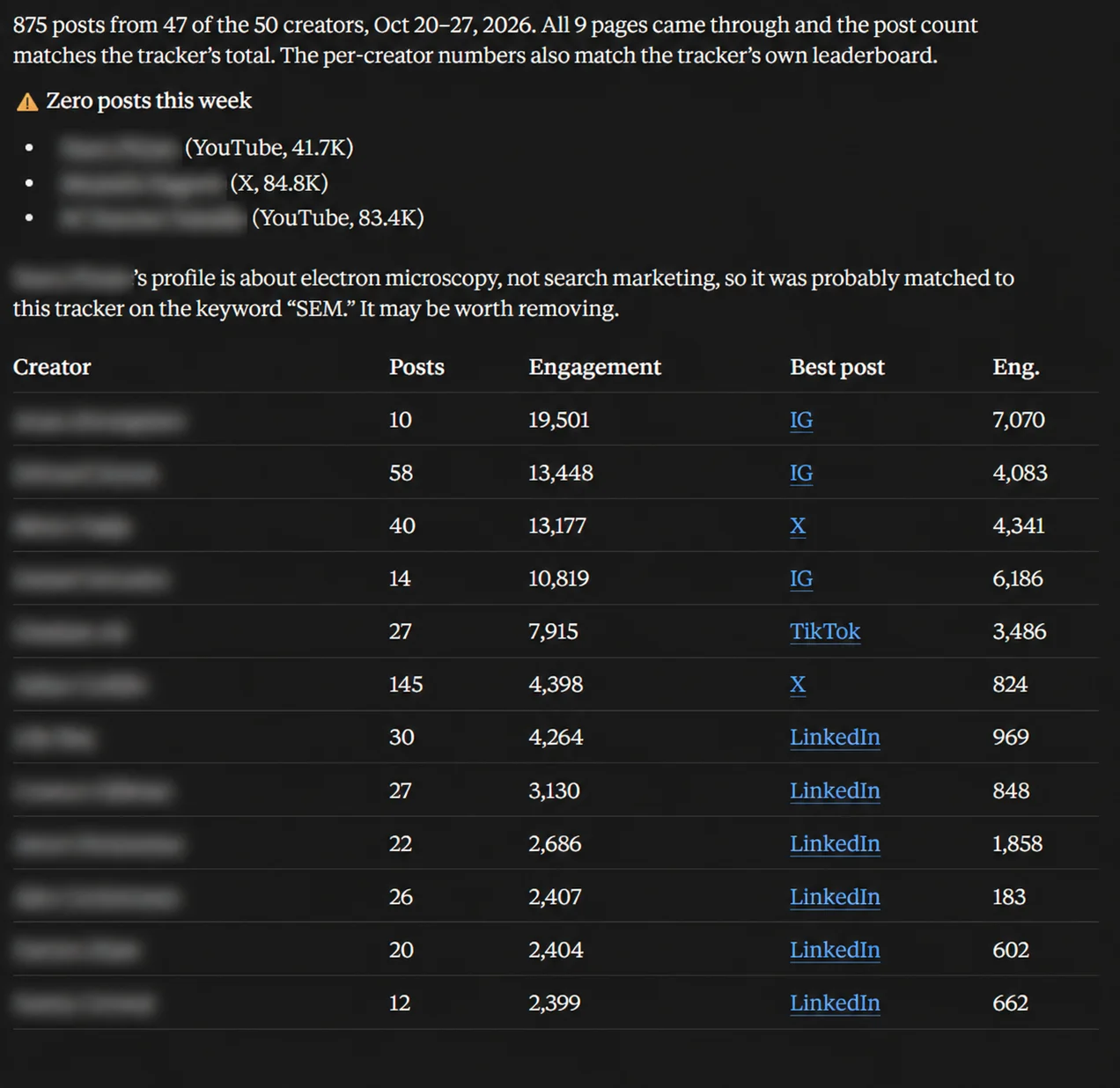
This is the part of my own workflow that changed the most in the last year. Rather than opening a dashboard, I connect the Favikon MCP to Claude and ask questions in plain language. The tracker still does the collecting. Claude does the reading.
If you have not set up an MCP connection before, it takes a few minutes and you only do it once. Here are four prompts I use weekly. Replace the bracketed parts.
That fourth one is the backstop for the tagging problem earlier in this guide, and it is the prompt I would start with if you only run one.
I wrote a longer piece on the same approach applied to LinkedIn specifically, with more prompts, in how to increase your LinkedIn performance with Claude.
Connect Favikon to Claude and run these prompts on your own creators.
What You Still Cannot Automate
The last two are the ones I would push back on hardest if someone told me their tracking was fully automated. A tracker tells you a post got 40,000 views. It does not tell you that the creator rewrote your key message, missed two deadlines, and drove an audience that bounced in nine seconds.
Automate the collection. Keep the judgement.
That is also why I still watch a sample of the content on every campaign I run. Not all of it, but enough that the numbers in my report connect to something I have actually seen.
Frequently Asked Questions
1. Can you track influencer content without the creator signing up?
Yes. If a creator's profile is public, their posts and public engagement metrics can be tracked automatically without them creating an account, authorising access, or being contacted. What you cannot get without their authorisation is private analytics such as reach, impressions, saves and link clicks.
2. How do you track influencer content if they forget the campaign hashtag?
Use more than one signal. A good tracker catches content four ways: the campaign hashtag, a tag of your brand account, a keyword or product name in the caption, and a manual add of the post URL. Relying on the hashtag alone is the most common reason posts go missing from reports.
3. Can you automatically track Instagram Stories?
Partly. A tracker can detect that a Story was posted and capture its view count. Fuller Story metrics such as taps, exits and link clicks require the creator's authorisation, and Meta's API makes Story insights available for only 24 hours after posting, even if the Story is archived or saved to a highlight.
4. How often does influencer tracking data refresh?
Most tracking platforms refresh on a daily cycle. Favikon refreshes every 24 hours. Instagram insights data can additionally lag by up to 48 hours, so a report pulled on the day of posting should be treated as provisional rather than final.
5. How far back can you track a creator's content?
Typically around two years, and often further depending on the platform and the account. Historical depth is what lets you benchmark a campaign post against a creator's own median performance, which is a far more useful comparison than an industry average.
6. Can you recover an influencer post after it is deleted?
No. Once a creator deletes a post, it is removed from the platform and no tracking tool can retrieve it. Metrics collected before deletion remain in your tracker, but the content itself cannot be re-verified. Archive the URL and a screenshot at the time if the post matters contractually.
7. Can you track the sales a competitor's influencer campaign generated?
No. Click data, promo code redemptions, conversion rates and revenue are private to the brand running the campaign. You can automate everything visible, including which creators posted, when, and how the content performed publicly. For the commercial results, the only reliable route is asking the creator or the brand's influencer marketing manager directly.
8. What is the difference between influencer tracking and social listening?
Influencer tracking follows a named set of creators and collects their content and metrics. Social listening follows a topic, keyword or industry and surfaces whoever is talking about it. Use tracking when you know who you are watching, and listening when you are trying to find out what is happening in a category.
Others articles